Raspberry Pi Pico W
⚡ The essentials in 60 seconds
- mcu — Raspberry RP2040, 7×7 mm QFN-56, TSMC 40 nm. (Wikipedia — RP2040)
- cpu — Dual-core ARM Cortex-M0+ (ARMv6-M), up to 133 MHz official ("Dual-core cortex M0+ at up to 133 MHz", datasheet). RP2040 was later certified to 200 MHz (overclock territory; not the datasheet rating). (Wikipedia — RP2040)
- gpu — none (microcontroller; video output only via PIO bit-banging, e.g. VGA with pico-extras scanvideo).
- ram — 264 KB on-chip SRAM in 6 independent banks. No internal flash/EEPROM.
- storage — external 2 MB QSPI flash (Winbond W25Q16JV) with XIP; RP2040 QSPI controller supports up to 16 MB in principle. ~1 MB usable for files under MicroPython/CircuitPython. (datasheet, CircuitPython board page)
- connectivity_wireless — Infineon CYW43439 combo chip, connected to RP2040 over a PIO-driven SPI bus running at ~33 MHz: - Wi-Fi 4 (802.11n), single-band 2.4 GHz, WPA3, SoftAP up to 4 clients. - Bluetooth 5.2: LE Central + Peripheral roles, and Bluetooth Classic. - On-board PCB antenna licensed from Abracon (ProAnt "Niche"); 14×9 mm antenna keep-out at the board edge. - Three CYW43439 GPIOs are used by board functions: WL_GPIO0 = user LED, WL_GPIO1 = SMPS power-save pin, WL_GPIO2 = VBUS sense. - Four RP2040 GPIOs are consumed internally and not available as free GPIO: GP23 (wireless power-on), GP24 (wireless SPI data/IRQ shared), GP25 (wireless SPI CS), GP29 (wireless SPI CLK, shared with ADC3 VSYS/3 monitor). (datasheet §3.8, CircuitPython board page)
- On this board : 9 tutorials · 10 code
The Raspberry Pi Pico W stands as a pivotal entry in the landscape of microcontroller development boards, representing the second major revision of the original Raspberry Pi Pico line. Launched in 2022, this board was designed to bring wireless connectivity to the ultra-low-cost segment of embedded computing, maintaining a remarkably accessible price point of six US dollars for the standard model. Manufactured by Raspberry Pi Ltd in the United Kingdom, the Pico W is not a single-board computer running a full operating system like Linux, but rather a microcontroller development board. This distinction is crucial for beginners to understand: while a Raspberry Pi computer acts like a tiny desktop PC, the Pico W acts more like the brain inside a microwave or a smart thermostat, executing specific tasks with high efficiency and minimal power consumption. The board is currently active, with the manufacturer guaranteeing its availability until at least January 2028, ensuring that projects started today will have long-term component support.
At the heart of the Pico W lies the RP2040 microcontroller, a chip designed in-house by Raspberry Pi. This component features a dual-core ARM Cortex-M0+ processor capable of running at speeds up to 133 MHz. For those unfamiliar with these terms, the "dual-core" aspect means the chip has two independent processing units, allowing it to handle multiple tasks simultaneously, such as reading sensors and managing network communications without lag. The "Cortex-M0+" is a specific architecture optimized for low-power applications, and the 133 MHz frequency refers to the number of cycles the processor can execute per second, providing ample headroom for complex logic. The RP2040 is paired with 264 KB of on-chip SRAM, which is fast, temporary memory used for running code and storing variables. Unlike computers with hard drives, the Pico W uses an external 2 MB QSPI flash chip for permanent storage. This flash memory supports "XIP" or Execute-In-Place, meaning the processor can run code directly from the storage chip without needing to load it all into the faster but smaller RAM first.
The defining feature of the "W" variant is its wireless capability, provided by the Infineon CYW43439 combo chip. This component enables both Wi-Fi and Bluetooth connectivity, a rare combination at this price point. The Wi-Fi support is limited to the 2.4 GHz band (Wi-Fi 4 or 802.11n), which is the most common frequency for home routers, and it supports modern WPA3 security protocols. It can also act as a SoftAP, allowing it to create its own Wi-Fi network for up to four connected devices, which is useful for setting up devices without an existing network. The Bluetooth support is particularly notable because it includes Bluetooth Classic in addition to Bluetooth Low Energy (LE). Many cheap boards only support LE, but the inclusion of Classic Bluetooth allows the Pico W to communicate with a wider range of devices, such as older audio accessories or keyboards. This wireless module is connected to the main processor via a specialized SPI bus driven by the RP2040’s Programmable I/O (PIO) blocks, running at approximately 33 MHz.
The Programmable I/O (PIO) is one of the most powerful yet often misunderstood features of the RP2040. It consists of eight state machines that can handle low-level timing and data transfer tasks independently of the main CPU. This allows the board to generate precise signals for things like NeoPixel LEDs, audio, or video output without slowing down the main program. In the case of the Pico W, the PIO is even used to manage the communication with the wireless chip itself. The board exposes 26 general-purpose input/output (GPIO) pads for user projects. These pins allow the board to interact with the physical world, reading switches or controlling motors. It is important to note that these pins operate at 3.3 Volts and are not tolerant of 5 Volt signals, meaning connecting standard Arduino-style 5V sensors directly could damage the board. Additionally, four GPIO pins are consumed internally by the wireless module for power and data management, so they are not available for general use.
Powering the Pico W is flexible, accepting 5 Volts via a micro-USB connector. The board includes a sophisticated power management system with a buck-boost converter that can handle input voltages from 1.8 to 5.5 Volts, making it suitable for battery-powered projects using a single lithium-ion cell. However, users must be aware of specific hardware quirks. For instance, the on-board user LED is not connected to a standard GPIO pin but is instead controlled by the wireless chip. This means that simple code to blink an LED, which works on the original Pico, will fail on the Pico W unless the wireless driver is initialized. Furthermore, reading the battery voltage via the analog-to-digital converter can be inaccurate while Wi-Fi is active because the wireless communication shares a pin with the voltage monitor.
Software support for the Pico W is extensive and beginner-friendly. The official recommendation for quick prototyping is MicroPython, a version of the Python programming language that runs directly on the chip. The datasheet notes that MicroPython is the fastest way to get code running, and it includes built-in libraries for Wi-Fi networking. For those preferring the Arduino ecosystem, the community-supported "arduino-pico" core by Earle Philhower is the recommended path, as it provides robust Wi-Fi and Bluetooth libraries. The official C/C++ SDK from Raspberry Pi offers the highest performance and control, including the ability to use the lwIP network stack and BTstack for Bluetooth. There is also official support for CircuitPython, though it is worth noting that Bluetooth support in CircuitPython is currently limited to hardware capability without full software implementation.
The board is designed with manufacturing in mind, featuring castellated pads that allow it to be soldered directly onto custom circuit boards as a surface-mount module. This makes it ideal for product development. However, developers must respect the antenna keep-out area, a 14x9 mm zone at the edge of the board that must remain free of metal to ensure proper wireless signal transmission. Enclosing the board in a metal case will block the signal entirely. While the Pico W lacks hardware security features like secure boot, which are present in newer models, it remains a highly capable platform for IoT projects, home automation, and educational purposes. Its combination of dual-core performance, flexible I/O, and integrated wireless connectivity at a six-dollar price point makes it a versatile tool for makers and engineers alike. The board operates reliably in temperatures ranging from -20°C to +70°C, covering most indoor and many outdoor applications.
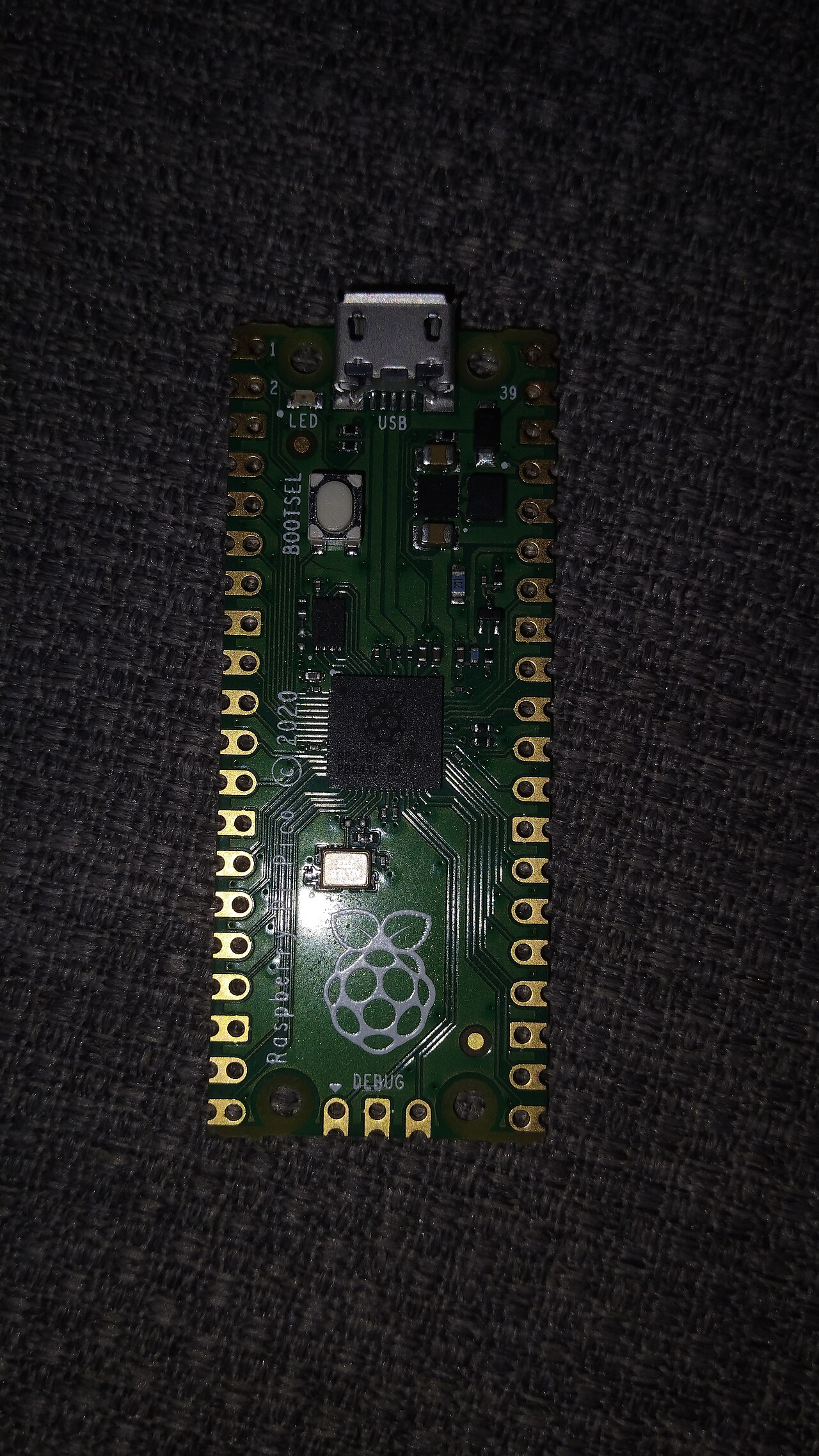
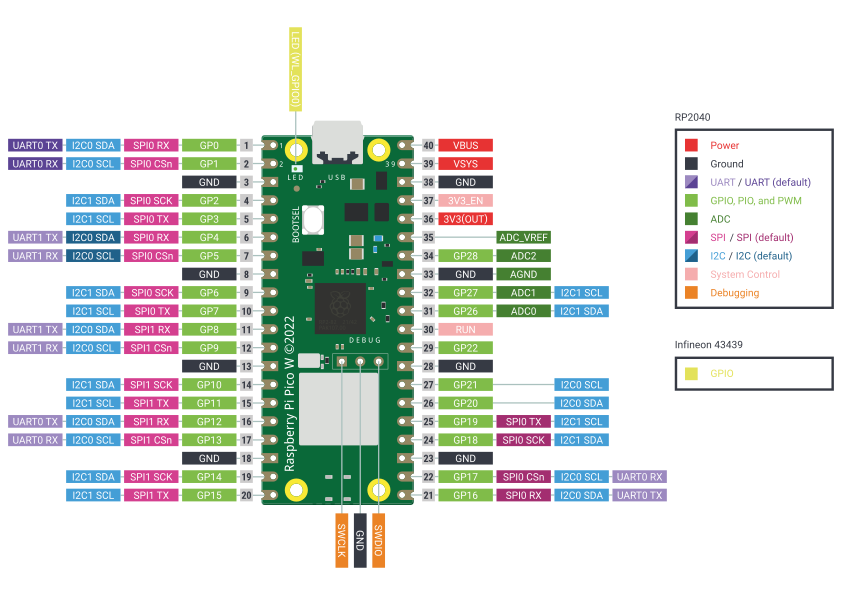
Pinout diagram
| Attr | Specs | verified |
|---|---|---|
mcu | Raspberry RP2040, 7×7 mm QFN-56, TSMC 40 nm. (Wikipedia — RP2040) | ✔ |
cpu | Dual-core ARM Cortex-M0+ (ARMv6-M), up to 133 MHz official ("Dual-core cortex M0+ at up to 133 MHz", datasheet). RP2040 was later certified to 200 MHz (overclock territory; not the datasheet rating). (Wikipedia — RP2040) | ✔ |
gpu | none (microcontroller; video output only via PIO bit-banging, e.g. VGA with pico-extras scanvideo). | ? unverified |
ram | 264 KB on-chip SRAM in 6 independent banks. No internal flash/EEPROM. | ? unverified |
storage | external 2 MB QSPI flash (Winbond W25Q16JV) with XIP; RP2040 QSPI controller supports up to 16 MB in principle. ~1 MB usable for files under MicroPython/CircuitPython. (datasheet, CircuitPython board page) | ✔ |
connectivity_wireless | Infineon CYW43439 combo chip, connected to RP2040 over a PIO-driven SPI bus running at ~33 MHz: - Wi-Fi 4 (802.11n), single-band 2.4 GHz, WPA3, SoftAP up to 4 clients. - Bluetooth 5.2: LE Central + Peripheral roles, and Bluetooth Classic. - On-board PCB antenna licensed from Abracon (ProAnt "Niche"); 14×9 mm antenna keep-out at the board edge. - Three CYW43439 GPIOs are used by board functions: WL_GPIO0 = user LED, WL_GPIO1 = SMPS power-save pin, WL_GPIO2 = VBUS sense. - Four RP2040 GPIOs are consumed internally and not available as free GPIO: GP23 (wireless power-on), GP24 (wireless SPI data/IRQ shared), GP25 (wireless SPI CS), GP29 (wireless SPI CLK, shared with ADC3 VSYS/3 monitor). (datasheet §3.8, CircuitPython board page) | ✔ |
no_wired_ethernet | USB 1.1 device/host (micro-B). | ? unverified |
gpio | 40-pin 0.1″ dual header + castellations, 51×21×1 mm PCB. Exposed user GPIO: GP0–GP22, GP26–GP28 (26 pads); Adafruit counts "25 GPIO pins, 3 of those can be analog inputs" for the Pico W. I/O voltage fixed at 3.3 V, not 5 V-tolerant. (datasheet, CircuitPython board page) | ✔ |
peripherals_rp2040 | 2× UART, 2× SPI, 2× I²C, 16 PWM channels (8 slices × 2), 4× 12-bit 500 ksps SAR ADC + internal temperature sensor (only GP26–GP28 broken out; ADC3/GP29 = VSYS/3), 8 PIO state machines (2 blocks × 4 SM), 12-channel DMA, USB 1.1 (device & host). No DAC (no true analog output). (datasheet, Wikipedia — RP2040) | ✔ |
power | VBUS 5 V ±10% (micro-USB) → Schottky diode → VSYS 1.8–5.5 V → on-board RT6154 buck-boost SMPS → 3V3 rail (PFM power-save mode by default, PWM mode via WL_GPIO1). Power VSYS from a battery directly (e.g. 1 Li-ion cell). 3V3 pin can power external circuitry, keep load under ~300 mA. 3V3_EN (pin 37) shorted low disables the SMPS. USB host mode requires 5 V applied to the VBUS pin. | ? unverified |
typical_current_draw | datasheet states current "will depend on use-case"; baseline RP2040 consumption figures are published in the RP2040 datasheet, and the CYW43439 radio dominates draw when transmitting. | ? unverified |
temperature | Operating −20 °C to +70 °C (max includes self-heating); recommended maximum ambient 70 °C. (datasheet §2.3) | ✔ |
- Manufacturer: Raspberry Pi Ltd (UK). First-party microcontroller board, second revision of the original Raspberry Pi Pico line. (Wikipedia — RP2040, retrieved 2026-10-13)
- Year: Launched 2022. The official Pico W datasheet's first documentation release is dated 30 June 2022 (Raspberry Pi Pico W Datasheet, Release History, first release 30 June 2022; latest revision 7 dated 03 July 2026). (datasheet PDF, retrieved 2026-10-13)
- Launch price: US$6.00 (Pico W), US$7.00 (Pico WH, with pre-soldered headers) — RRP table in the official datasheet, order codes SCO918 (Pico W, EAN 5056561803173) and SCO919 (Pico WH, EAN 5056561800196). Wikipedia corroborates "The Pico W (2022) adds Wi-Fi and Bluetooth and was launched at US$6". (datasheet, Wikipedia, retrieved 2026-10-13)
- Status: Active. The datasheet states Raspberry Pi "guarantee availability of the Raspberry Pi Pico W product until at least January 2028". (datasheet, Appendix A)
- Variants: - Pico W (SCO918) — unpopulated headers. - Pico WH (SCO919) — same board with soldered headers ("H"). - Pin-compatible predecessor: Pico (no wireless); successor: Pico 2 W (2024, RP2350, US$7). (Wikipedia)
+ Strengths
- Wireless at a $6 price point — Wi-Fi 4 + Bluetooth 5.2 with Bluetooth Classic (rare at this class; most $5–7 boards are LE-only). WPA3 and 4-client SoftAP are supported by the CYW43439. (datasheet §3.8)
- User LED behind the Wi-Fi chip: the green LED hangs off WL_GPIO0 of the CYW43439, not off an RP2040 pin — blinking it requires the wireless driver (official picow_blink example; plain blink_simple deliberately does not work on Pico W). (datasheet, pico-examples README)
- Wireless-chip GPIOs reused for power/USB intelligence: VBUS presence sensing (WL_GPIO2) and SMPS power-save control (WL_GPIO1) are read/driven through the CYW43439 via SDK helpers. (datasheet §3.4, §3.8)
- RP2040 PIO (2 blocks / 8 state machines): bit-bang protocols (NeoPixel, I²S, VGA, SDIO…) without CPU load; the CYW43 SPI bus itself is a PIO peripheral. (Wikipedia — RP2040, pico-sdk cyw43_bus_pio_spi.c)
- Dual cores + 264 KB RAM + 133 MHz — headroom vs. single-core rivals; runs MicroPython, CircuitPython, FreeRTOS, lwIP, BTstack concurrently.
- SMT-module friendly: castellated pads + documented reflow footprint; usable as a surface-mount module (TP1–TP6 test points). (datasheet §2.2)
- No hardware security engine on RP2040 (no TrustZone/secure boot — that arrives with RP2350/Pico 2). (Wikipedia — RP2350 via Pico 2 note)
− Weaknesses
- On-board LED is not on a normal GPIO. It is wired to the CYW43439 (WL_GPIO0); blink_simple fails on Pico W and you must use the Wi-Fi-chip path (picow_blink in C SDK; GPIO-23-mapped LED in MicroPython). (pico-examples README, datasheet)
- GP23/GP24/GP25 are not free GPIOs (wireless power-on, SPI data/IRQ, SPI CS). Code that assumes a bare-Pico pinout (e.g. using GP25 as the LED) breaks. (datasheet §2.1)
- VSYS ADC reading is corrupted while Wi-Fi SPI is active — SPI CLK shares the VSYS-monitor ADC pin (GP29/ADC3): "only when there isn't an SPI transaction in progress can VSYS be read via the ADC". Likewise the shared DIN/DOUT/IRQ line means IRQ checks are only valid between SPI transactions. (datasheet §3.8, CircuitPython board page)
- ADC accuracy trap: ADC_VREF is filtered from 3V3 through a 200 Ω resistor; ADC input current (~150 µA, varying per chip and with sampling) creates an inherent ~30 mV offset. Datasheet gives resistor-mod / external-reference workarounds. (datasheet §3.3)
- Back-powering leak on GP26–GP29: these pins have an internal reverse diode to the 3.3 V IO rail — applying voltage to them while the Pico W is unpowered leaks current into IOVDD. (datasheet §3.2)
- Antenna sensitivity: 14×9 mm keep-out; metal near/below the antenna degrades gain and bandwidth; must not be enclosed in metal (Faraday cage). (datasheet §2.2.1, §3.8)
- BLE software support is uneven: CircuitPython = no BLE (hardware-only); MicroPython exposes BLE through the bluetooth module (aioble recommended); full BT Classic/LE needs the C SDK with BTstack. (CircuitPython board page, MicroPython bluetooth docs, pico-examples bluetooth)
- RP2040 silicon errata apply (the Pico W datasheet history explicitly tracks them, e.g. "Added errata E15 in RP2040 Datasheet"); the full known-issues appendix lives in the RP2040 datasheet. (datasheet Appendix D, RP2040 datasheet)
- Low-power design must manage the radio: wireless power-on is driven by GP23 and SMPS power-save by WL_GPIO1; the Pico W datasheet publishes no board-level sleep-current figure, and battery designs must account for the CYW43439's supply behaviour separately.
- USB host mode power: host examples need 5 V on the VBUS pin, not just VSYS. (datasheet §3.5)
- Retour d'expérience expert expert — expert-raspberrypi
- Je tourne sur la Pico W depuis sa sortie en 2022. Le rapport prix/fonctionnalités est imbattable avec le Wi-Fi 4 et le Bluetooth 5.2 classique à 6 dollars. Par contre, attention aux pièges matériels : les GPIO 23 à 25 sont réservés au module radio, donc le code prévu pour une Pico standard ne march… — expert-raspberrypi
- Merci pour le rappel sur les GPIO réservés. J'ai justement perdu une heure ce matin car un script MicroPython hérité d'une Pico standard ne répondait pas à cause de la LED câblée sur WL_GPIO0. Concernant l'ADC, j'ai remarqué aussi un offset d'environ 30 mV sur mes mesures de capteurs. La doc mentio… — maker-bidouille
- La précision de l'ADC est effectivement limitée par l'impédance de la source, comme indiqué dans la fiche technique. Pour le Bluetooth, sachez que le support est inégal selon l'environnement : CircuitPython offre peu de support BLE natif comparé au C SDK avec BTstack. Si vous faites du BLE Central,… — electron-libre
Community feedback and projects
- Correct way to implement interrupts inside a class (Pi Pico W) forum.arduino.cc
- No reset on the pi pico w? - SOLVED forum.arduino.cc
- MicroPython websockets library for Raspberry Pi Pico W? stackoverflow.com
- How can one make MicroPython HTTPS REST API requests on Pico W? raspberrypi.stackexchange.com
- pico-w-datasheet.pdf datasheet
- rp2040-datasheet.pdf datasheet
- Official datasheet (incl. schematic appendix, ordering, powerchain)
- RP2040 datasheet (chip reference + errata appendix)
- Pico-series product documentation (Pico W spec page)
- pico-examples README
- Getting started with Pico-series (official book)
- Getting started with Pico-series (official book)
- Pico SDK (CYW43 driver, cyw43_arch)
- Pico SDK (CYW43 driver, cyw43_arch)
- Pico examples (Wi-Fi/BT)
- MicroPython RP2 docs
- CircuitPython Pico W page
- Arduino core (Philhower)
- Embassy Rust examples
- Embassy Rust examples
- RP2040
- Raspberry Pi Pico section
- Community
- Community
- On-board LED is not on a normal GPIO. It is wired to the CYW43439 (WL_GPIO0); blink_simple fails on Pico W and you must use the Wi-Fi-chip path (picow_blink in C SDK; GPIO-23-mapped LED in MicroPython). (pico-examples README, datasheet)
- GP23/GP24/GP25 are not free GPIOs (wireless power-on, SPI data/IRQ, SPI CS). Code that assumes a bare-Pico pinout (e.g. using GP25 as the LED) breaks. (datasheet §2.1)
- VSYS ADC reading is corrupted while Wi-Fi SPI is active — SPI CLK shares the VSYS-monitor ADC pin (GP29/ADC3): "only when there isn't an SPI transaction in progress can VSYS be read via the ADC". Likewise the shared DIN/DOUT/IRQ line means IRQ checks are only valid between SPI transactions. (datasheet §3.8, CircuitPython board page)
- ADC accuracy trap: ADC_VREF is filtered from 3V3 through a 200 Ω resistor; ADC input current (~150 µA, varying per chip and with sampling) creates an inherent ~30 mV offset. Datasheet gives resistor-mod / external-reference workarounds. (datasheet §3.3)
- Back-powering leak on GP26–GP29: these pins have an internal reverse diode to the 3.3 V IO rail — applying voltage to them while the Pico W is unpowered leaks current into IOVDD. (datasheet §3.2)
- Antenna sensitivity: 14×9 mm keep-out; metal near/below the antenna degrades gain and bandwidth; must not be enclosed in metal (Faraday cage). (datasheet §2.2.1, §3.8)
- BLE software support is uneven: CircuitPython = no BLE (hardware-only); MicroPython exposes BLE through the bluetooth module (aioble recommended); full BT Classic/LE needs the C SDK with BTstack. (CircuitPython board page, MicroPython bluetooth docs, pico-examples bluetooth)
- RP2040 silicon errata apply (the Pico W datasheet history explicitly tracks them, e.g. "Added errata E15 in RP2040 Datasheet"); the full known-issues appendix lives in the RP2040 datasheet. (datasheet Appendix D, RP2040 datasheet)
- Low-power design must manage the radio: wireless power-on is driven by GP23 and SMPS power-save by WL_GPIO1; the Pico W datasheet publishes no board-level sleep-current figure, and battery designs must account for the CYW43439's supply behaviour separately.
- USB host mode power: host examples need 5 V on the VBUS pin, not just VSYS. (datasheet §3.5)
- Faire clignoter la LED embarquée (elle est derrière la puce Wi-Fi !) debutant Schéma : IMG-pico-w-debutant-1-picow-blink-led.svg — Raspberry Pi Pico W vue de dessus avec la LED utilisateur mise en évidence, flèche pointant depuis la puce CYW43439 (blindage métallique) vers la LED, câble micro-USB branché
- Se connecter à un réseau Wi-Fi (station, WPA2/WPA3) debutant Schéma : IMG-pico-w-debutant-2-picow-connexion-wifi.svg — Pico W sur une table avec des ondes Wi-Fi reliant la puce CYW43439 à une box Internet, terminal série affichant l'adresse IP obtenue, zone keep-out d'antenne annotée
- Bouton et potentiomètre sans marcher sur le sans-fil (GPIO libres & ADC) debutant Schéma : IMG-pico-w-debutant-3-picow-gpio-libres.svg — Pico W sur breadboard, bouton poussoir sur GP2 vers GND et potentiomètre sur GP26 (ADC0), broches GP23 à GP25 et GP29 barrées en rouge avec étiquette reserve radio, console serie affichant les valeurs ADC
- Servir une page web depuis la Pico W (socket TCP + HTTP) intermediaire Schéma : IMG-pico-w-intermediaire-1-picow-serveur-web.svg — Pico W connectee au routeur, un navigateur web sur laptop affichant la page servie par l'IP de la carte, fleches de requete HTTP aller-retour, terminal serie affichant la requete recue
- Client HTTP : consommer une API depuis la Pico W intermediaire Schéma : IMG-pico-w-intermediaire-2-picow-http-client.svg — Pico W interrogeant un service web distant via le routeur, reponse JSON affichee dans le terminal serie, comparatif des trois piles MicroPython, CircuitPython et Arduino en legende
- Heure exacte via NTP : l'horloge temps réel des projets connectés intermediaire Schéma : IMG-pico-w-intermediaire-3-picow-ntp-horloge.svg — Pico W envoyant un paquet UDP vers un serveur NTP via Internet, horloge affichant l'heure UTC, ecarts d'horloge interne avant/apres synchronisation annotés
- Client MQTT : télémétrie IoT légère sur la Pico W avance Schéma : IMG-pico-w-avance-1-picow-mqtt-client.svg — Pico W publiant des messages MQTT vers un broker heberge sur un NAS via le routeur, abonne vers un dashboard, topics en arborescence capteur/picow dessines en etiquettes
- C SDK : cyw43_arch, lwIP threadbackground vs poll, et verrous d'arch avance Schéma : IMG-pico-w-avance-2-picow-sdk-cyw43-lwip.svg — architecture logicielle Pico W : application, pile lwIP, couche cyw43_arch, pilote SPI PIO vers la puce CYW43439, deux variantes filees (thread arriere-plan vs boucle poll) cote a cote
- Point d'accès & provisioning Wi-Fi par navigateur (mode SoftAP) avance Schéma : IMG-pico-w-avance-3-picow-softap-provisioning.svg — Pico W emettant son propre reseau Wi-Fi, smartphone connecte a ce reseau affichant le formulaire de configuration, puis fleche de bascule vers le reseau domestique, zone keep-out antenne respectee par le boitier
Code library — examples written for this board
clignotante.pyPythonbouton-interruption.pyPythonpwm-servo.pyPythonlecture-adc.pyPythonneopixel.pyPythonoled-i2c.pyPythoncapteur-dht.pyPythonjournalisation.pyPythonserveur-web-led.pyPythontaches-cooperatives.pyPython
Examples and repos found online
- raspberrypi/pico-extras github.com
- raspberrypi/pico-examples github.com
- raspberrypi/pico-sdk github.com
- pimoroni/pimoroni-pico github.com