Raspberry Pi Zero W (2017) — Board Sheet
⚡ The essentials in 60 seconds
- soc — Broadcom BCM2835 — single-core ARM1176JZF-S (ARMv6, 32-bit) clocked at 1 GHz ("The CPU is clocked at … 1 GHz on the Zero and Zero W"); GPU VideoCore IV. (Wikipedia, processors section, retrieved 2026-10-13; official BCM2835 doc)
- ram — 512 MB LPDDR2 SDRAM, shared CPU/GPU. (official launch post; official docs Zero table)
- wireless — Cypress (Broadcom) CYW43438 combo chip — "It uses the same Cypress CYW43438 wireless chip as Raspberry Pi 3 Model B to provide 802.11n wireless LAN and Bluetooth 4.0 connectivity". Official docs table: 2.4 GHz single-band 802.11n Wi-Fi (35 Mb/s), Bluetooth 4.0 + BLE. (launch post, retrieved 2026-10-13; official docs Zero table)
- antenna — no external or ceramic antenna — a PCB trace antenna ("a PCB antenna layout that we licensed from ProAnt in Sweden", per co-founder Pete Lomas). In the launch post's comment thread, official Raspberry Pi staff state it is "a ground plane cut-out which acts as a resonant cavity at 2.4 GHz … actually a better antenna than the chip antenna we have on the Pi 3 (we had to turn down the output power to pass the FCC / CE certification)". (Ars Technica; launch post comments)
- storage — microSD slot only; no onboard storage. (launch post)
- video — mini-HDMI (1080p60 class, as on the Zero); unpopulated composite video header pads and a reset header ("Composite video and reset headers" in the official feature list). (launch post)
- On this board : 9 tutorials · 10 code
Launched on February 28, 2017, to coincide with the fifth birthday of the Raspberry Pi project, the Raspberry Pi Zero W represents a pivotal moment in accessible computing. Developed by Raspberry Pi Trading Ltd. and manufactured by Sony at their Pencoed plant in Wales, this board was introduced as a new variant of the original Raspberry Pi Zero, distinguished primarily by the integration of wireless connectivity. At its launch, it was priced at just ten US dollars, a figure that remains its documented reference price, although current retail availability and pricing should be verified through official channels as they may fluctuate. The "W" in its name stands for wireless, signaling its primary advantage over its predecessor: the inclusion of both Wi-Fi and Bluetooth capabilities without the need for external adapters. This integration transformed the board from a simple wired microcomputer into a versatile platform for Internet of Things (IoT) applications, allowing users to deploy Linux-based systems in locations where Ethernet cables are impractical.
At the heart of the Raspberry Pi Zero W lies the Broadcom BCM2835 system-on-chip, a component that also powers the original Raspberry Pi Model B. This chip features a single-core ARM1176JZF-S processor, which is based on the ARMv6 architecture and operates at a clock speed of one gigahertz. For those unfamiliar with these terms, the clock speed refers to how many cycles the processor can execute per second, with one gigahertz equating to one billion cycles. While this is sufficient for many lightweight tasks, it is important to note that the ARMv6 architecture is 32-bit only, meaning it cannot run modern 64-bit operating systems or software optimized for newer architectures. The board is equipped with 512 megabytes of LPDDR2 SDRAM, which is shared between the central processing unit and the VideoCore IV graphics processing unit. This memory configuration is adequate for headless operations, such as running a web server or a network ad-blocker, but it is limited for desktop environments with graphical interfaces.
The wireless capabilities are provided by the Cypress CYW43438 combo chip, the same module found in the more powerful Raspberry Pi 3 Model B. This chip supports 802.11n Wi-Fi on the 2.4 GHz band and Bluetooth 4.0 with Bluetooth Low Energy (BLE) support. It is worth noting that while official Raspberry Pi documentation consistently lists Bluetooth 4.0, some third-party sources and chip datasheets may reference version 4.1 or higher; users should rely on the official specifications for compatibility planning. The Wi-Fi performance is capped at approximately 35 megabits per second, and it does not support the 5 GHz band, which means it may experience interference in crowded wireless environments. A notable engineering feature is the antenna design. Instead of using a standard ceramic chip antenna, the Zero W employs a printed circuit board trace antenna, a design licensed from ProAnt in Sweden. Raspberry Pi staff have stated that this ground-plane cutout acts as a resonant cavity at 2.4 GHz and can actually outperform the ceramic antenna used in the Pi 3, although the transmit power was reduced to meet FCC and CE regulatory certifications.
Physically, the board is remarkably compact, measuring 65 millimeters by 30 millimeters and approximately 5 millimeters thick. It retains the form factor of the original Zero but adds the necessary components for wireless communication. Connectivity options include a micro-HDMI port for video output, capable of 1080p resolution at 60 frames per second, and a micro-USB port for data transfer using USB 2.0 On-The-Go (OTG) technology. A second micro-USB port is dedicated solely to power input. Users must be careful not to confuse these ports, as plugging a peripheral into the power-only port will result in no function. The board also features a 40-pin general-purpose input-output (GPIO) header, which is compatible with Raspberry Pi HATs (Hardware Attached on Top). However, on the standard Zero W, these pins are unpopulated, meaning users must solder them themselves unless they purchase the Zero WH variant, which comes with pre-soldered headers. The GPIO pins operate at 3.3-volt logic levels and support various communication protocols like I2C, SPI, and UART, but they do not include analog-to-digital converters.
Power management is a critical consideration for the Zero W. It requires a 5-volt power supply via the micro-USB port, with a recommended current of 1.2 amperes. The board’s typical active power consumption is around 150 milliamperes, which is higher than the wired Zero due to the power draw of the radio module. A significant limitation of the Zero series, including the Zero W, is the lack of undervoltage detection. Unlike later Raspberry Pi models, the Zero W does not have a dedicated circuit to warn the user if the power supply voltage drops below the required threshold. This can lead to silent data corruption on the microSD card or unexpected system lockups if the power source is unstable. Additionally, the board has a thermal limit of 85 degrees Celsius, beyond which the processor will throttle its speed to prevent damage.
Software support for the Zero W is centered around Raspberry Pi OS, specifically the 32-bit version compatible with the ARMv6 architecture. While this OS is well-supported, users should be aware that newer distributions are gradually dropping support for ARMv6, making the Zero W a legacy platform in the long term. Installation is straightforward using tools like Raspberry Pi Imager, which can pre-configure Wi-Fi settings and enable SSH for headless setup. This headless capability is one of the board’s strongest features, as it allows users to configure and control the device entirely over the network without needing a monitor or keyboard. The board has become a staple in various projects, from network ad-blocking with Pi-hole to retro gaming handhelds and security auditing tools like Pwnagotchi. Despite its limitations in processing power and connectivity speeds, the Raspberry Pi Zero W remains a compelling option for developers and hobbyists seeking an ultra-low-cost, low-power entry point into wireless Linux computing.
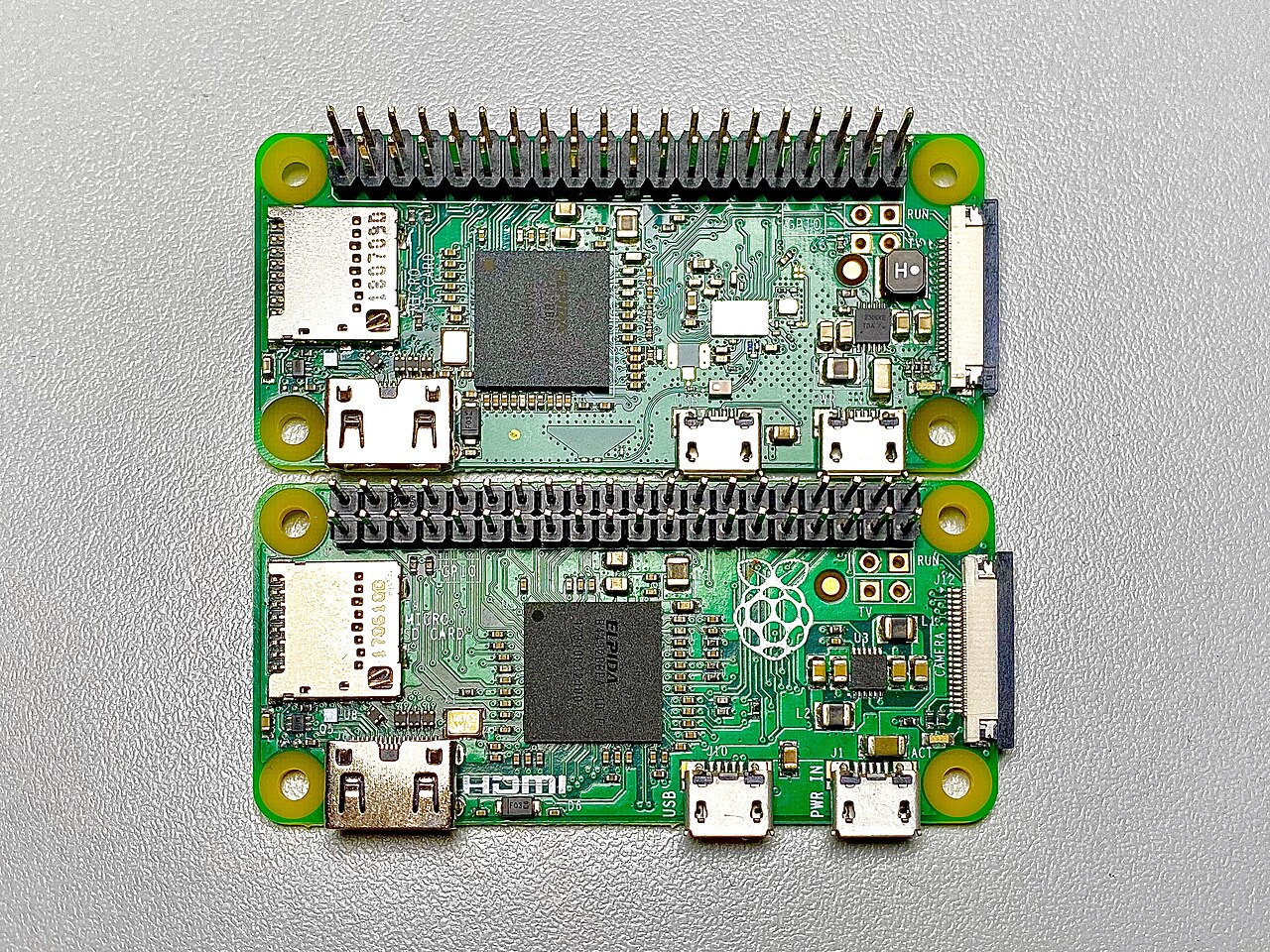
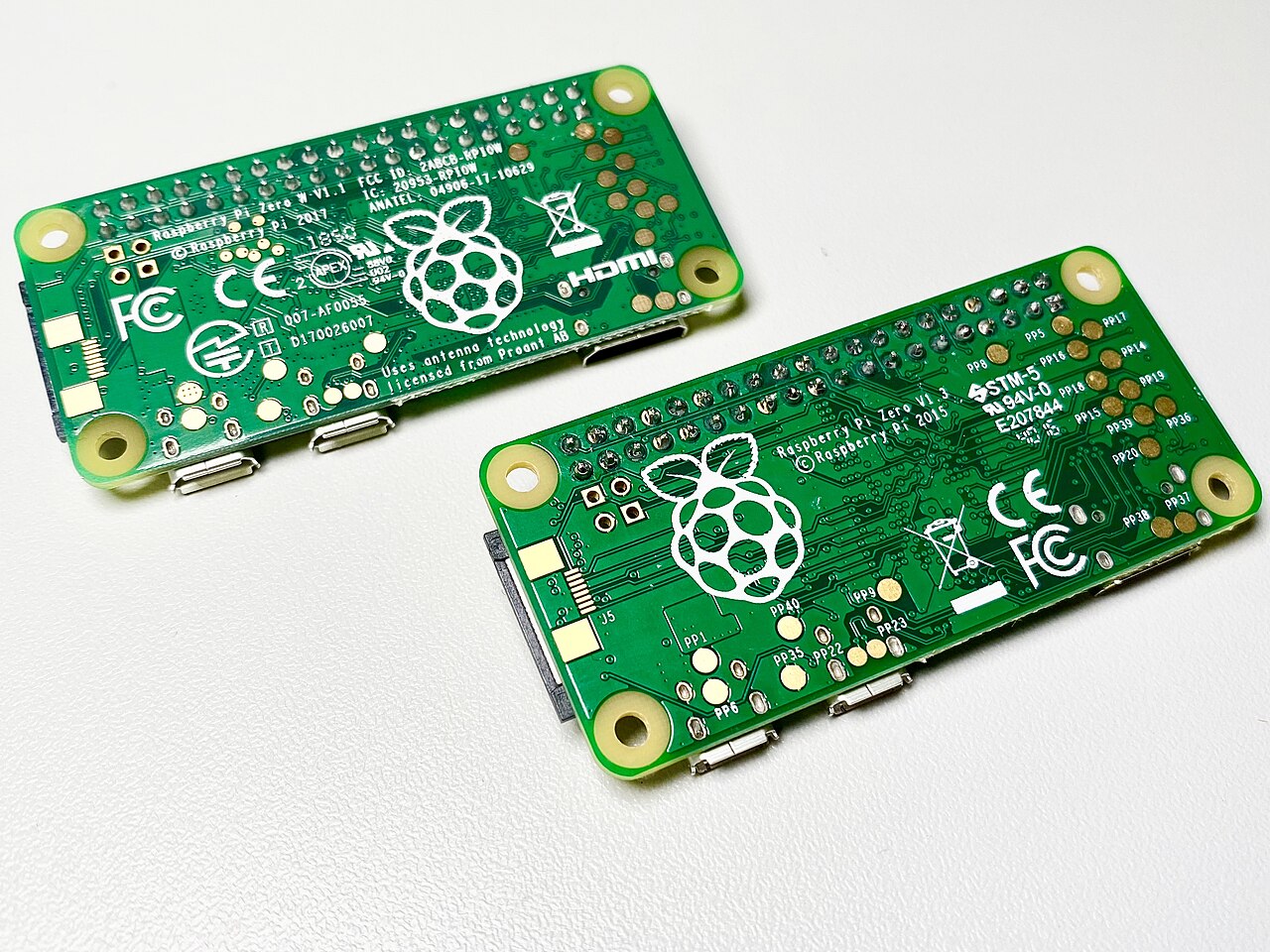
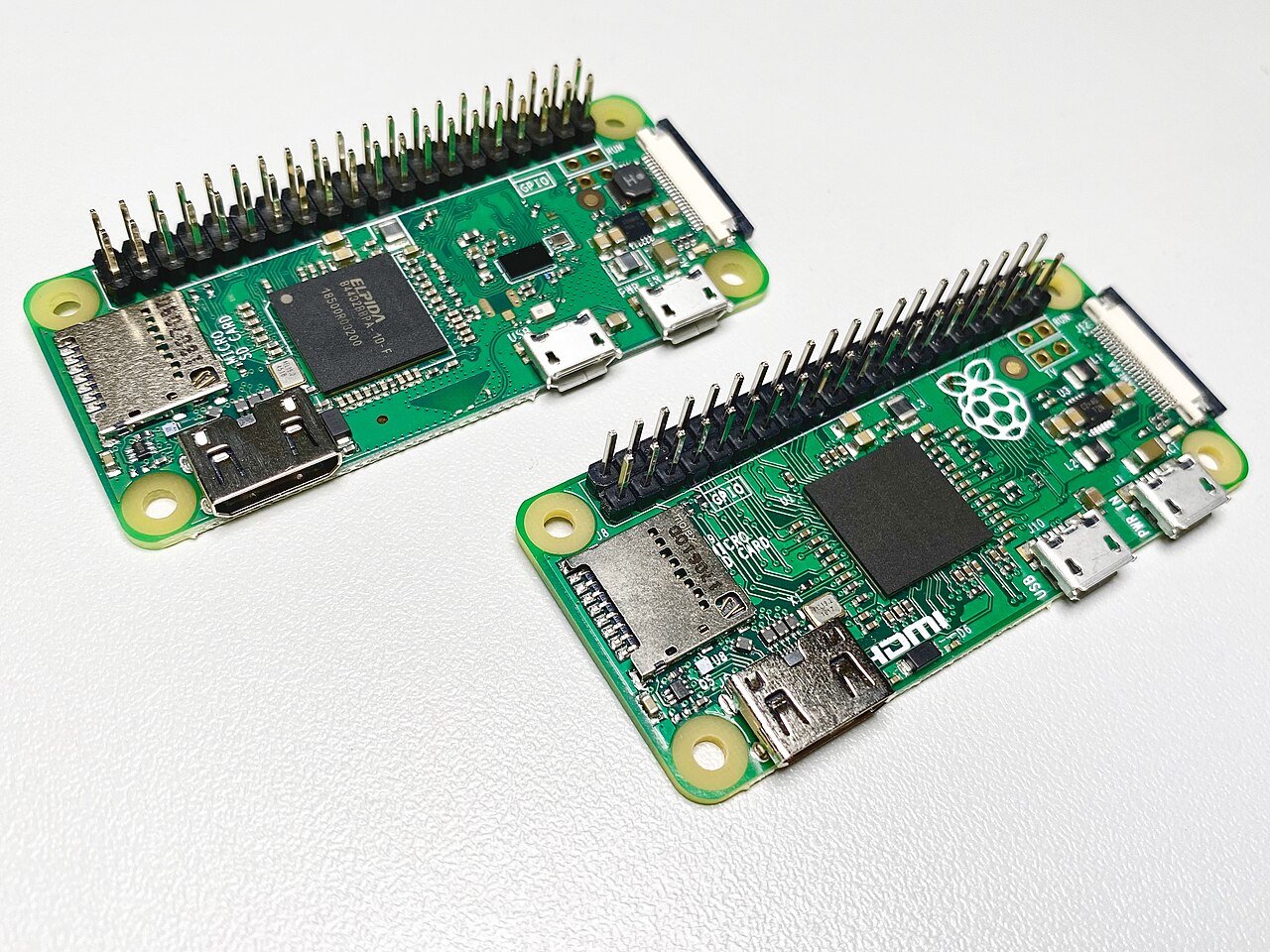
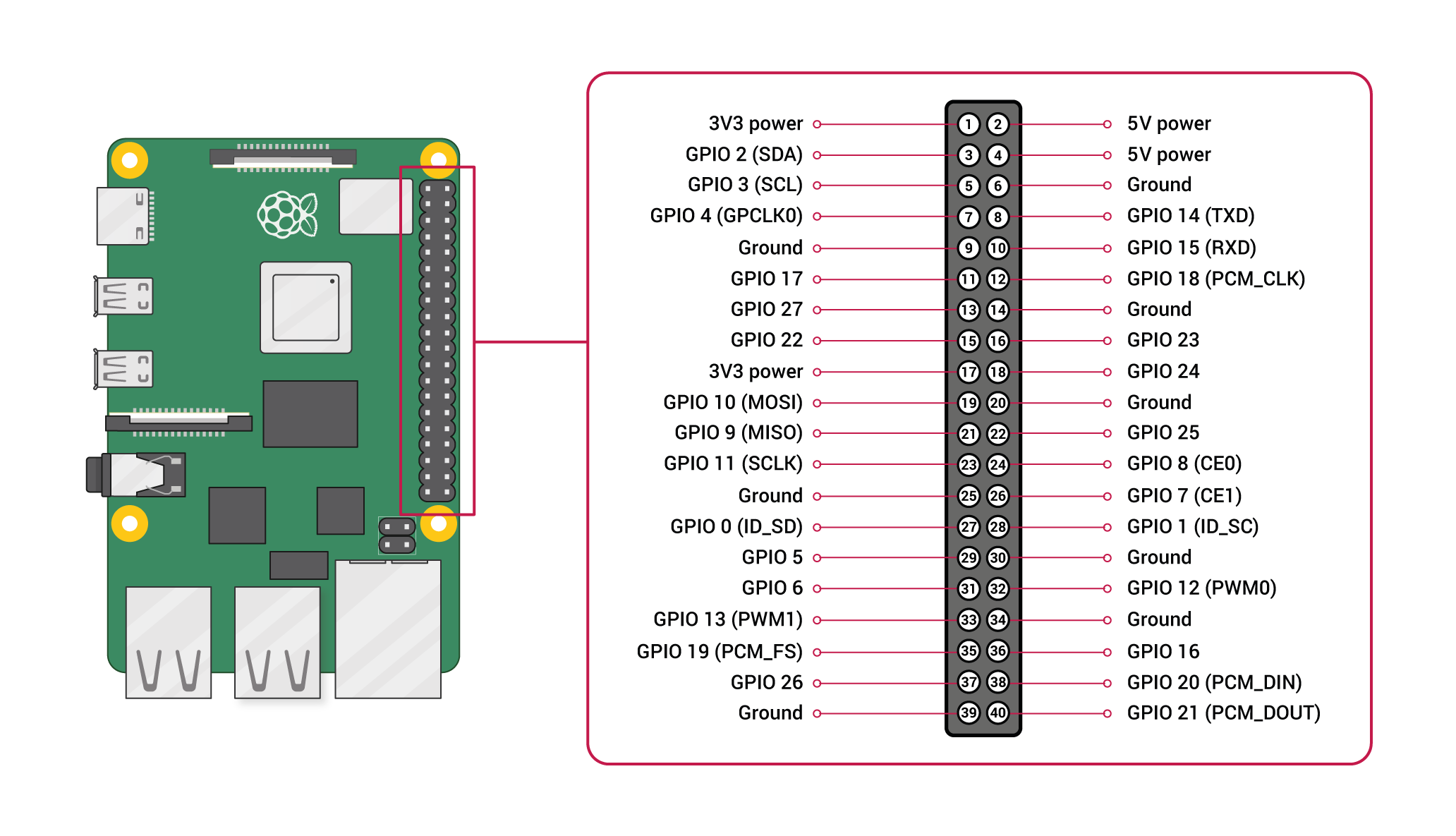
Pinout diagram
| Attr | Specs | verified |
|---|---|---|
soc | Broadcom BCM2835 — single-core ARM1176JZF-S (ARMv6, 32-bit) clocked at 1 GHz ("The CPU is clocked at … 1 GHz on the Zero and Zero W"); GPU VideoCore IV. (Wikipedia, processors section, retrieved 2026-10-13; official BCM2835 doc) | ✔ |
ram | 512 MB LPDDR2 SDRAM, shared CPU/GPU. (official launch post; official docs Zero table) | ✔ |
wireless | Cypress (Broadcom) CYW43438 combo chip — "It uses the same Cypress CYW43438 wireless chip as Raspberry Pi 3 Model B to provide 802.11n wireless LAN and Bluetooth 4.0 connectivity". Official docs table: 2.4 GHz single-band 802.11n Wi-Fi (35 Mb/s), Bluetooth 4.0 + BLE. (launch post, retrieved 2026-10-13; official docs Zero table) | ✔ |
antenna | no external or ceramic antenna — a PCB trace antenna ("a PCB antenna layout that we licensed from ProAnt in Sweden", per co-founder Pete Lomas). In the launch post's comment thread, official Raspberry Pi staff state it is "a ground plane cut-out which acts as a resonant cavity at 2.4 GHz … actually a better antenna than the chip antenna we have on the Pi 3 (we had to turn down the output power to pass the FCC / CE certification)". (Ars Technica; launch post comments) | ✔ |
storage | microSD slot only; no onboard storage. (launch post) | ✔ |
video | mini-HDMI (1080p60 class, as on the Zero); unpopulated composite video header pads and a reset header ("Composite video and reset headers" in the official feature list). (launch post) | ✔ |
usb | 2 × micro-USB — one power-only, one data (USB 2.0 OTG) from the BCM2835; no host-mode ports, no hub. (launch post; official docs Zero series intro: "2 × micro-USB ports (one for input power, one for external devices)") | ✔ |
camera | CSI camera connector in the official Zero W feature list; official docs: "Since version 1.3 of the original Zero, all Zero models also include a mini 22-pin, 0.5 mm (fine) pitch, 11.5 mm width, CSI (camera) port" — needs the short Zero camera flex cable. (launch post; official docs) | ✔ |
gpio | 40-pin HAT-compatible header, unpopulated (solder it yourself; the WH ships soldered). Electrically identical to A+/B+/2B: 3.3 V logic, I²C/SPI/UART/hardware PWM; no ADC/DAC. Per-pin 16 mA, 50 mA total across all GPIO pins. (launch post; official power doc, retrieved 2026-10-13; pinout.xyz) | ✔ |
power | 5 V micro-USB; official table: recommended PSU 1.2 A, USB peripheral current "limited by PSU, board, and connector ratings only", typical bare-board active consumption 150 mA (vs 100 mA for the wired Zero — the radio adds ~50 mA). (official power doc) | ✔ |
temperature | hard thermal limit 85 °C (progressive ARM throttling 80–85 °C); read with vcgencmd measure_temp. (frequency management doc) | ✔ |
mechanical | 65 mm × 30 mm × ~5 mm (2.6″ × 1.2″ × 0.2″), ~same board as the Zero. (Ars Technica; official mechanical drawings RP-008367-DS) | ✔ |
- Manufacturer / developer: Raspberry Pi (Trading) Ltd. (now Raspberry Pi Ltd.), UK; production by Sony under contract at the Pencoed (Wales) plant, consistent with the Zero W's Sony-UK revision code 9000c1. (Wikipedia, Raspberry Pi series article; official revision codes doc, retrieved 2026-10-13)
- Launch: 28 February 2017 — announced on Raspberry Pi's fifth birthday as "Raspberry Pi Zero W, a new variant of Raspberry Pi Zero with wireless LAN and Bluetooth, priced at only $10". (official launch post, retrieved 2026-10-13; Ars Technica, 28 Feb 2017; PCWorld, 28 Feb 2017)
- Status: Active / still shipping. The official hardware docs list the Zero W in the current Zero series table with no End-of-Life notice (EoL notices do exist there for Pi 2B rev 1.1/1.2 and CM3, so the absence is meaningful). (official docs Zero series table, retrieved 2026-10-13)
- Variants: - Zero W v1.1 — the only Zero W revision code in the official table: 9000c1, 512 MB, Sony UK. (revision codes doc) - Zero WH (2018) — electrically the Zero W with pre-soldered 40-pin GPIO header, launched 12 January 2018 at US$15. (Wikipedia; launch blog referenced there: raspberrypi.org/blog/zero-wh/) - Related (separate sheets): Zero (2015, $5, no radio), Zero 2 W (2021, RP3A0, $15). (official docs Zero table)
+ Strengths
- The $10 Wi-Fi + BLE Linux computer — at launch the cheapest way to run full Linux with wireless, "a great platform for experimenting with IoT applications". (launch post, retrieved 2026-10-13)
- Pi 3's radio on a $10 board: the same Cypress CYW43438 as the $35 Pi 3 Model B (802.11n 2.4 GHz + Bluetooth 4.0/BLE), eliminating the USB-dongle-plus-hub that the original Zero forced on users — "this hub can easily cost more than the Zero itself". (launch post)
- Novel antenna design: PCB ground-plane-cutout resonant-cavity antenna (ProAnt-licensed), officially rated by staff as better than the Pi 3's ceramic chip antenna, with TX power trimmed to pass FCC/CE. (Ars Technica; launch post comments)
- Tiny + low-power: 65 × 30 mm at ~150 mA typical active draw — wearables, sensor nodes, battery builds. (official power doc)
- USB OTG gadget mode: the data port emulates Ethernet/serial/MIDI/storage — pairs with Wi-Fi for fully headless or "Linux USB stick" builds. (Adafruit gadget guide)
- Full 40-pin HAT-compatible GPIO + CSI camera port + composite/reset headers on a board this small. (launch post feature list)
- Official case ecosystem: launched same day — injection-moulded case with three interchangeable lids (blank / GPIO / camera), including the camera flexi and rubber feet, designed with Kinneir Dufort and T-Zero ($5 per PCWorld). (launch post; PCWorld)
- BLE on Linux: out-of-the-box Bluetooth Low Energy on a mainline-Linux SBC made it the default BLE-beacon/sensor-node teaching platform. (launch post; official docs Zero table)
− Weaknesses
- No undervoltage detection: official docs — low-voltage detection exists "on all models since the Pi B+ (2014) except the Zero range". A sagging 5 V rail produces no kernel warning, just SD corruption and lockups. (official power doc, retrieved 2026-10-13)
- Wi-Fi is 2.4 GHz / 802.11n only, ~35 Mb/s (official figure) — no 5 GHz, no WPA3-capable modern rates; congested 2.4 GHz environments hit it hard. (official docs Zero table)
- Regulatory-domain pitfall: the Wi-Fi regulatory domain "determines available channels, transmit power, and overall network performance; incorrect settings can cause legal issues, increased interference, reduced capacity, and degraded connectivity". Set the WLAN country (raspi-config → L4) for correct 2.4 GHz channels/power. (official networking doc, retrieved 2026-10-13)
- Broadcom brcmfmac frame-forgery vulnerability (CVE-2017-9417): the FullMAC Wi-Fi driver used by the CYW43438/BCM43xx family allowed forgery of EAPOL-Success frames; widely reported against Raspberry Pi Wi-Fi boards in June 2017 and patched in kernel/firmware updates.
- Weak-Wi-Fi / antenna-joint complaints on early boards: community threads report units with markedly low RX/TX performance attributed to the antenna feed; Raspberry Pi reportedly accepted RMAs.
- Bluetooth version confusion: official sources say BT 4.0 + BLE, while CYW43438 marketing elsewhere says 4.1+EDR; don't rely on either for compatibility claims. (launch post; official docs Zero table)
- 512 MB RAM + 1 GHz single-core ARMv6: desktop use is painful; ARMv6/32-bit is a dead end — newer distro releases drop it earlier than Pi 3+ boards. (Wikipedia)
- Adapter ergonomics: mini-HDMI (not micro!), micro-USB OTG vs power ports that are easy to mix up (power-only port accepts peripherals that then do nothing), unsoldered header, and a CSI port needing the short Zero flex cable. (launch post feature list; official docs)
- BCM2835 peripheral spec has known errors — official docs: "The peripheral specification document contains a number of errors"; bare-metal work needs the community errata list. (official BCM2835 doc; errata list)
- Thermal throttling at 85 °C in sealed cases under sustained Wi-Fi TX + CPU load (rare at ~0.75 W, but real in sun-heated enclosures). (frequency management doc)
- Retour d'expérience expert expert — expert-raspberrypi
- Je reviens vers vous pour confirmer ce qui est souvent dit sur le Zero W. Le rapport qualité-prix est indéniable : pour 10 dollars, on a un vrai Linux avec Wi-Fi et Bluetooth LE, grâce au chip Cypress CYW43438 identique à celui du Pi 3. C'est parfait pour l'IoT et ça remplace proprement le montage … — expert-raspberrypi
- Merci pour le rappel sur l'alim, ça me fait penser à mes projets domotique. J'avoue que l'intégration radio du Pi 3 sur une si petite carte est bluffante, surtout pour le prix. Mais concernant la sous-tension, est-ce que des gens utilisent des modules externes pour surveiller la tension 5V, ou est-… — maker_bricoleur
- Regarding the undervoltage issue, it is indeed the major documented weakness. Personally, I stopped relying on kernel logs to detect voltage drops, there simply isn't a register for that on the Zero W's BCM2835. As for me, I added a small external supervision circuit that cuts the power if it drops… — linux_puriste
Community feedback and projects
- Banana Pi M2 Zero alternative to Raspberry Pi Zero W, BPI-M2 Magic, BPI-M2 Berry, BPI-R2 and BPI-W2 forum.banana-pi.org
- How to install Ubuntu on Raspberry pi zero W? stackoverflow.com
- FFmpeg installation on Raspberry Pi Zero W: Undefined references to __atomic stackoverflow.com
- From Beginner to Badass:Your Guide to Starting Projects with Raspberry Pi Zero W medium.com
Content not available yet.
- raspberrypi.com/news/raspberry-pi-zero-w-joins-family/
- pip.raspberrypi.com/documents/RP-008368-DS
- RP-008367-DS
- introduction.adoc
- power supplies
- revision codes
- official processor doc
- peripheral datasheet errata
- cypress.com
- pinout.xyz
- Ars Technica (28 Feb 2017)
- PCWorld (28 Feb 2017)
- Wikipedia series article
- Adafruit Pi Zero guide
- pwnagotchi.ai
- Raspberry Pi forums
- No undervoltage detection: official docs — low-voltage detection exists "on all models since the Pi B+ (2014) except the Zero range". A sagging 5 V rail produces no kernel warning, just SD corruption and lockups. (official power doc, retrieved 2026-10-13)
- Wi-Fi is 2.4 GHz / 802.11n only, ~35 Mb/s (official figure) — no 5 GHz, no WPA3-capable modern rates; congested 2.4 GHz environments hit it hard. (official docs Zero table)
- Regulatory-domain pitfall: the Wi-Fi regulatory domain "determines available channels, transmit power, and overall network performance; incorrect settings can cause legal issues, increased interference, reduced capacity, and degraded connectivity". Set the WLAN country (raspi-config → L4) for correct 2.4 GHz channels/power. (official networking doc, retrieved 2026-10-13)
- Broadcom brcmfmac frame-forgery vulnerability (CVE-2017-9417): the FullMAC Wi-Fi driver used by the CYW43438/BCM43xx family allowed forgery of EAPOL-Success frames; widely reported against Raspberry Pi Wi-Fi boards in June 2017 and patched in kernel/firmware updates.
- Weak-Wi-Fi / antenna-joint complaints on early boards: community threads report units with markedly low RX/TX performance attributed to the antenna feed; Raspberry Pi reportedly accepted RMAs.
- Bluetooth version confusion: official sources say BT 4.0 + BLE, while CYW43438 marketing elsewhere says 4.1+EDR; don't rely on either for compatibility claims. (launch post; official docs Zero table)
- 512 MB RAM + 1 GHz single-core ARMv6: desktop use is painful; ARMv6/32-bit is a dead end — newer distro releases drop it earlier than Pi 3+ boards. (Wikipedia)
- Adapter ergonomics: mini-HDMI (not micro!), micro-USB OTG vs power ports that are easy to mix up (power-only port accepts peripherals that then do nothing), unsoldered header, and a CSI port needing the short Zero flex cable. (launch post feature list; official docs)
- BCM2835 peripheral spec has known errors — official docs: "The peripheral specification document contains a number of errors"; bare-metal work needs the community errata list. (official BCM2835 doc; errata list)
- Thermal throttling at 85 °C in sealed cases under sustained Wi-Fi TX + CPU load (rare at ~0.75 W, but real in sun-heated enclosures). (frequency management doc)
- Premier démarrage headless de la Zero W (Wi-Fi + SSH) debutant Schéma : IMG-zero-w-debutant-1-installation-headless-raspberry-pi-os.svg — Zero W alimentée par le port micro-USB POWER, carte microSD insérée, PC portable affichant une session SSH sur le réseau Wi-Fi.
- Suder le header 40 broches et faire clignoter une LED debutant Schéma : IMG-zero-w-debutant-2-soudure-header-gpio-premier-clignotement.svg — Zero W avec header 40 broches à souder, plan de câblage broche 11 (GPIO17) → résistance 330 Ω → LED → broche 14 (GND).
- Se connecter au Wi-Fi en ligne de commande (nmcli) debutant Schéma : IMG-zero-w-debutant-3-connexion-wifi-ligne-de-commande.svg — Zero W et son antenne trace PCB repérée sur la carte, ondes 2,4 GHz vers la box, terminal affichant nmcli dev wifi list.
- Pi-hole : bloqueur de pub DNS sur Zero W intermediaire Schéma : IMG-zero-w-intermediaire-1-pi-hole-bloqueur-de-pubs-wifi.svg — Zero W posée près de la box, flèches DNS : tous les appareils du LAN envoient leurs requêtes vers le port 53 de la Zero W qui filtre avant Internet.
- Gadget USB : Ethernet sur le port OTG + relais Wi-Fi intermediaire Schéma : IMG-zero-w-intermediaire-2-gadget-usb-ethernet-sur-le-port-otg.svg — Zero W branchée au port USB d'un PC via le port données micro-USB ; elle apparaît comme interface usb0 et relaie Internet par Wi-Fi.
- Balise BLE : diffuser un beacon avec le CYW43438 intermediaire Schéma : IMG-zero-w-intermediaire-3-balise-bluetooth-low-energy.svg — Zero W émettant des paquets d'advertising BLE captés par un smartphone affichant le nom ZeroW-01 et une charge utile personnalisée.
- Nœud capteur autonome sur batterie : énergie et fiabilité avance Schéma : IMG-zero-w-avance-1-noeud-capteur-autonome-sur-batterie.svg — Zero W dans un boîtier avec batterie USB 5 V 5000 mAh, relevés de consommation (150 mA typiques) et thermomètre indiquant la limite 85 °C.
- Caméra sur le port CSI 22 broches (flex court) + time-lapse avance Schéma : IMG-zero-w-avance-2-camera-csi-flex-court-et-time-lapse.svg — nappe courte 22 broches pas fin 0,5 mm insérée dans le connecteur CSI de la Zero W, module caméra posé à côté, images envoyées en Wi-Fi vers un serveur.
- Appliance headless durable : root en lecture seule + suivi avance Schéma : IMG-zero-w-avance-3-appliance-headless-lecture-seule-suivi.svg — Zero W en boîtier dans une armoire réseau, microSD verrouillée en lecture seule (cadenas), sonde cron relevant température, RAM et uptime vers un tableau de bord.
Code library — examples written for this board
clignotante.pyPythonbouton-gpio.pyPythoncapteur-i2c.shBashsurveillance-temperature.shBashcapteur-dht11.pyPythonservo-pwm-sysfs.shBashserveur-web-capteur.pyPythonwifi-station.shBashjournal-cron.shBashveilleur-systemd.pyPython
Examples and repos found online
- raspberrypi/noobs github.com
- WiringPi/WiringPi github.com
- joan2937/pigpio github.com
- raspberrypi/linux github.com