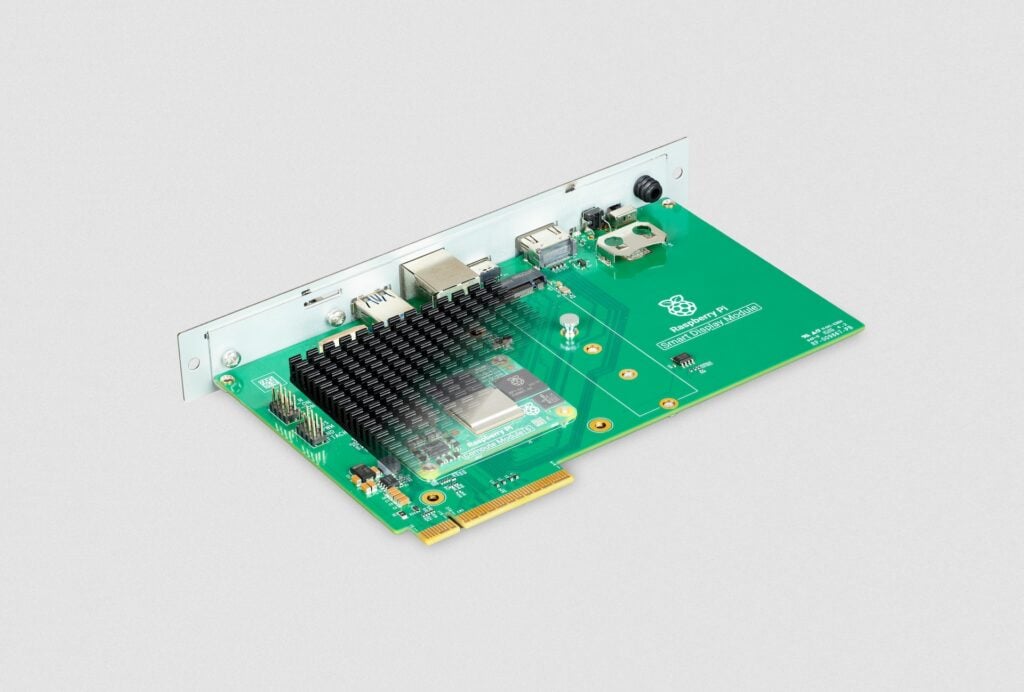
Raspberry Pi Smart Display Module
⚡ The essentials in 60 seconds
- soc — Raspberry Pi Compute Module 5 (sold separately)
- form_factor — Intel Smart Display Module (SDM) specification
- video — 4K video playback
- expansion — On-board M.2 expansion slot
- ai_acceleration — Compatible with Hailo processor or other AI accelerators via M.2
- cooling — Fanless and silent operation
- On this board : 9 tutorials · 10 code
The Raspberry Pi Smart Display Module represents a significant evolution in how we think about integrating computing power with visual interfaces, specifically targeting the professional display market through a highly specialized form factor. To understand the significance of this hardware, one must first grasp the concept of the Intel Smart Display Module, or SDM, which serves as the foundational architecture for this device. The SDM is not merely a connector but a standardized specification that allows a small, self-contained computer to plug directly into the back of a compatible monitor or display panel. This design philosophy eliminates the need for external boxes, tangled cables, and separate power supplies, creating a seamless, all-in-one solution where the computer essentially becomes an internal component of the screen itself. The Raspberry Pi Smart Display Module adopts this exact format, transforming the versatile Raspberry Pi Compute Module 5 into a plug-and-play engine for professional displays. It is crucial to note that this module is sold separately from the Compute Module 5 itself, meaning users must acquire the core computing unit independently, but once combined, they form a cohesive unit designed for specific industrial and commercial applications.
Launched on September 29, 2026, at a price point of thirty dollars, this module bridges the gap between hobbyist flexibility and enterprise-grade reliability. The collaboration with Sharp Display Solutions Europe underscores the seriousness of this endeavor, as Sharp is a major player in the professional display industry. This partnership ensures that the module is not just a theoretical exercise but a product rigorously tested and optimized for integration into displays that adhere to the Intel SDM standard. For the end-user, this means that if you have a professional monitor or digital signage screen that supports the SDM slot, you can simply insert this Raspberry Pi module, and the display will recognize the computer, handling power, video, audio, data, and control signals through internal connections. This internal routing is a key pedagogical point: it reduces visual clutter and potential points of failure associated with external cabling, which is vital in public-facing installations where aesthetics and reliability are paramount.
The performance capabilities of the module are anchored by the Raspberry Pi Compute Module 5, a powerful system-on-chip that brings desktop-class processing to this compact form factor. One of the most notable features is its support for 4K video playback. In the context of digital signage and information displays, resolution is critical. Whether displaying high-definition advertisements, detailed maps, or complex data visualizations, the ability to render 4K content ensures that images remain crisp and legible from a distance. This capability is not just about raw pixel count but about the efficient decoding of video streams, allowing the system to run smooth, high-quality media without stuttering or lag. Furthermore, the module is designed to work seamlessly with Content Management Systems, or CMS, that are compatible with the Raspberry Pi 5 or Compute Module 5. A CMS is the software backbone of digital signage, allowing administrators to schedule, update, and manage content remotely across multiple screens. By ensuring compatibility with existing CMS platforms, the Smart Display Module allows businesses to integrate this hardware into their current workflows without needing to overhaul their entire software infrastructure.
Beyond basic video playback, the module introduces a layer of expandability that is rare in such compact, integrated solutions. It features an onboard M.2 expansion slot, a standard interface typically found in laptops and desktop computers for high-speed storage or specialized peripherals. In the context of this display module, the M.2 slot is not just for adding more storage; it opens the door to advanced computational tasks, particularly in the realm of artificial intelligence. The module is compatible with AI accelerators such as the Hailo processor. To explain this for a general audience, an AI accelerator is a specialized chip designed to perform machine learning tasks much faster and more efficiently than a general-purpose CPU. By adding a Hailo accelerator via the M.2 slot, the display can become "smart." It can analyze video feeds in real-time, recognize objects, count people, or detect specific behaviors directly on the device, without sending data to a cloud server. This capability is transformative for applications like retail analytics, where understanding customer movement patterns can optimize store layouts, or for security systems that need to react instantly to unusual activity.
The physical design of the module is equally thoughtful, prioritizing reliability and user experience in professional environments. It is engineered for fanless, silent operation. In many computing scenarios, cooling fans are necessary to dissipate heat, but they introduce noise, vibration, and potential mechanical failure points. By designing the module to operate without a fan, Raspberry Pi ensures that the device remains completely silent, which is essential in quiet environments like libraries, museums, or corporate lobbies. Moreover, the absence of moving parts enhances durability, a critical factor for devices expected to run continuously. The module is explicitly designed for 24/7 operation, meaning it can run non-stop for weeks, months, or even years without requiring a reboot or maintenance. This continuous duty cycle is a hallmark of industrial-grade hardware, distinguishing it from consumer electronics that are designed for intermittent use.
The target use cases for the Raspberry Pi Smart Display Module are diverse but share a common need for robust, integrated, and high-performance display solutions. Digital signage is perhaps the most obvious application, where businesses use screens to display advertisements, news, or promotional content. The module’s ability to handle 4K content and integrate seamlessly into professional displays makes it ideal for creating eye-catching, high-resolution advertisements that can be updated remotely. Another key application is Flight Information Display Systems, or FIDS, found in airports. These systems require extreme reliability and the ability to display complex, real-time data clearly. The 24/7 operational design and the potential for AI-driven data processing make the module well-suited for this high-stakes environment. Similarly, wayfinding systems in large hospitals, universities, or shopping centers benefit from the module’s compact form factor and silent operation, providing clear directions without the distraction of noisy hardware. Retail and corporate signage also stand to gain, as the integration of AI accelerators allows for interactive experiences that respond to customer presence or behavior, creating a more engaging and personalized environment.
In summary, the Raspberry Pi Smart Display Module is a specialized tool that leverages the power of the Compute Module 5 within the standardized Intel SDM framework. It offers a clean, cable-free integration path for professional displays, supports high-resolution 4K video, and provides expandability for AI applications through its M.2 slot. Developed in partnership with Sharp Display Solutions Europe, it is built for silent, continuous, and reliable operation, making it a compelling choice for digital signage, wayfinding, and other commercial display applications. While it requires the separate purchase of the Compute Module 5, the resulting system offers a sophisticated, integrated solution that balances performance, flexibility, and industrial-grade durability.
| Attr | Specs | verified |
|---|---|---|
soc | Raspberry Pi Compute Module 5 (sold separately) | ? unverified |
form_factor | Intel Smart Display Module (SDM) specification | ? unverified |
video | 4K video playback | ? unverified |
expansion | On-board M.2 expansion slot | ? unverified |
ai_acceleration | Compatible with Hailo processor or other AI accelerators via M.2 | ? unverified |
cooling | Fanless and silent operation | ? unverified |
connectivity | Internal connections for power, video, audio, data, and control | ? unverified |
compatibility | Displays and devices conforming to Intel SDM specification | ? unverified |
software | Compatible with CMS supporting Raspberry Pi 5 or Compute Module 5 | ? unverified |
use_case | Digital signage, FIDS, wayfinding, retail and corporate signage | ? unverified |
duty_cycle | Designed for continuous 24/7 operation | ? unverified |
partner | Developed in collaboration with Sharp Display Solutions Europe | ? unverified |
Launched on September 29, 2026, this module was developed in collaboration with Sharp Display Solutions Europe. It aims to directly integrate the Raspberry Pi Compute Module 5 into professional displays using the Intel Smart Display Module (SDM) format.
+ Strengths
["- Cable-free integration for power, video, audio, and control via the SDM format.","- Silent, fanless operation designed for continuous 24/7 use.","- M.2 slot allows for the addition of high-speed storage or AI accelerators like the Hailo."]
− Weaknesses
["- The Raspberry Pi Compute Module 5 is sold separately.","- Compatibility is limited to displays and devices conforming to the Intel SDM specification.","- Requires content management systems compatible with the Raspberry Pi 5 or Compute Module 5."]
- Retour d'expérience expert expert — expert-microdb
- Après 3 semaines de déploiement sur 12 écrans SDM, je valide. L'intégration est propre, zéro câble apparent, ce qui simplifie grandement la maintenance en boutique. Le module chauffe peu, aucun ventilateur nécessaire même en 4K continu. Attention toutefois : il faut impérativement le Compute Module… — expert-microdb
- Bon retour. Une question sur la gestion thermique : avec un Hailo-8L dans le slot M.2, as-tu noté une réduction des performances vidéo en 4K ? Je crains que le TDP combiné ne force un throttling silencieux sur la longue durée, surtout si l'écran est encastré. Sinon, l'absence de câblage est effecti… — membre-forum
Community feedback and projects
- Discussions Reddit — Raspberry Pi Smart Display Module reddit.com
- Articles CNX Software — Raspberry Pi Smart Display Module cnx-software.com
Content not available yet.
Content not available yet.
Content not available yet.
["- not specified","- not specified","- not specified"]
- Getting started with the Raspberry Pi Smart Display Module debutant Guide pas à pas pour assembler et démarrer votre Raspberry Pi Smart Display Module avec un écran SDM compatible.
- Using Smart Display Module GPIOs debutant Apprenez à contrôler les broches GPIO du Raspberry Pi Smart Display Module pour interagir avec des périphériques externes.
- Connect the Smart Display Module to the network for digital signage debutant Apprenez à configurer la connexion réseau du Raspberry Pi Smart Display Module pour diffuser du contenu à distance.
- Getting Started with the Raspberry Pi Smart Display Module intermediaire Guide étape par étape pour installer et démarrer votre Smart Display Module avec un écran compatible SDM.
- Interfacing GPIO and sensors with the Smart Display Module intermediaire Apprenez à connecter et lire un capteur via les GPIO du Smart Display Module pour enrichir vos affichages dynamiques.
- Deploying an autonomous digital signage with M.2 storage intermediaire Configurez le Raspberry Pi Smart Display Module pour un affichage 24/7 avec stockage local rapide via M.2.
- Getting Started with the Smart Display Module on Compute Module 5 avance Guide avancé pour l'intégration sans câble du Raspberry Pi Smart Display Module dans un écran SDM compatible.
- Advanced I/O Integration on the Smart Display Module avance Ce tutoriel détaille l'exploitation des interfaces d'entrée-sortie du Smart Display Module pour connecter des capteurs ou des périphériques de contrôle.
- Deploy Real-Time AI Inference on the Smart Display Module avance Intégrer un accélérateur IA M.2 pour analyser des flux vidéo 4K sur un affichage SDM sans latence.
Code library — examples written for this board
gpio-led-blink-python.pyPythondht22-sensor-monitor.pyPythonwifi-status-checker.pyPythonm2-ssd-mount-check.shBashhailo-inference-test.pyPythongpio-led-status-indicator.pyPythonsensor-temp-humidity-display.pyPythonnetwork-streaming-player.pyPythonm2-storage-benchmark.shBashai-inference-hailo.pyPython