Orange Pi PC (Allwinner H3)
⚡ The essentials in 60 seconds
- soc — Allwinner H3 — 4× Arm Cortex-A7 (ARMv7-A, 32-bit), NEON, Mali-400MP2 GPU @ up to 600 MHz, OpenGL ES 2.0 (official wiki).
- cpu_clocks — quad A7 nominally @ 1.2 GHz on vendor and Armbian images. CNX's launch article noted the marketing claim of 1.6 GHz was "likely 1.2 GHz instead" on this board.
- ram — 1 GB DDR3, shared with the GPU (official wiki).
- storage — microSD (TF) slot only — no eMMC, no SPI NOR on the base PC. Official wiki says "Max. 32 GB"; CNX lists "up to 64 GB".
- video — full-size HDMI (Type-A) with CEC and HDCP, CVBS/AV out; CSI camera connector (GC2035/OV5640 per official wiki). HDMI and the display pipeline (DE2/FE) are enabled in the mainline DTS.
- audio — 3.5 mm AV-port composite out + mic input (H3 codec, enabled in mainline DTS: &codec with "Line Out"/"MIC1" routing), HDMI audio. On-board microphone (CNX).
- On this board : 9 tutorials · 10 code
The Orange Pi PC stands as a pivotal moment in the history of single-board computers, representing the democratization of quad-core Linux computing at an unprecedented price point. Introduced in late August 2015 by Shenzhen Xunlong Software Co., Ltd., this board launched at just fifteen US dollars plus shipping, making it the most affordable quad-core Cortex-A7 Linux board on the market at the time. Its arrival flooded the market with low-cost alternatives to the Raspberry Pi, leveraging the Allwinner H3 system-on-chip to deliver significant processing power for hobbyists, educators, and makers who previously found such capabilities out of reach. While the design is now considered legacy and the vendor’s official support has largely shifted to community-driven models, the Orange Pi PC remains a relevant platform for learning embedded Linux, thanks to robust community support from projects like Armbian and full mainline Linux kernel support.
At the heart of the Orange Pi PC is the Allwinner H3 processor, a quad-core Arm Cortex-A7 system-on-chip. To understand what this means for the user, it is helpful to know that a "quad-core" processor contains four independent processing units, allowing the board to handle multiple tasks simultaneously, such as running a web server while managing background downloads. The Cortex-A7 architecture is a 32-bit design, which is efficient for power consumption but limits the board to 32-bit operating systems. The CPU typically runs at a nominal clock speed of 1.2 GHz, a frequency that determines how many cycles the processor can execute per second. While some marketing materials initially claimed higher speeds, practical performance on vendor and community images stabilizes around this 1.2 GHz mark. The chip also integrates a Mali-400MP2 GPU, which handles graphical rendering and video playback, supporting OpenGL ES 2.0 for basic 3D graphics and hardware-accelerated 1080p video decoding. This multimedia capability is complemented by 1 GB of DDR3 RAM, which is shared between the CPU and the GPU, a common configuration in budget-friendly boards that balances cost with sufficient memory for lightweight desktop environments and server applications.
Connectivity options on the base Orange Pi PC are functional but reflect its cost-optimized design. The board features a full-size HDMI Type-A port for high-definition video output, supporting CEC and HDCP, alongside a CVBS/AV composite output for older televisions. For network connectivity, it includes a 10/100 Mbps Ethernet RJ45 port. It is crucial to note that this is not Gigabit Ethernet; the maximum transfer speed is capped at 100 megabits per second. This limitation is due to the use of the H3’s internal 10/100 MII PHY, a cost-saving measure that eliminates the need for an external network chip. While this speed is sufficient for home ad-blocking, basic file sharing, or media streaming, it serves as a hard ceiling for heavy network tasks like NAS operations. Wireless connectivity is absent on this base model; users requiring Wi-Fi must look to the Orange Pi PC Plus variant or use USB dongles. The board provides three USB 2.0 host ports for peripherals, though users should be aware that the VBUS power on these ports is always on and cannot be software-switched. Additionally, there is one micro-USB 2.0 OTG port, which is strictly for data transfer and cannot be used to power the board.
One of the most significant points of confusion and potential frustration for new users concerns the power supply. The Orange Pi PC must be powered via a 5V DC barrel jack with a current rating of at least 2 Amps. The micro-USB port, despite its familiar shape, is an OTG (On-The-Go) data port only and has no power input path. Attempting to power the board with a standard phone charger plugged into the micro-USB port will result in a dead board, a common mistake for those transitioning from Raspberry Pi Zero or 3B+ models. The power regulation is handled by a SY8106A I2C regulator, which manages CPU voltage scaling to optimize performance and heat. Speaking of heat, the Allwinner H3 is known to run hot. Under sustained load, such as compiling software or running multiple services, the CPU will throttle its speed to prevent overheating unless adequate cooling, such as a heatsink, is provided. Users should expect idle consumption of roughly 0.5 to 1 watt, rising to 2-3 watts under peak load.
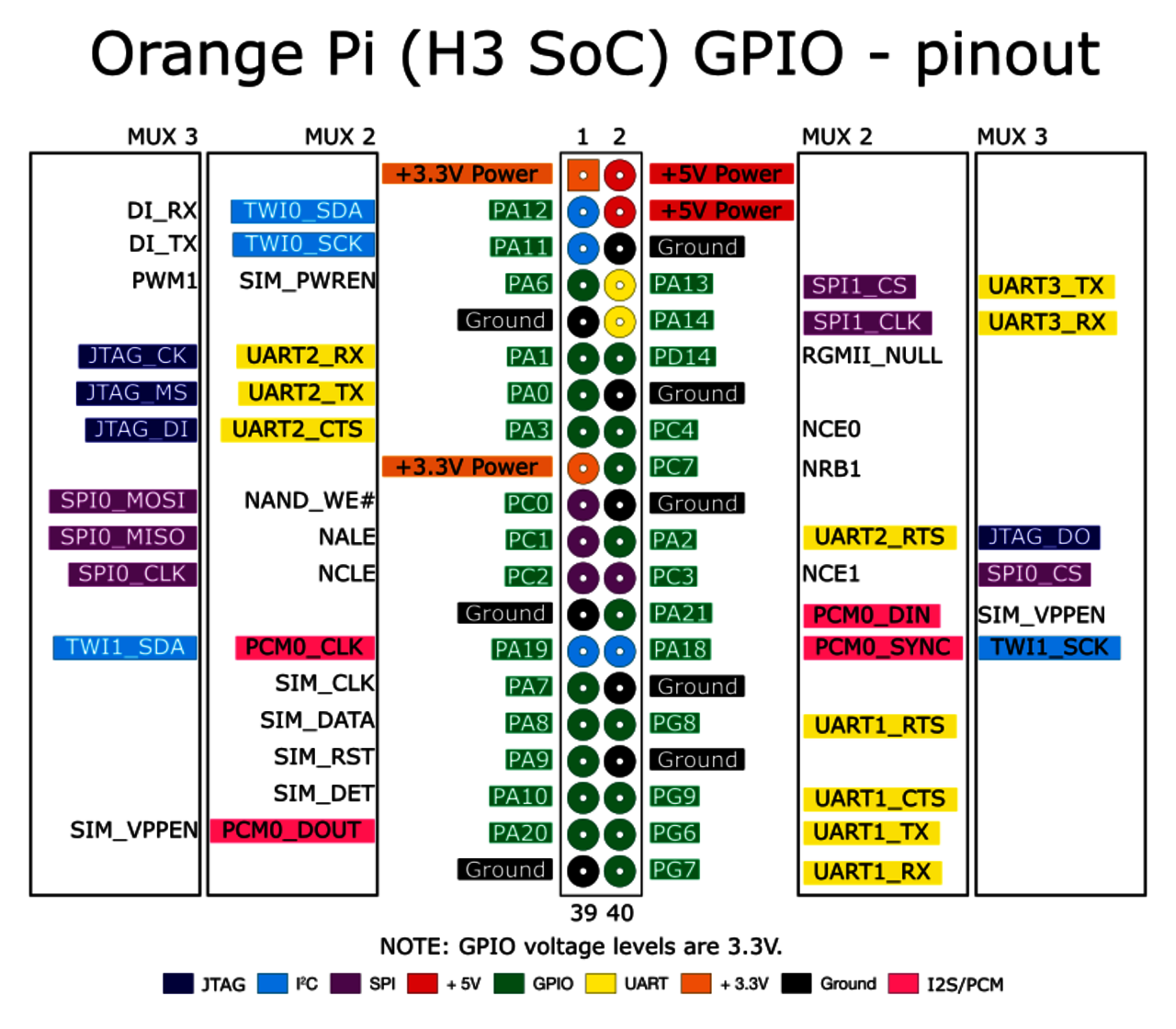
The physical interface of the Orange Pi PC includes a 40-pin GPIO header that is mechanically compatible with the Raspberry Pi B+ style. This allows for the use of many Raspberry Pi HATs and accessories, although electrical compatibility must be verified as the logic levels are 3.3V. The header exposes 28 GPIOs along with various communication interfaces including UART, I2C, SPI, PWM, CAN, I2S, SPDIF, and analog inputs. A critical safety warning applies here: some boards in this generation have been reported to route higher voltages (such as 5V, 13V, or 26V) to specific header pins labeled PW1, PW2, or VPP. Connecting 3.3V peripherals to these pins can destroy them. Until the specific pinout is verified with a multimeter, users should treat all non-GND power pins on the header with extreme caution. Other on-board features include an infrared receiver for remote control input, a CSI connector for camera modules like the GC2035 or OV5640, and an on-board microphone.
Software support for the Orange Pi PC has evolved significantly since its launch. The official vendor images, which include Android 4.4/7.0 and older Debian/Ubuntu builds, rely on a legacy Linux 3.4 kernel and are largely unmaintained, posing security risks. The recommended path for modern usage is Armbian, a community-driven operating system that provides mainline-based kernels (such as 6.1.x) with proper device tree support, thermal management, and dynamic voltage and frequency scaling. Armbian currently offers community-supported images for Debian "Trixie" and Ubuntu "Resolute." Mainline Linux support is comprehensive, with the device tree sun8i-h3-orangepi-pc.dts included in the official kernel tree, ensuring that Ethernet, HDMI, IR, audio, and LEDs work out of the box. Installation is straightforward: users write an image to a Class 10 microSD card using tools like balenaEtcher or Win32DiskImager. The board boots from the SD card first, making it easy to recover from software errors by simply reflashing the card.
Despite its age, the Orange Pi PC remains a capable device for specific projects. It is well-suited for running network ad-blockers like Pi-hole, where its 1 GB of RAM and stable Ethernet connection are more than adequate. It can also serve as a home automation hub for platforms like Home Assistant or as a media center using Kodi, especially when paired with the RetrOrangePi distribution for retro gaming. The availability of tools like WiringOP for GPIO control and libgpiod for mainline Linux GPIO access makes it an excellent platform for learning hardware interfacing. However, users must be mindful of its limitations: the lack of Wi-Fi, the 100 Mbps network cap, and the thermal constraints of the H3 chip. By understanding these characteristics and leveraging the robust Armbian community, the Orange Pi PC continues to offer valuable educational and practical utility in the world of embedded computing.
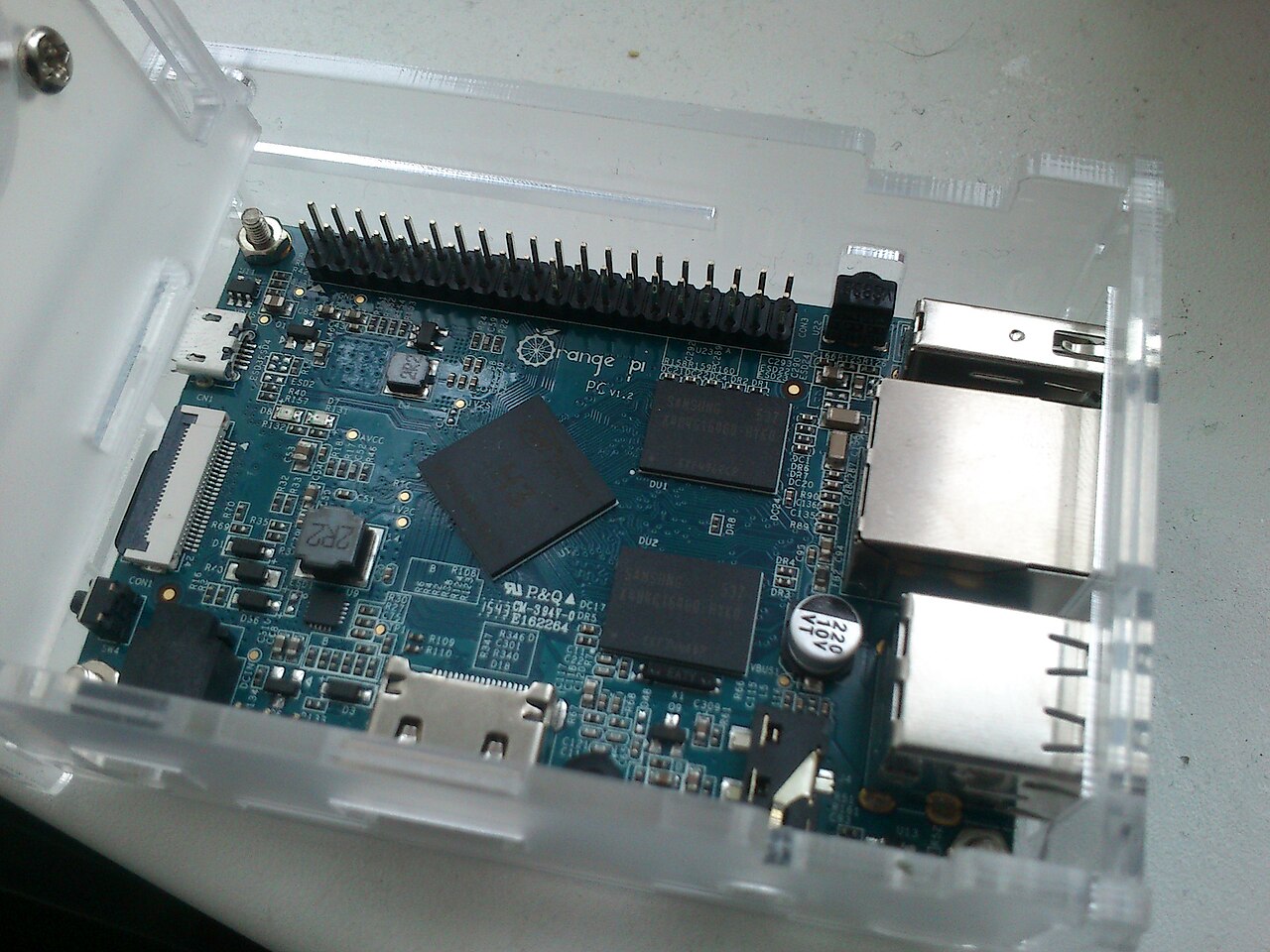

Pinout diagram
| Attr | Specs | verified |
|---|---|---|
soc | Allwinner H3 — 4× Arm Cortex-A7 (ARMv7-A, 32-bit), NEON, Mali-400MP2 GPU @ up to 600 MHz, OpenGL ES 2.0 (official wiki). | ? unverified |
cpu_clocks | quad A7 nominally @ 1.2 GHz on vendor and Armbian images. CNX's launch article noted the marketing claim of 1.6 GHz was "likely 1.2 GHz instead" on this board. | ? unverified |
ram | 1 GB DDR3, shared with the GPU (official wiki). | ? unverified |
storage | microSD (TF) slot only — no eMMC, no SPI NOR on the base PC. Official wiki says "Max. 32 GB"; CNX lists "up to 64 GB". | ? unverified |
video | full-size HDMI (Type-A) with CEC and HDCP, CVBS/AV out; CSI camera connector (GC2035/OV5640 per official wiki). HDMI and the display pipeline (DE2/FE) are enabled in the mainline DTS. | ? unverified |
audio | 3.5 mm AV-port composite out + mic input (H3 codec, enabled in mainline DTS: &codec with "Line Out"/"MIC1" routing), HDMI audio. On-board microphone (CNX). | ? unverified |
ethernet | 10/100 Mbps RJ45 only — NOT gigabit (official wiki "10/100 Ethernet RJ45"). Implemented with the H3's internal 10/100 MII PHY (&emac with phy-mode = "mii" and int_mii_phy in the mainline DTS). No PoE, no second NIC. | ? unverified |
wifi_bluetooth | none on the base PC (the PC Plus adds 802.11 b/g/n; no BT on either). | ? unverified |
usb | 3× USB 2.0 host (one shared controller via on-board hub — DTS enables ehci0-3/ohci0-3), 1× micro-USB 2.0 OTG port. DTS note: "VBUS on USB host ports are always on" (not software-switchable). | ? unverified |
gpio_expansion | 40-pin header, Raspberry Pi (B+ style) mechanically compatible, with 28 GPIOs plus UART, I2C, SPI, PWM, CAN, I2S, SPDIF, LRADC, ADC, LINE-IN, FM-IN, HP-IN (CNX 2015). Logic level 3.3 V (sunxi standard). | ✔ |
on_board_i_o | power LED (PL10, active-high, "orangepi:green:pwr"), status LED (PA15, "orangepi:red:status"), power button SW4 (PL3, KEY_POWER, wakeup-capable), IR receiver (all from the mainline DTS), 3-pin UART debug header (115200 8N1 on UART0 PA-pins per DTS). | ? unverified |
power | 5 V / ≥2 A via DC barrel jack. The micro-USB OTG port CANNOT be used to power the board — stated explicitly by the official wiki ("the OTG interface of the development board cannot be used as a power input"), the user manual, and CNX. CPU core supply is a SY8106A (silergy,sy8106a) I2C regulator at 1.0–1.3 V on the R_I2C bus (mainline DTS). | ? unverified |
consumption | roughly 0.5–1 W idle, ~2–3 W peak with peripherals. | ? unverified |
temperature | H3 is known to run hot; throttles under sustained load without cooling. | ? unverified |
size_weight | 85 × 55 mm; 38 g (CNX) vs 43 g (official wiki) — sources disagree. | ? unverified |
- Manufacturer: Shenzhen Xunlong Software Co., Ltd. (brand: Orange Pi) — the Orange Pi series is designed and manufactured by Xunlong in Shenzhen (Wikipedia: Orange Pi, retrieved 2026-10-13).
- Year introduced: 2015. The Orange Pi PC went on sale at the end of August 2015 (CNX Software, "Orange Pi PC Allwinner H3 Board Is Now Available for $15", 2015-08-26, retrieved 2026-10-13).
- Launch price: US$15 + shipping (AliExpress listing cited by CNX, 2015-08-26) — at the time the cheapest quad-core Cortex-A7 Linux board on the market.
- Status: Legacy / end-of-life in practice. The design dates from 2015; official images are old (Android 4.4/7.0, Debian/Ubuntu legacy-kernel builds) and the vendor's support model has always been forum-driven (CNX 2015 review note: "under staffed… rely on the forums"). The Armbian community still ships images for it ("Community support" tier, 2 images: Debian "Trixie" and Ubuntu "Resolute", armbian.com/boards/orangepipc, retrieved 2026-10-13).
- Variants (same family): - Orange Pi PC — the base board documented here (no WiFi, no eMMC). - Orange Pi PC Plus (2016) — adds AP6212-class 802.11 b/g/n WiFi with external antenna and 8 GB eMMC, launched at $19.99 (CNX, 2016-06-09, retrieved 2026-10-13). - Orange Pi 2 — the larger H3 predecessor ($25, more USB ports, WiFi, reset/u-boot keys) (CNX 2015). - Orange Pi PC 2 — different SoC (Allwinner H5), Armbian "Standard support" (armbian.com/boards/orangepipc2).
+ Strengths
- Price/performance landmark: $15 quad-core A7 Linux computer at launch — the reason the H3 family flooded the cheap SBC/TV-box market (CNX 2015).
- Raspberry Pi-compatible 40-pin header (mechanical + mostly signal-compatible), easing porting of Pi HAT-style wiring, with an unusually rich pin mux: CAN, I2S, SPDIF, LRADC, ADC, LINE-IN/FM-IN/HP-IN on the same header (CNX spec list).
- Integrated 10/100 Ethernet PHY in the SoC (no external PHY chip needed — int_mii_phy in the DTS) — a cost-cutting feature of the H3 that this board exploits.
- Multimedia SoC: Mali-400MP2 + CedarX video engine; hardware 1080p playback; VPU decoding worked in Armbian's 3.4 legacy builds as early as 2016 (grokipedia/Armbian history note, source).
- IR receiver on-board (mainline &ir enabled) — usable as a set-top-box remote input.
- CSI camera connector (GC2035/OV5640) and on-board microphone — rare at this price.
- Gadget-mode capable OTG port (dr_mode = "otg" in mainline DTS) for USB gadget work (g_serial etc.), with the caveats listed in Problems.
- DVFS via I2C regulator (SY8106A on R_I2C @0x65) — CPU voltage scaling works in mainline (DTS regulator node, 1.0–1.3 V).
− Weaknesses
- OTG port cannot power the board — and this confuses everyone. The micro-USB connector is OTG-only: no power input path. Official wiki: "MicroUSB (OTG) cannot be used as power input"; same in the user manual (ManualsLib, Orange Pi PC manual p.10) and CNX's spec line "micro USB OTG cannot be used to power the board". Users coming from Pi Zero/3B+ boards habitually try to power it from a phone charger on the micro-USB port and get a dead board.
- OTG host/gadget mode confusion. The port has an ID pin (PG12) but host-port VBUS is hard-wired on (DTS comment). Users report gadget mode not enumerating (Armbian forum: "orange pi pc USB otg not working", topic 10822) and the OTG port not behaving like the other three host ports (Armbian forum topic 32961); the upstream position is that the ID-detect wiring/cable quality decides the mode (linux-sunxi mailing list discussion).
- 100 Mbps Ethernet only. Frequently mistaken for gigabit; the internal PHY is 10/100 MII (DTS phy-mode = "mii"). Fine for ad-blockers/VPN-free homes, a hard ceiling for NAS use.
- No WiFi/Bluetooth on the base PC — only the PC Plus has WiFi; Ethernet or USB dongles only.
- microSD fragility and capacity confusion. Official wiki caps the card at 32 GB and recommends SanDisk Class 10, warning other brands "may have the problem of system failure"; CNX says up to 64 GB. SD-card corruption under logging load is the classic H3 failure mode — use a quality card, and consider log2ram (ships with Armbian).
- Legacy vendor stack is dead-ended. Official images run Linux 3.4 (legacy 3.4.y), Android 4.4/7.0 — unmaintained, security-wise ancient. CNX warned from day one that Xunlong is "under staffed" for image maintenance (CNX 2015). Practical answer: run Armbian/mainline.
- Thermal behavior of the H3. The quad A7 runs hot; sustained all-core load without a heatsink causes throttling.
- Possible 13 V/26 V pins on the GPIO header (see SoC & specs) — reported killer of peripherals on this H3 board generation.
- Vendor kernel CPU OPP quirks: the mainline DTS carries a note that both Armbian's and the official DVFS tables operate below the SY8106A datasheet minimum (1.1 V), forcing the regulator minimum to 1.0 V — evidence that vendor OPP tables shipped outside datasheet conditions (mainline DTS comment).
- Retour d'expérience expert expert — expert-pi-like
- Retour d'experience sur l'Orange Pi PC après plusieurs mois d'utilisation. Le rapport qualite-prix reste imbattable pour un quad-core A7, surtout avec les images Armbian qui sont bien maintenues. Le connecteur CSI et le micro integre sont des bonus appreciables a ce prix. Par contre, attention au p… — expert-pi-like
- Merci pour ces precisions sur l'alimentation, je pensais pouvoir gagner de la place en utilisant le micro-usb comme sur d'autres boards. J'ai une question sur le header GPIO : tu mentionnes la compatibilite Raspberry Pi. Est-ce que les HATs officiels fonctionnent out-of-the-box ? Je voudrais branch… — maker-du-44
- Pour le header, la mecanique est compatible mais la mise en oeuvre electrique demande de la vigilance. Comme le souligne expert-pi-like, la documentation officielle est parfois confuse. Sur ma version, j'ai du vérifier chaque pin au multimetre. Certains pins etiquetes VPP peuvent fournir une tensio… — linux-tinkerer
Community feedback and projects
- v26.11 on Orange Pi PC Plus fails to boot from eMMC. forum.armbian.com
- USB keyboard does not work after installing Armbian on the Orange Pi PC Plus forum.armbian.com
- Orange Pi PC Not Booting? You Are Not Alone www.cnx-software.com
Content not available yet.
- Official Wiki page (specs, flashing, debug UART)
- Official downloads / service page
- Official GitHub (SDKs, u-boot/kernel forks, wiringOP)
- User manual (power requirements, "OTG can not be used as a power supply")
- Launch article + full spec table
- PC Plus variant article
- Mainline device tree (authoritative pin/feature map)
- Armbian board page (support tier, current images)
- Armbian documentation
- Armbian forum threads on OTG quirks
- Armbian forum threads on OTG quirks
- linux-sunxi wiki page (H3 reference; Cloudflare-blocked during this research, cite with caution)
- WiringOP (wiringPi for Orange Pi)
- RetrOrangePi
- RetrOrangePi
- Wikipedia (series background, manufacturer)
- OTG port cannot power the board — and this confuses everyone. The micro-USB connector is OTG-only: no power input path. Official wiki: "MicroUSB (OTG) cannot be used as power input"; same in the user manual (ManualsLib, Orange Pi PC manual p.10) and CNX's spec line "micro USB OTG cannot be used to power the board". Users coming from Pi Zero/3B+ boards habitually try to power it from a phone charger on the micro-USB port and get a dead board.
- OTG host/gadget mode confusion. The port has an ID pin (PG12) but host-port VBUS is hard-wired on (DTS comment). Users report gadget mode not enumerating (Armbian forum: "orange pi pc USB otg not working", topic 10822) and the OTG port not behaving like the other three host ports (Armbian forum topic 32961); the upstream position is that the ID-detect wiring/cable quality decides the mode (linux-sunxi mailing list discussion).
- 100 Mbps Ethernet only. Frequently mistaken for gigabit; the internal PHY is 10/100 MII (DTS phy-mode = "mii"). Fine for ad-blockers/VPN-free homes, a hard ceiling for NAS use.
- No WiFi/Bluetooth on the base PC — only the PC Plus has WiFi; Ethernet or USB dongles only.
- microSD fragility and capacity confusion. Official wiki caps the card at 32 GB and recommends SanDisk Class 10, warning other brands "may have the problem of system failure"; CNX says up to 64 GB. SD-card corruption under logging load is the classic H3 failure mode — use a quality card, and consider log2ram (ships with Armbian).
- Legacy vendor stack is dead-ended. Official images run Linux 3.4 (legacy 3.4.y), Android 4.4/7.0 — unmaintained, security-wise ancient. CNX warned from day one that Xunlong is "under staffed" for image maintenance (CNX 2015). Practical answer: run Armbian/mainline.
- Thermal behavior of the H3. The quad A7 runs hot; sustained all-core load without a heatsink causes throttling.
- Possible 13 V/26 V pins on the GPIO header (see SoC & specs) — reported killer of peripherals on this H3 board generation.
- Vendor kernel CPU OPP quirks: the mainline DTS carries a note that both Armbian's and the official DVFS tables operate below the SY8106A datasheet minimum (1.1 V), forcing the regulator minimum to 1.0 V — evidence that vendor OPP tables shipped outside datasheet conditions (mainline DTS comment).
- Faire clignoter la LED de statut via GPIO debutant Schéma : IMG-orangepi-pc-debutant-1-opipc-led-gpio.svg — Orange Pi PC avec la LED rouge de statut (PA15) reliée au contrôleur GPIO du H3, broches 5V et GND du connecteur 40 broches surlignées.
- Lire un bouton et afficher l'état dans la console debutant Schéma : IMG-orangepi-pc-debutant-2-opipc-bouton-console.svg — Bouton poussoir externe entre une broche GPIO et la masse avec résistance de pull-up, et le bouton d'alimentation SW4 (PL3) de l'Orange Pi PC, entrées d'un terminal console.
- Premier script Python : piloter les LED système debutant Schéma : IMG-orangepi-pc-debutant-3-opipc-premier-script-python.svg — Script Python traversant la couche leds-gpio du noyau Linux pour piloter les LED orangepi:red:status et orangepi:green:pwr de l'Orange Pi PC, sans bibliothèque propriétaire.
- Variation d'intensité d'une LED avec le PWM intermediaire Schéma : IMG-orangepi-pc-intermediaire-1-opipc-pwm-led.svg — LED externe avec résistance connectée à une broche PWM du connecteur 40 broches de l'Orange Pi PC, signal PWM et rapport cyclique illustrés par une respiration lumineuse.
- Lire un capteur I2C (BME280) sur le bus intermediaire Schéma : IMG-orangepi-pc-intermediaire-2-opipc-i2c-capteur.svg — Capteur BME280 relié aux lignes SDA/SCL du connecteur 40 broches de l'Orange Pi PC en 3.3 V, adresses I2C balayées par i2cdetect, température et pression remontées dans un terminal.
- Configurer Ethernet et se connecter en SSH intermediaire Schéma : IMG-orangepi-pc-intermediaire-3-opipc-ethernet-ssh.svg — Orange Pi PC relié par câble RJ45 10/100 au routeur (pas de WiFi sur ce modèle), session SSH établie depuis un ordinateur, LED link de l'EMAC interne du H3 mise en évidence.
- Graver une carte SD et récupérer un système cassé avance Schéma : IMG-orangepi-pc-avance-1-opipc-boot-sd-recouvrement.svg — Étapes de gravure d'une image Armbian sur microSD (balenaEtcher/Win32DiskImager) et ordre d'amorçage du BROM du H3 (SD d'abord), flèche de récupération par simple re-gravure de la carte.
- Surveiller température et fréquence CPU avance Schéma : IMG-orangepi-pc-avance-2-opipc-surveillance-thermique.svg — Sonde thermique sunxi THS et régulateur SY8106A reliés au quad Cortex-A7 du H3, courbe température/fréquence sous stress avec palier de throttling, dissipateur dessiné sur la puce.
- Héberger un service web léger (nginx et conteneurs) avance Schéma : IMG-orangepi-pc-avance-3-opipc-serveur-web-leger.svg — Orange Pi PC sous Armbian servant nginx en service systemd derrière un routeur 10/100, conteneurs Docker optionnels (Pi-hole, Home Assistant), logs détournés vers RAM pour ménager la microSD.
Code library — examples written for this board
clignotante.pyPythonbouton-gpio.pyPythoncapteur-i2c.shBashsurveillance-temperature.shBashcapteur-dht11.pyPythonservo-pwm-sysfs.shBashserveur-web-capteur.pyPythonreseau-ethernet.shBashjournal-cron.shBashveilleur-systemd.pyPython
Examples and repos found online
- orangepi-xunlong/orangepi-build github.com
- orangepi-xunlong/wiringOP github.com
- duxingkei33/orangepi_PC_gpio_pyH3 github.com