ODROID-C4 (Hardkernel)
⚡ The essentials in 60 seconds
- soc — Amlogic S905X3 ("SM1" family), 4× Arm Cortex-A55 (ARMv8-A 64-bit, NEON, FPU, Armv8 Crypto extensions) (CNX launch + comparison articles). GPU: Arm Mali-G31 MP2 @650 MHz, OpenGL ES 3.2 / Vulkan 1.0 / OpenCL 2.0 (CNX launch article; GPU clock from Wikipedia ODROID table).
- cpu_clock — rated up to 2.0 GHz (CNX launch article; Wikipedia). Mainline Linux OPP table for SM1 goes 1.0 / 1.2 / 1.404 / 1.5 / 1.608 / 1.704 / 1.8 / 1.908 GHz at 770–950 mV (arch/arm64/boot/dts/amlogic/meson-sm1.dtsi, torvalds/linux master, retrieved 2026-10-13). > x" as the safe summary.
- caches — 32 KB I-cache + 32 KB D-cache per core, shared 256 KB L2 (mainline meson-sm1.dtsi, above).
- ram — 4 GB DDR4 on 32-bit bus (Wikipedia ODROID table; CNX). 2 GB variant exists (shop menu). Note: the mainline board DTS ships a 1 GB memory@0 placeholder node that the bootloader is expected to replace with the real size (meson-sm1-odroid.dtsi, retrieved 2026-10-13).
- storage — microSD slot, UHS-I up to SDR104 (CNX; sd-uhs-sdr104 in mainline dtsi) and eMMC module socket (8/16/32/64/128/256 GB modules sold, Linux- or Android-preloaded variants, $34–$125 — fetched 2026-10-13). Mainline drives eMMC up to HS200 (mmc-hs200-1_8v, 200 MHz, in meson-sm1-odroid.dtsi). >
- video — 1× HDMI 2.0 Type-A, up to 4K@60 Hz with HDR, CEC, EDID (CNX). VPU: 4K H.265 75 fps 10-bit decode, low-latency 1080p60 H.265/H.264 encode, multi-decode 4K×2K@60 + 1080p60 (CNX launch article).
- On this board : 9 tutorials · 10 code
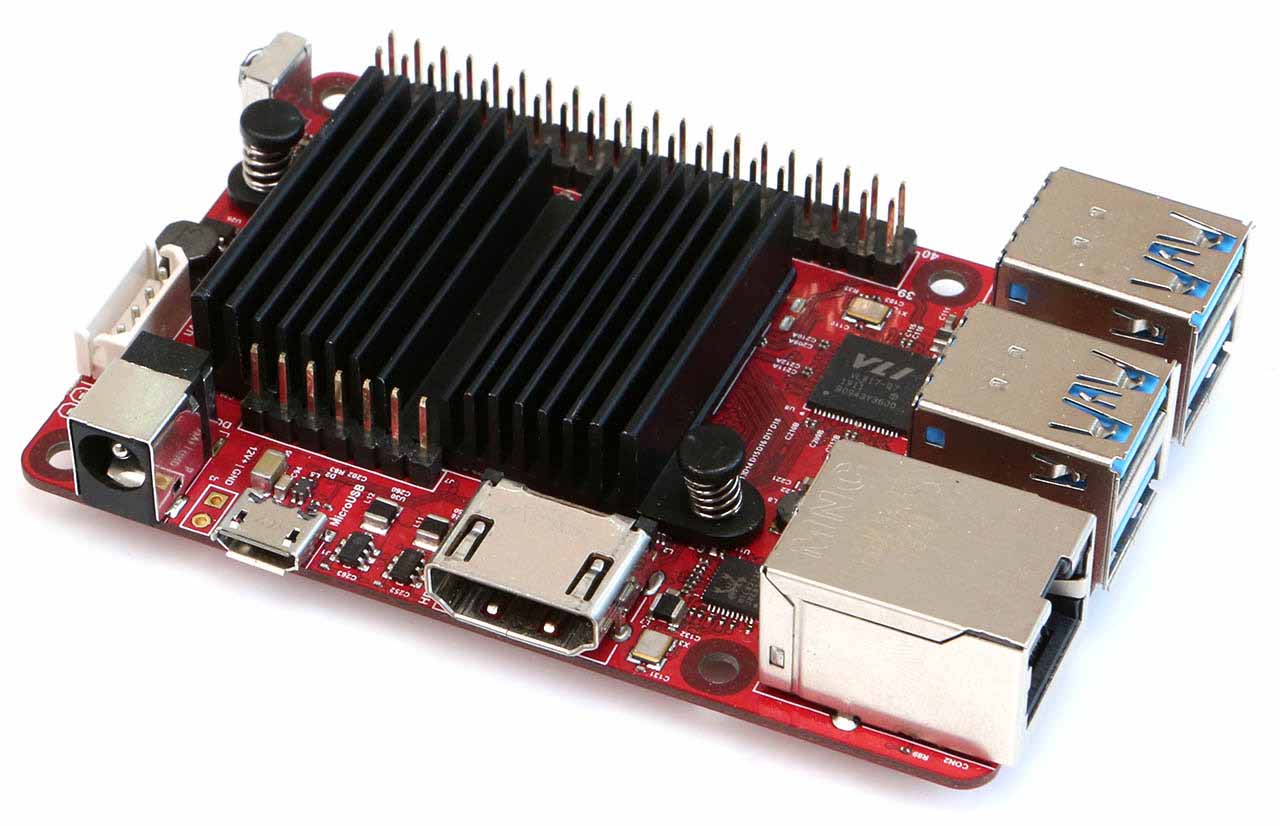
Launched in April 2020 by Hardkernel, a South Korean manufacturer based in Anyang, the ODROID-C4 represents a significant evolution in the company’s budget-friendly single-board computer lineup. Positioned as the direct successor to the popular ODROID-C2, this board was marketed as a direct competitor to the Raspberry Pi 4, offering a compelling alternative for users seeking high performance at an accessible price point. With a launch price of fifty US dollars, which included a passive heatsink, the C4 aimed to deliver substantial upgrades in processing power and memory bandwidth. Specifically, Hardkernel claimed a forty percent increase in multi-core CPU performance and a fifty percent boost in DRAM bandwidth compared to its predecessor. As of late 2026, the board remains active in the market, with both two-gigabyte and four-gigabyte RAM variants available, although the exact introduction date of the two-gigabyte model is not clearly documented in public sources. It is worth noting that while the C4 is still supported, Hardkernel has introduced the ODROID-C5 as a lower-cost upgrade path, signaling a natural progression in the product line.
At the heart of the ODROID-C4 lies the Amlogic S905X3 system-on-chip, a quad-core processor based on the Arm Cortex-A55 architecture. This 64-bit processor operates at a rated maximum frequency of two gigahertz, though users should be aware of some historical ambiguity regarding default clock speeds; some early firmware images capped the processor at 1.5 gigahertz, while the hardware itself supports higher frequencies up to 1.908 gigahertz in mainline Linux configurations. The Cortex-A55 cores are designed for efficiency, featuring support for Armv8 Crypto extensions, which significantly accelerate encryption tasks. Benchmarks have shown that this feature allows the C4 to perform SHA256 hashing approximately seven times faster than the Raspberry Pi 4’s BCM2711 chip, making it an excellent choice for secure server applications. The system is paired with either two or four gigabytes of DDR4 RAM, connected via a 32-bit bus, providing ample memory for multitasking and demanding applications. Graphics processing is handled by an Arm Mali-G31 MP2 GPU running at 650 megahertz, which supports modern graphics APIs including OpenGL ES 3.2 and Vulkan 1.0, enabling smooth 4K video playback at sixty frames per second with HDR support.
Connectivity and expansion capabilities are robust, catering to both desktop and server use cases. The board features a Gigabit Ethernet port, utilizing a Realtek RTL8211F PHY, ensuring fast and reliable wired network connections. For storage, the ODROID-C4 offers a microSD card slot supporting UHS-I speeds and a dedicated eMMC module socket. This eMMC socket is a standout feature in its price class, allowing users to install high-speed storage modules ranging from eight to 256 gigabytes, which can significantly improve boot times and data throughput compared to standard SD cards. While the mainline Linux kernel supports eMMC speeds up to HS200, some advanced features like HS400 may only be available in the vendor-specific kernel tree. The board also includes four USB 3.0 host ports, facilitated by an on-board Realtek companion hub, providing high-speed connectivity for external drives and peripherals. However, users should note that the USB On-The-Go port cannot be used for power input; the board must be powered via its DC barrel jack, which accepts a wide voltage range of approximately 5.5 to 17 volts. This wide input range makes the C4 suitable for automotive or solar-powered installations, a flexibility not found in many five-volt-only competitors.
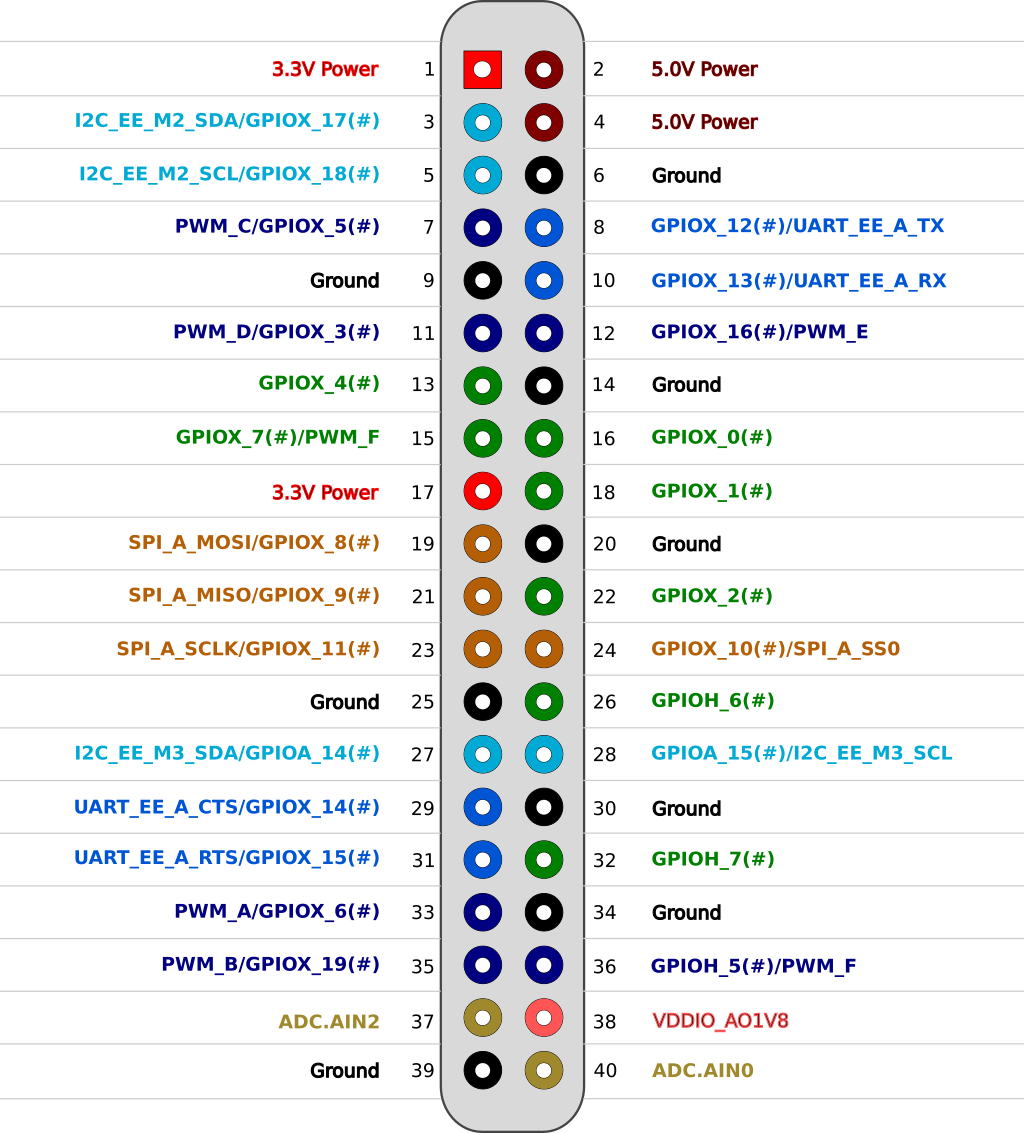
For hardware enthusiasts and makers, the ODROID-C4 includes a forty-pin general-purpose input-output header that is physically compatible with Raspberry Pi footprints. This header provides access to up to twenty-five GPIO pins, six PWM channels, two I2C buses, one SPI interface, and one UART serial connection. It is crucial to understand the voltage levels here: all logic inputs and outputs operate at 3.3 volts, but the two analog-to-digital converter inputs are limited to 1.8 volts. Connecting a 3.3-volt analog signal to these ADC pins can damage the system-on-chip, so careful attention to voltage levels is required when designing sensor circuits. The board also features an infrared receiver, which is supported by a dedicated keymap in the mainline Linux kernel, making it ideal for media center applications. Additionally, there is an mSOTA+ expansion slot that can accommodate a small Wi-Fi and Bluetooth module, allowing users to add wireless connectivity without occupying the valuable USB 3.0 ports.
Software support for the ODROID-C4 is extensive, with official images available for Ubuntu, Android, CoreELEC, and LineageOS. For server and development use, Armbian provides well-maintained images based on the mainline Linux kernel, which offers better long-term support and driver compatibility than the legacy 4.9 kernel provided by Hardkernel. Users can also install DietPi for minimal-footprint operating systems. The board’s power efficiency is notable, with idle consumption around 1.8 watts and stress testing showing approximately 3.64 watts, allowing for fanless operation in many scenarios. However, sustained high-load operations may require additional airflow, especially in enclosed cases. While the board lacks onboard Wi-Fi and Bluetooth, requiring an optional module or USB dongle, its combination of high-speed USB, Gigabit Ethernet, and eMMC storage at a fifty-dollar price point makes it a powerful and versatile platform for home servers, media centers, and IoT projects.
Pinout diagram
| Attr | Specs | verified |
|---|---|---|
soc | Amlogic S905X3 ("SM1" family), 4× Arm Cortex-A55 (ARMv8-A 64-bit, NEON, FPU, Armv8 Crypto extensions) (CNX launch + comparison articles). GPU: Arm Mali-G31 MP2 @650 MHz, OpenGL ES 3.2 / Vulkan 1.0 / OpenCL 2.0 (CNX launch article; GPU clock from Wikipedia ODROID table). | ? unverified |
cpu_clock | rated up to 2.0 GHz (CNX launch article; Wikipedia). Mainline Linux OPP table for SM1 goes 1.0 / 1.2 / 1.404 / 1.5 / 1.608 / 1.704 / 1.8 / 1.908 GHz at 770–950 mV (arch/arm64/boot/dts/amlogic/meson-sm1.dtsi, torvalds/linux master, retrieved 2026-10-13). > x" as the safe summary. | ? unverified |
caches | 32 KB I-cache + 32 KB D-cache per core, shared 256 KB L2 (mainline meson-sm1.dtsi, above). | ? unverified |
ram | 4 GB DDR4 on 32-bit bus (Wikipedia ODROID table; CNX). 2 GB variant exists (shop menu). Note: the mainline board DTS ships a 1 GB memory@0 placeholder node that the bootloader is expected to replace with the real size (meson-sm1-odroid.dtsi, retrieved 2026-10-13). | ? unverified |
storage | microSD slot, UHS-I up to SDR104 (CNX; sd-uhs-sdr104 in mainline dtsi) and eMMC module socket (8/16/32/64/128/256 GB modules sold, Linux- or Android-preloaded variants, $34–$125 — fetched 2026-10-13). Mainline drives eMMC up to HS200 (mmc-hs200-1_8v, 200 MHz, in meson-sm1-odroid.dtsi). > | ✔ |
video | 1× HDMI 2.0 Type-A, up to 4K@60 Hz with HDR, CEC, EDID (CNX). VPU: 4K H.265 75 fps 10-bit decode, low-latency 1080p60 H.265/H.264 encode, multi-decode 4K×2K@60 + 1080p60 (CNX launch article). | ? unverified |
audio | HDMI digital audio; optional S/PDIF via 7-pin audio expansion header (I2C-controlled S/PDIF out + 5 V) (CNX launch article). | ? unverified |
network | 1× Gigabit Ethernet (RJ45), SoC MAC + Realtek RTL8211F PHY (CNX; PHY part number also commented in mainline meson-sm1-odroid.dtsi: "Realtek RTL8211F (0x001cc916)"). No onboard Wi-Fi/Bluetooth — add via the mSOTA+ slot (Hardkernel "WiFi Module 5BK", $8.90, or any USB dongle (CNX: "optional WiFi with USB dongle"). > | ✔ |
usb | 4× USB 3.0 host (on-board Realtek USB2/USB3 companion hub, mainline compatibles usb2109,2817 / usb2109,817 in meson-sm1-odroid-c4.dts) + 1× USB 2.0 OTG (host or device, not usable for power input) (CNX; dts). | ? unverified |
gpio_40_pin_header | (Raspberry Pi-compatible footprint): up to 25× GPIO, 6× PWM, 2× ADC (12-bit, 1.8 V max), 2× I2C, 1× SPI, 1× UART, plus 5 V / 3.3 V / 1.8 V / GND rails. All logic I/Os are 3.3 V; ADC inputs max 1.8 V (CNX launch article). Mainline DT gpio-line-names maps header pins to SoC pins, e.g. PIN_3=GPIOX_17, PIN_5=GPIOX_18, PIN_7=GPIOX_5, PIN_8=GPIOX_12, PIN_10=GPIOX_13, PIN_11=GPIOX_3, PIN_12=GPIOX_16, PIN_13=GPIOX_4, PIN_15=GPIOX_7, PIN_16=GPIOX_0, PIN_18=GPIOX_1, PIN_19=GPIOX_8, PIN_21=GPIOX_9, PIN_22=GPIOX_2, PIN_23=GPIOX_11, PIN_24=GPIOX_10, PIN_26=GPIOH_6, PIN_27=GPIOA_14, PIN_28=GPIOA_15, PIN_29=GPIOX_14, PIN_31=GPIOX_15, PIN_32=GPIOH_7, PIN_33=GPIOX_6, PIN_35=GPIOX_19, PIN_36=GPIOH_5, PIN_42=GPIOAO_10, PIN_44=GPIOAO_9, PIN_45=GPIOAO_7, PIN_46=GPIOAO_8, PIN_47=GPIOAO_4 (meson-sm1-odroid.dtsi, retrieved 2026-10-13). No DAC, no onboard I2S breakout documented in the sources fetched. > | ? unverified |
misc | IR receiver (mainline RC keymap rc-odroid, meson-sm1-odroid-c4.dts), red power LED + blue status LED (mainline: GPIOAO_11, heartbeat trigger + panic indicator), debug UART console on SoC UART_AO @115200 (stdout-path in dtsi). | ? unverified |
power | 5.5/2.1 mm DC barrel jack. CNX: 5.5–17 V, 12 V/2 A adaptor recommended; Wikipedia: DC 7.5–17 V (up to 25 W). > | ? unverified |
mechanical_thermal | 85 × 56 mm PCB, ~59 g with heatsink (CNX); bundled heatsink 40×32×10 mm (Wikipedia). > | ? unverified |
- Manufacturer: Hardkernel Co., Ltd. (Anyang, South Korea) —
- Year / release date: 2020; launched 23 April 2020 (CNX Software launch article, 2020-04-23: ; comparison table confirms release date 23 Apr 2020: Wikipedia's ODROID table also lists 2020 ( retrieved 2026-10-13).
- Launch price: US$50 + shipping, heatsink included (CNX launch article, above).
- Positioning: direct successor of the ODROID-C2 (S905, 2016) in Hardkernel's $50 "C-class" line — CNX: "Hardkernel has just launched an update to its ODROID-C2 board" (link above). Hardkernel claims +40 % multi-core CPU and +50 % DRAM bandwidth vs C2 (quoted by CNX, same article).
- Status (2026-10): Active — "ODROID-C4 with 2GByte RAM" and "ODROID-C4 with 4GByte RAM" are still listed in the hardkernel.com shop navigation menu (fetched 2026-10-13), and C4 accessories (eMMC modules, case, WiFi module) are in stock on (fetched 2026-10-13). The ODROID-C5 (S905X5M, 2025) is marketed as its "lower-cost upgrade" (
- Variants: - ODROID-C4 4 GB DDR4 (launch SKU; Wikipedia ODROID table). - ODROID-C4 2 GB DDR4 (added later; listed in shop menu 2026-10-13). >
+ Strengths
- Best price/perf GbE server board of its generation: 4× USB 3.0 + GbE + eMMC socket at $50 — the eMMC socket (up to 256 GB modules) is unique in the Pi-4 price class (CNX comparison article: RPi 4 "does not offer an eMMC option").
- Armv8 crypto extensions: ~7× faster SHA256 (8 KB) than Raspberry Pi 4's BCM2711, which lacks them (CNX launch article benchmark section).
- Cortex-A55 efficiency: idle ≈ 1.8 W / stress ≈ 3.64 W with bundled passive heatsink (CNX) — fanless 24/7 boxes are the canonical use.
- mSOTA+ expansion slot for the small $8.90 Wi-Fi/BT module (WiFi Module 5BK) — keeps the USB 3.0 ports free vs a dongle ( fetched 2026-10-13).
- IR receiver with dedicated rc-odroid remote keymap in mainline (meson-sm1-odroid-c4.dts) — media-center friendly.
- Wide DC input (≈5.5–17 V) — can be powered from 12 V automotive/solar rails, unlike 5 V-only Pi boards (CNX; Wikipedia).
- Rich add-on ecosystem on the 40-pin header: Weather Board Zero ($2), Audio Amplifier board ($10), CAN FD add-on board ($11), 12 V fans, UPS, eMMC writer (all on fetched 2026-10-13).
- First-class mainline Linux status: board DT in torvalds tree, OPP/cpufreq, thermal, SARADC, USB-hub, IR, LEDs all described upstream (see Resources).
− Weaknesses
- No onboard Wi-Fi/Bluetooth — unlike the Pi 4, radios are optional extras (mSOTA+ module or USB dongle) (CNX launch article). Plan the extra $9 and one port/slot.
- ADC inputs are 1.8 V max while the rest of the header is 3.3 V — feeding 3.3 V analog into the SARADC pins can damage the SoC (CNX launch article: "all I/Os are 3.3V, except ADC @ 1.8V max").
- CPU frequency confusion (1.5 vs 2.0 GHz): launch marketing and some images default to 1.5 GHz while the SoC is rated 2.0 GHz and mainline OPPs stop at 1.908 GHz (CNX vs meson-sm1.dtsi, above). >
- Vendor kernel is legacy 4.9 (odroidc4-4.9.y, last touched 2020-05-11 per GitHub branch list) — Hardkernel ships it as prebuilt images; out-of-tree module builds and modern toolchains can bite. Mainline (Armbian, 6.6+) is the sane path for servers.
- Mainline eMMC tops out at HS200 (mmc-hs200-1_8v in meson-sm1-odroid.dtsi); >
- USB OTG port cannot power the board (CNX: "not for power input") — a 5 V USB-C cable hack won't work; use the barrel jack.
- 1 GB memory node in the stock mainline DTS: if a bootloader fails to fix up the memory@0 node, Linux sees only 1 GB of the 4 GB (meson-sm1-odroid.dtsi, retrieved 2026-10-13).
- Thermal headroom: passive heatsink is sufficient at ~3.6 W stress (CNX), but >
- Announcement/support thread: launch discussion with Hardkernel benchmarks: (linked from CNX launch article). >
- Retour d'expérience expert expert — expert-pi-like
- Retour d'experience sur l'ODROID-C4. Le rapport qualite/prix est reel : a 50 dollars avec le dissipateur inclus, on a un vrai GbE, 4x USB 3.0 et surtout un socket eMMC, chose inexistante sur le Pi 4. Les extensions crypto ARMv8 donnent des gains enorms sur le chiffrement. Par contre, attention aux … — expert-pi-like
- Merci pour le rappel sur les ADC. Je confirme le souci de fréquence. J'ai utilise une image Hardkernel officielle et j'ai du passer par des scripts pour atteindre les 1.908GHz max autorises par le noyau. Le kernel 4.9 fourni en usine est legacy et pose des problèmes avec les modules modernes. Pour … — maker-sol
- Petite question sur la section materielle. Tu mentionnes que l'OTG USB ne fournit pas d'alimentation. J'ai voulu alimenter via un cable USB-C pour tester une config portable sans prise secteur, et effectivement, ca ne démarre pas. Faut imperativement le jack barrel. Concernant le module Wi-Fi 5BK a… — hobby-tweak
Community feedback and projects
- Test Manjaro on ODROID forum.manjaro.org
- Can't get linux 5.10-rcX to boot on Odroids forum.manjaro.org
- Raspberry Pi 4 vs ODROID-C4 Features Comparison www.cnx-software.com
- $50 ODROID-C4 Raspberry Pi 4 Competitor Combines Amlogic S905X3 SoC with 4GB RAM www.cnx-software.com
Content not available yet.
- No onboard Wi-Fi/Bluetooth — unlike the Pi 4, radios are optional extras (mSOTA+ module or USB dongle) (CNX launch article). Plan the extra $9 and one port/slot.
- ADC inputs are 1.8 V max while the rest of the header is 3.3 V — feeding 3.3 V analog into the SARADC pins can damage the SoC (CNX launch article: "all I/Os are 3.3V, except ADC @ 1.8V max").
- CPU frequency confusion (1.5 vs 2.0 GHz): launch marketing and some images default to 1.5 GHz while the SoC is rated 2.0 GHz and mainline OPPs stop at 1.908 GHz (CNX vs meson-sm1.dtsi, above). >
- Vendor kernel is legacy 4.9 (odroidc4-4.9.y, last touched 2020-05-11 per GitHub branch list) — Hardkernel ships it as prebuilt images; out-of-tree module builds and modern toolchains can bite. Mainline (Armbian, 6.6+) is the sane path for servers.
- Mainline eMMC tops out at HS200 (mmc-hs200-1_8v in meson-sm1-odroid.dtsi); >
- USB OTG port cannot power the board (CNX: "not for power input") — a 5 V USB-C cable hack won't work; use the barrel jack.
- 1 GB memory node in the stock mainline DTS: if a bootloader fails to fix up the memory@0 node, Linux sees only 1 GB of the 4 GB (meson-sm1-odroid.dtsi, retrieved 2026-10-13).
- Thermal headroom: passive heatsink is sufficient at ~3.6 W stress (CNX), but >
- Announcement/support thread: launch discussion with Hardkernel benchmarks: (linked from CNX launch article). >
- Faire clignoter la LED bleue via le GPIO debutant Schéma : IMG-odroid-c4-debutant-1-odroidc4-led-gpio.svg — Vue de dessus de l'ODROID-C4 avec la LED bleue status (broche GPIOAO_11) mise en évidence à côté du connecteur 40 broches.
- Lire un bouton poussoir dans la console debutant Schéma : IMG-odroid-c4-debutant-2-odroidc4-bouton-console.svg — Broches 13 (GPIOX_4) et 14 (GND) du connecteur 40 broches reliées par un bouton poussoir, résistance de pull-up interne indiquée.
- Premier script Python : LED et informations système debutant Schéma : IMG-odroid-c4-debutant-3-odroidc4-premier-python.svg — ODROID-C4 relié à un écran HDMI affichant un terminal Python, LED status clignotant au rythme du script.
- Variation d'intensité d'une LED avec le PWM intermediaire Schéma : IMG-odroid-c4-intermediaire-1-odroidc4-pwm-led.svg — LED avec résistance de 330 Ω reliée à une broche PWM du connecteur 40 broches de l'ODROID-C4 et au GND, signal carré illustré.
- Lire un capteur I2C (Weather Board Zero) intermediaire Schéma : IMG-odroid-c4-intermediaire-2-odroidc4-i2c-capteur.svg — Weather Board Zero Hardkernel emboîtée sur le connecteur 40 broches, bus SDA/SCL (3,3 V) reliant le capteur BME-class au SoC S905X3.
- Ethernet Gigabit et accès SSH sécurisé intermediaire Schéma : IMG-odroid-c4-intermediaire-3-odroidc4-ethernet-ssh.svg — ODROID-C4 relié par câble RJ45 (Ethernet Gigabit, PHY RTL8211F) à une box routeur, un ordinateur portable se connectant en SSH, absence de Wi-Fi embarqué annotée.
- Boot sur microSD et eMMC, procédure de recouvrement avance Schéma : IMG-odroid-c4-avance-1-odroidc4-boot-emmc.svg — ODROID-C4 en coupe fonctionnelle : emplacement microSD sur le bord, connecteur eMMC avec son petit levier de sélection, flèches de priorité de boot vers le SoC S905X3.
- Surveillance thermique et fréquence CPU avance Schéma : IMG-odroid-c4-avance-2-odroidc4-thermique.svg — ODROID-C4 vu de dessus avec son dissipateur passif 40×32 mm, sondes de température (junction du S905X3) et graphique fréquence/temps de 1,0 à 1,908 GHz.
- Serveur web léger et conteneurs avance Schéma : IMG-odroid-c4-avance-3-odroidc4-serveur-web.svg — ODROID-C4 en serveur : nginx et deux conteneurs Podman sur Armbian, port Ethernet Gigabit relié au réseau local, flèches HTTPS entrantes.
Code library — examples written for this board
clignotante.pyPythonbouton-gpio.pyPythoncapteur-i2c.shBashsurveillance-temperature.shBashcapteur-dht11.pyPythonservo-pwm-sysfs.shBashserveur-web-capteur.pyPythonreseau-ethernet.shBashjournal-cron.shBashveilleur-systemd.pyPython
Examples and repos found online
- abandonware/meta-odroid github.com
- ztombol/odroid-tools github.com
- muehlbau/odroid-smartpower-linux github.com
- OtherCrashOverride/encoder-c4 github.com
- SamuelSchlesinger/odroid-c4-cluster github.com