Raspberry Pi 4 Model B (2019) — Board Sheet
⚡ The essentials in 60 seconds
- soc — Broadcom BCM2711 — quad-core Cortex-A72 (ARMv8-A, 64-bit) @ 1.5 GHz (default arm_freq=1500); "about 50% faster than the Raspberry Pi 3B+". Caches: 32 kB L1 data + 48 kB L1 instruction per core, shared 1 MB L2. Heat-spreader package continued from BCM2837B0. (BCM2711 official docs, GitHub mirror, retrieved 2026-10-13; BCM2711 datasheet RP-008248-DS)
- gpu — VideoCore VI @ 500 MHz — 32-bit but with a new MMU so it can address all RAM; OpenGL ES 3.0 per official docs, OpenGL ES 3.1 and Vulkan 1.2 per Wikipedia (Vulkan 1.2 conformance announced Aug 2022). Media: H.265 4Kp60 decode, H.264 1080p60 decode / 1080p30 encode. (BCM2711 docs; Wikipedia; Tom's Hardware via Wikipedia)
- ram — 1 / 2 / 3 / 4 / 8 GB LPDDR4-2400 (shared CPU/GPU) — first Pi with selectable RAM sizes. (BCM2711 docs; launch post)
- storage — microSD only on the 4B (boot + OS); eMMC options exist only on CM4. USB mass storage boot is supported via the EEPROM boot order. (Docs product table; Boot EEPROM docs)
- bus_architecture_the_big_change — the BCM2711 exposes a single PCI Express Gen 2 lane (4 Gbps total) feeding an external VIA Labs VL805 USB 3.0 controller (2 × USB 3.0 + 2 × USB 2.0), while Gigabit Ethernet is native in the SoC, driving an external Broadcom PHY over a dedicated RGMII link — true GbE, unlike the 3B+'s USB-2-limited 300 Mb/s. (Launch post; BCM2711 docs)
- video — 2 × micro-HDMI (type D) — dual 4Kp30 or single 4Kp60; 3.5 mm 4-pole AV jack (stereo audio + composite, no mic); 1 × CSI and 1 × DSI FFC connector exposed (SoC supports 2+2). (Launch post; Wikipedia)
- On this board : 9 tutorials · 10 code
The Raspberry Pi 4 Model B, launched on June 24, 2019, represents a significant architectural leap forward for the popular single-board computer family. Designed by Raspberry Pi Holdings Ltd. with silicon provided by Broadcom, this board was introduced as a "surprise" release, promising roughly three times the performance of its predecessor, the Raspberry Pi 3 Model B+. At its heart lies the Broadcom BCM2711 System-on-Chip, which integrates a quad-core Cortex-A72 processor running at 1.5 GHz. To put this in perspective, the Cortex-A72 is a 64-bit ARMv8-A core, meaning it can handle more complex software and larger memory addresses than the 32-bit cores found in earlier models. The chip includes 1 MB of shared Level 2 cache, which helps the processor access frequently used data quickly, reducing the time it spends waiting for information from the main memory. This architecture allows the Pi 4 to function not just as a simple controller, but as a capable desktop computer or media center.
One of the most defining features of the Raspberry Pi 4 is its approach to memory. Unlike previous models that came with a fixed amount of RAM, the Pi 4 was the first to offer selectable memory capacities, ranging from 1 GB to 8 GB of LPDDR4-2400 RAM. This memory is shared between the CPU and the GPU, meaning the operating system and graphics processes compete for the same pool. The introduction of an 8 GB model in May 2020, priced at $75, transformed the Pi 4 into a viable option for heavier workloads, such as running virtual machines or acting as a small server. However, users should note that the 1 GB variant is generally recommended only for specific low-memory applications, as modern desktop operating systems benefit significantly from 4 GB or more. A 3 GB variant was also introduced later, in April 2026, further expanding the lineup.
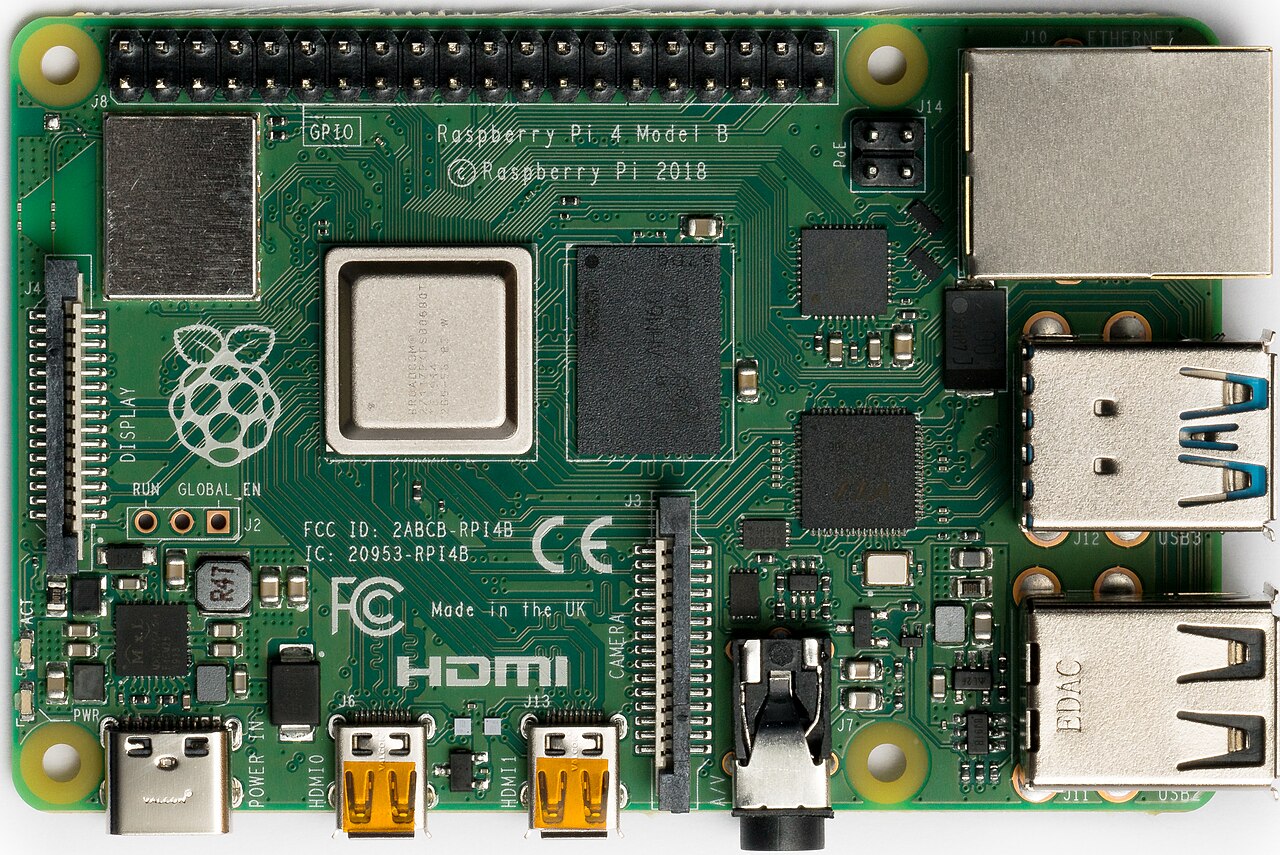
The input and output capabilities of the Pi 4 marked a major departure from previous designs, primarily due to the introduction of a dedicated PCI Express Gen 2 lane. In simpler terms, this is a high-speed data highway inside the chip that allows peripherals to communicate with the processor much faster than before. This lane feeds an external VIA Labs VL805 controller, providing two USB 3.0 ports and two USB 2.0 ports. USB 3.0 is significantly faster than the USB 2.0 standard used on earlier Pis, enabling quicker data transfers for external drives and faster network speeds when using USB adapters. Additionally, the Pi 4 features native Gigabit Ethernet, meaning the network controller is built directly into the SoC rather than being attached via the slower USB bus. This results in true gigabit speeds, a substantial improvement over the 300 Mb/s limit of the previous generation’s USB-based Ethernet.
For display output, the Raspberry Pi 4 was the first in the series to support dual monitors. It features two micro-HDMI ports, each capable of driving a 4K display at 30 frames per second, or a single 4K display at 60 frames per second. This capability, combined with the VideoCore VI GPU running at 500 MHz, makes the Pi 4 a credible choice for digital signage, desktop use, and media playback. The GPU supports hardware decoding of H.265 (HEVC) video at 4K resolution, which is essential for modern high-definition streaming. The move to micro-HDMI connectors, however, has been a point of friction for some users, as these cables are smaller and more fragile than standard HDMI, and early adopters reported issues with incompatible cables failing to deliver a signal.
Powering the Raspberry Pi 4 requires attention to detail. The board uses a USB-C connector for power, requiring 5.1 V and a recommended current of 3.0 A (15 W). It is crucial to use a high-quality power supply, as the board includes an undervoltage detector that triggers if the voltage drops below 4.63 V, which can lead to system instability or data corruption. A notable historical issue affected early board revisions (1.0 and 1.1), where a design flaw in the USB-C power input meant that some smart cables and chargers would not deliver power at all. This was fixed in revision 1.2, but users with older boards must use standard cables without electronic markers or the official power supply. The board also supports Power over Ethernet (PoE) via a four-pin header, though there is some ambiguity in documentation regarding whether it supports the higher-power PoE+ standard or only the older 802.3af standard; designing for the lower 802.3af standard is the safer approach.
Thermal management is another critical aspect of the Pi 4’s design. The BCM2711 chip runs hotter than its predecessors, and the board has a hard thermal limit of 85 °C. Unlike the Raspberry Pi 3 B+, which had a soft limit that would gently reduce performance to keep temperatures down, the Pi 4 initially lacked a defined soft limit, meaning it could throttle abruptly when reaching the maximum temperature. This makes active cooling, such as a heatsink or fan, highly recommended for sustained workloads. The board includes a Dynamic Voltage and Frequency Scaling (DVFS) engine that adjusts the CPU speed based on temperature and load, stepping down from 1.5 GHz to lower frequencies like 1.0 GHz or 750 MHz to manage heat.
Software support for the Raspberry Pi 4 has evolved significantly since its launch. It debuted with Raspbian based on Debian 10 "Buster," featuring a new open-source graphics driver called V3D, which replaced the closed-source legacy driver. This shift improved compatibility with modern Linux standards and eventually led to Vulkan 1.2 conformance, a milestone for graphics performance. Today, the board is supported by Raspberry Pi OS in both 32-bit and 64-bit versions, with the 64-bit release becoming fully official in 2022. This allows the board to run a wide variety of applications, from home automation hubs like Home Assistant to retro gaming consoles via RetroPie and media centers using LibreELEC. The introduction of an on-board SPI boot EEPROM was another first for the flagship line, enabling advanced boot options such as booting from USB or network storage, and providing diagnostic information via blinking LEDs if the boot process fails. Despite the release of the Raspberry Pi 5 in 2023, the Pi 4 remains in production and is expected to be supported until January 2034, ensuring its longevity as a staple in the maker and educational communities.
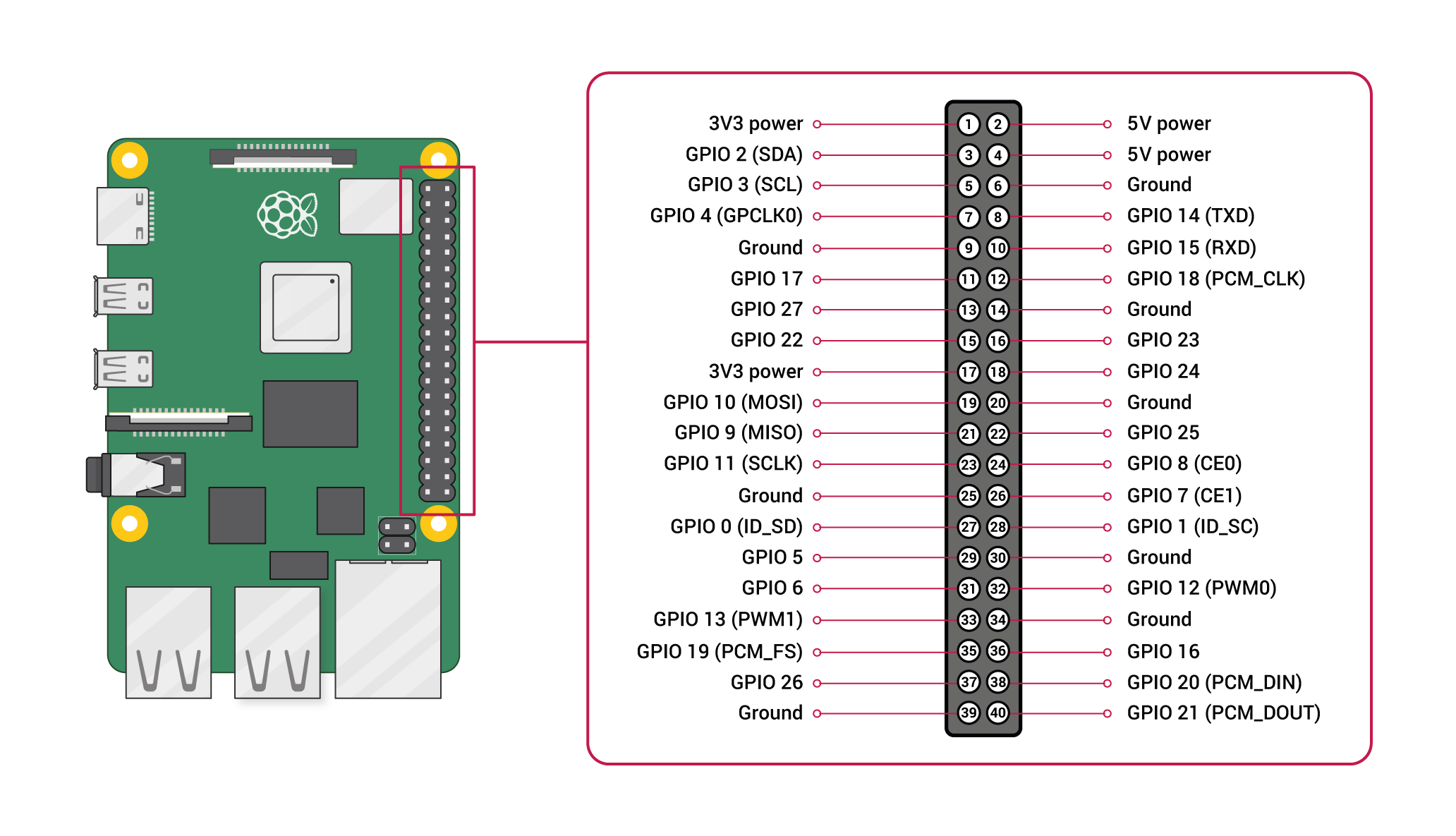
Pinout diagram
| Attr | Specs | verified |
|---|---|---|
soc | Broadcom BCM2711 — quad-core Cortex-A72 (ARMv8-A, 64-bit) @ 1.5 GHz (default arm_freq=1500); "about 50% faster than the Raspberry Pi 3B+". Caches: 32 kB L1 data + 48 kB L1 instruction per core, shared 1 MB L2. Heat-spreader package continued from BCM2837B0. (BCM2711 official docs, GitHub mirror, retrieved 2026-10-13; BCM2711 datasheet RP-008248-DS) | ✔ |
gpu | VideoCore VI @ 500 MHz — 32-bit but with a new MMU so it can address all RAM; OpenGL ES 3.0 per official docs, OpenGL ES 3.1 and Vulkan 1.2 per Wikipedia (Vulkan 1.2 conformance announced Aug 2022). Media: H.265 4Kp60 decode, H.264 1080p60 decode / 1080p30 encode. (BCM2711 docs; Wikipedia; Tom's Hardware via Wikipedia) | ✔ |
ram | 1 / 2 / 3 / 4 / 8 GB LPDDR4-2400 (shared CPU/GPU) — first Pi with selectable RAM sizes. (BCM2711 docs; launch post) | ✔ |
storage | microSD only on the 4B (boot + OS); eMMC options exist only on CM4. USB mass storage boot is supported via the EEPROM boot order. (Docs product table; Boot EEPROM docs) | ✔ |
bus_architecture_the_big_change | the BCM2711 exposes a single PCI Express Gen 2 lane (4 Gbps total) feeding an external VIA Labs VL805 USB 3.0 controller (2 × USB 3.0 + 2 × USB 2.0), while Gigabit Ethernet is native in the SoC, driving an external Broadcom PHY over a dedicated RGMII link — true GbE, unlike the 3B+'s USB-2-limited 300 Mb/s. (Launch post; BCM2711 docs) | ✔ |
video | 2 × micro-HDMI (type D) — dual 4Kp30 or single 4Kp60; 3.5 mm 4-pole AV jack (stereo audio + composite, no mic); 1 × CSI and 1 × DSI FFC connector exposed (SoC supports 2+2). (Launch post; Wikipedia) | ✔ |
wireless | Cypress/Infineon CYW43455 — dual-band 2.4/5 GHz 802.11ac (official table: "120 Mb/s" class) + Bluetooth 5.0 / BLE. (Docs product table; launch post) | ✔ |
gpio | standard 40-pin header, 3.3 V logic, electrically compatible with all previous 40-pin Pis; SoC exposes up to 6 × I²C, 6 × UART (muxed), 6 × SPI (5 exposed), hardware PWM, I²S/PCM; no ADC/DAC. Per-pin ≤16 mA, ≤50 mA total across the header. (BCM2711 docs; pinout.xyz, retrieved 2026-10-13; power-supplies docs) | ✔ |
power | USB-C, 5.1 V; official recommendation 3.0 A (15 W); USB-PPS not supported. Typical bare-board active current 600 mA; measured: idle ~0.6 A, H.264 playback ~0.78–0.85 A, stress ~1.2 A avg / 1.25 A max, halt 0.023 A. Max total USB peripheral draw 1.2 A. Low-voltage detection trips below 4.63 V ±5 %. (Power-supplies docs, GitHub mirror, retrieved 2026-10-13) | ✔ |
poe | 4-pin header on the RJ45; the power-supplies page states the 4B jack supports IEEE 802.3af-2003 via PoE HAT, while the product table advertises "PoE+ support" — see Problems. (Power-supplies docs; docs product table) | ✔ |
thermal | hard limit 85 °C (ARM throttled 80–85 °C, ARM+GPU at 85 °C); no soft limit on Pi 4 (unlike 3B+); DVFS engine (dvfs=1/2/3, default 3) with stepped frequencies 1500/1000/750/600 MHz. (Frequency-management docs, GitHub mirror, retrieved 2026-10-13) | ✔ |
mechanical | 65 × 56 mm Model B outline, 4 mounting holes; right-side connectors overhang the edge by 1 mm (case cut-out change vs 3B+); HAT/GPIO compatibility preserved. | ? unverified |
- Manufacturer / developer: Raspberry Pi Holdings Ltd. (formerly Raspberry Pi (Trading) Ltd. / Raspberry Pi Foundation), Broadcom BCM2711 silicon; board design led by James Adams. (Official launch post, 24 Jun 2019)
- Launch: 24 June 2019, at US$35 (1 GB) / $45 (2 GB) / $55 (4 GB) — "We have a surprise for you today: Raspberry Pi 4 is now on sale, starting at $35 … ~3× performance". (Launch post; Wikipedia "Raspberry Pi 4", retrieved 2026-10-13)
- Price history: 8 GB model added 28 May 2020 at $75 (launch post "8GB Raspberry Pi 4 on sale now at $75", Eben Upton); a 3 GB variant was introduced in April 2026 (Wikipedia infobox lists it at $83.75 — odd figure, quoted as-is). (Wikipedia, retrieved 2026-10-13; 8 GB launch post)
- Status: Active / in production as of 2026-10-13. Succeeded as flagship by the Raspberry Pi 5 (announced 28 Sep 2023), but the Pi 4 remains sold and listed in the current official product table, and the official product brief states it "will remain in production until January 2034". (Wikipedia, retrieved 2026-10-13; Product Brief RP-008344-DS; docs product table via GitHub mirror)
- Variants: RAM options 1, 2, 3, 4, 8 GB; board revisions 1.0/1.1 → 1.2 (USB-C fix, ~Sep 2019); SoC steppings B0 → C0 (mid-2021, better thermals, 1.5 GHz retained; Pi 400 C0 parts run 1.8 GHz). Platform siblings: Compute Module 4 / 4S (19 Oct 2020), Raspberry Pi 400 keyboard (2 Nov 2020), extended-temperature CM4 variant (−40 °C). (Wikipedia, retrieved 2026-10-13; Jeff Geerling on C0 stepping, 27 Sep 2021)
+ Strengths
- First true-Gigabit Pi and first with USB 3.0 — PCIe Gen 2 lane + native RGMII Ethernet ended the USB-2 bottleneck; the launch post markets "~3× performance" over the 3B+. (Launch post)
- First Pi with dual display output (2 × micro-HDMI, up to 4K) and 4Kp60 HEVC decode — a credible desktop and media-box board from 2019 on. (Launch post; BCM2711 docs)
- First Pi with selectable RAM (up to 8 GB) — 8 GB at $75 made the Pi a viable dev/server box; RAM choice was "the first time we're offering a choice of memory capacities". (Launch post; 8 GB post)
- First Pi with SPI boot EEPROM → USB boot, network boot (PXE/TFTP), configurable boot order, HDMI boot diagnostics. (Boot EEPROM docs)
- Open-source graphics milestone: Pi 4 dropped the closed legacy driver for Mesa V3D; by Aug 2022 the V3D driver reached Vulkan 1.2 conformance — first Raspberry Pi with conformant Vulkan. (Launch post; Wikipedia)
- DVFS power management (4-series only): per-block dynamic voltage/frequency scaling with selectable modes dvfs=1/2/3. (Frequency-management docs)
- Platform breadth: same silicon spawned CM4/CM4S (exposing the PCIe lane for NVMe/SSD carrier boards) and the Pi 400 at 1.8 GHz — the longest-lived "B" platform after the original. (Wikipedia)
- PMIC telemetry: on-board PMIC ADCs expose supply voltage etc. via vcgencmd pmic_read_adc; PMIC reset reasons (watchdog, over/under-voltage, over-temperature) surface in the device tree. (Power-supplies docs; PMIC whitepaper RP-004340-WP)
− Weaknesses
- USB-C power-input bug (rev 1.0/1.1): the two CC lines share a single pull-down resistor instead of one each, so e-marked USB-C cables (and some PD chargers) deliver no power — "chargers using an e-marker chip will not be able to detect the Pi, thus supplying no voltage". Fixed at board revision 1.2; early boards need dumb (non-e-marker) cables or the official PSU. (Wikipedia, retrieved 2026-10-13; canonical post: raspberrypi.com "Raspberry Pi 4 USB-C issues" news article)
- Runs hot; throttles at 85 °C with no soft limit: unlike the 3B+, "There is currently no soft limit defined" for the Pi 4, so sustained load in a case walks the 80–85 °C throttle band; heatsink/fan (official case fan) strongly advised for sustained CPU/PCIe work. (Frequency-management docs)
- USB 3.0 → RF interference: documented community finding that active USB 3.0 devices degrade 2.4 GHz Wi-Fi and cheap USB-2/SD devices near the VL805 hub (shielding/cable quality dependent).
- VL805 firmware coupling: the USB controller firmware is versioned separately (VL805_FW) from the 2711 bootloader; mismatched/partial EEPROM updates have bricked USB on otherwise-booting boards — always update via rpi-eeprom-update on a current OS. (Boot EEPROM docs sample output; rpi-eeprom repo)
- PoE standard ambiguity: the product table says "Gigabit Ethernet RJ45 with PoE+ support", but the power-supplies page says the 4B jack is "PoE capable, supporting the IEEE 802.3af-2003" standard (the 802.3at/PoE+ wording is reserved for Pi 5). Design to 802.3af (~13 W) with the official PoE HAT. (Docs product table vs power-supplies docs)
- Power budget is tight: 1.2 A total for all USB peripherals; weak supplies/cables trip the 4.63 V undervoltage detector → throttling, SD corruption. USB-PD multi-port supplies renegotiate when other devices plug in — can reboot a halted Pi. (Power-supplies docs)
- micro-HDMI fiddliness: dual micro-HDMI (type D) was new in 2019; cables must sustain 6 Gbps for 4Kp60, adapters are fragile, and many early users reported "no display" from bad cables/adapter combos. (Launch post)
- 5 GHz AP/regulatory lock: 5 GHz channels stay disabled until the wireless country code is set correctly (standard cfg80211 behaviour).
- 1 GB model is a trap: Raspberry Pi itself recommends the 1 GB variant only for special low-memory uses; desktop use wants ≥4 GB. (Wikipedia)
- C0 stepping runs hotter at equal clock (community measurements), though it tolerates thermals better overall. (Jeff Geerling, Sep 2021)
- Retour d'expérience expert expert — expert-raspberrypi
- Retour global sur la Pi 4 Model B. Le passage au PCIe pour l'USB 3.0 et le GbE natif change tout au niveau réseau, c'est du vrai gigabit contrairement au bridage USB du 3B+. Par contre, gare à l'alimentation. Si vous avez une révision 1.0 ou 1.1, les câbles USB-C avec puce e-marker ne passent pas, … — expert-raspberrypi
- Merci pour le rappel sur l'alim. J'ai justement galéré avec ma version 1.2. J'utilisais un chargeur multi-ports USB-PD, et dès que je branchais mon téléphone sur un autre port, le Pi redémarrait. Apparemment les alimentations PD renégocient la tension quand un nouveau device est connecté, ce qui co… — maker_du_42
- +1 sur la chaleur. Avec le stepping C0, je trouve que ça chauffe un peu plus que le B0 à fréquence équivalente, bien que ce soit plus stable globalement. Pour le Wi-Fi 5GHz, n'oubliez pas de configurer le code pays dans /etc/wpa_supplicant.conf, sinon les canaux restent bloqués par la réglementatio… — linux_gamer
Community feedback and projects
- Ruggedized IoT Platform with Raspberry Pi 4 / Advantech UNO-220 / machinechat JEDI One forum.digikey.com
- How to Mount Your Raspberry Pi 4 B forum.digikey.com
- Raspberry Pi 4 vs Banana Pi M5 | Full spec comparison | Atechtimez forum.banana-pi.org
- Raspberry Pi 4 Alternatives: Five ARM Contenders---Banana Pi BPI-M5 forum.banana-pi.org
- So they just released the Raspberry Pi 4 - Discussion - It's FOSS Community itsfoss.community
- raspberry-pi-4-product-brief.pdf datasheet
- Official product page (canonical)
- Launch post (24 Jun 2019)
- Product Brief RP-008344-DS (specs, dimensions, 2034 EOL date)
- BCM2711 datasheet RP-008248-DS
- BCM2711 datasheet RP-008248-DS
- Official docs hub (power, thermals, boot EEPROM)
- Bootloader repo (rpi-eeprom)
- GPIO pinout reference
- Wikipedia
- Wikipedia
- Community
- Community
- USB-C power-input bug (rev 1.0/1.1): the two CC lines share a single pull-down resistor instead of one each, so e-marked USB-C cables (and some PD chargers) deliver no power — "chargers using an e-marker chip will not be able to detect the Pi, thus supplying no voltage". Fixed at board revision 1.2; early boards need dumb (non-e-marker) cables or the official PSU. (Wikipedia, retrieved 2026-10-13; canonical post: raspberrypi.com "Raspberry Pi 4 USB-C issues" news article)
- Runs hot; throttles at 85 °C with no soft limit: unlike the 3B+, "There is currently no soft limit defined" for the Pi 4, so sustained load in a case walks the 80–85 °C throttle band; heatsink/fan (official case fan) strongly advised for sustained CPU/PCIe work. (Frequency-management docs)
- USB 3.0 → RF interference: documented community finding that active USB 3.0 devices degrade 2.4 GHz Wi-Fi and cheap USB-2/SD devices near the VL805 hub (shielding/cable quality dependent).
- VL805 firmware coupling: the USB controller firmware is versioned separately (VL805_FW) from the 2711 bootloader; mismatched/partial EEPROM updates have bricked USB on otherwise-booting boards — always update via rpi-eeprom-update on a current OS. (Boot EEPROM docs sample output; rpi-eeprom repo)
- PoE standard ambiguity: the product table says "Gigabit Ethernet RJ45 with PoE+ support", but the power-supplies page says the 4B jack is "PoE capable, supporting the IEEE 802.3af-2003" standard (the 802.3at/PoE+ wording is reserved for Pi 5). Design to 802.3af (~13 W) with the official PoE HAT. (Docs product table vs power-supplies docs)
- Power budget is tight: 1.2 A total for all USB peripherals; weak supplies/cables trip the 4.63 V undervoltage detector → throttling, SD corruption. USB-PD multi-port supplies renegotiate when other devices plug in — can reboot a halted Pi. (Power-supplies docs)
- micro-HDMI fiddliness: dual micro-HDMI (type D) was new in 2019; cables must sustain 6 Gbps for 4Kp60, adapters are fragile, and many early users reported "no display" from bad cables/adapter combos. (Launch post)
- 5 GHz AP/regulatory lock: 5 GHz channels stay disabled until the wireless country code is set correctly (standard cfg80211 behaviour).
- 1 GB model is a trap: Raspberry Pi itself recommends the 1 GB variant only for special low-memory uses; desktop use wants ≥4 GB. (Wikipedia)
- C0 stepping runs hotter at equal clock (community measurements), though it tolerates thermals better overall. (Jeff Geerling, Sep 2021)
- Allumer une LED via le GPIO avec libgpiod debutant Schéma : IMG-model-4b-debutant-1-model4b-led-gpio-libgpiod.svg — Raspberry Pi 4B, connecteur 40 broches, GPIO18 (broche 12) vers LED avec résistance 330 ohms puis GND
- Bouton poussoir et messages dans la console debutant Schéma : IMG-model-4b-debutant-2-model4b-bouton-console.svg — Bouton entre GPIO27 (broche 13) et GND avec pull-up interne, LED sur GPIO17 (broche 11) avec résistance 330 ohms
- Premier script Python : rapport d'information système debutant Schéma : IMG-model-4b-debutant-3-model4b-premier-script-python.svg — Script Python interrogeant vcgencmd pour la température et la fréquence du BCM2711, sortie affichée dans un terminal
- Variateur d'intensité : faire varier une LED en PWM matériel intermediaire Schéma : IMG-model-4b-intermediaire-1-model4b-pwm-led.svg — Signal PWM sur GPIO18 (broche 12) vers LED avec résistance, courbe de rapport cyclique 0 à 100 %
- Premier capteur sur le bus I2C intermediaire Schéma : IMG-model-4b-intermediaire-2-model4b-i2c-capteur.svg — Bus I2C du Pi 4B : SDA (broche 3), SCL (broche 5), 3.3 V et GND vers un capteur BME680, résistances de pull-up
- Gigabit Ethernet natif et administration à distance en SSH intermediaire Schéma : IMG-model-4b-intermediaire-3-model4b-ethernet-ssh.svg — Pi 4B connecté en RJ45 au routeur (Ethernet gigabit natif via RGMII), session SSH depuis un ordinateur portable
- Booter sur NVMe/USB et procédure de recouvrement avance Schéma : IMG-model-4b-avance-1-model4b-boot-nvme-usb.svg — Pi 4B avec EEPROM SPI, adaptateur NVMe sur USB 3.0 branché sur un port bleu, ordre de démarrage modifié, microSD de secours à côté
- Surveillance thermique et fréquence : DVFS, seuils et bridage avance Schéma : IMG-model-4b-avance-2-model4b-surveillance-thermique.svg — Jauge de température du SoC avec seuils 80 et 85 °C, paliers DVFS 1500/1000/750/600 MHz et dissipateur sur le Pi 4B
- Serveur multimédia : Kodi, décodage 4K et accès GPU en conteneur avance Schéma : IMG-model-4b-avance-3-model4b-serveur-multimedia.svg — Pi 4B en media center : double sortie micro-HDMI 4K, flux H.265 4K60 décodé par le VideoCore VI, stockage sur disque USB 3.0
Code library — examples written for this board
led_blink.pyPythonbutton_led.pyPythonservo_sweep.pyPythondht_temp.pyPythonoled_i2c.pyPythonmcp3008_read.pyPythoncam_photo.pyPythonweb_led.pyPythongpiotools_blink.shBashblink_c.cC
Examples and repos found online
- raspberrypi/rpi-eeprom github.com
- raspberrypi/rpicam-apps github.com
- raspberrypi/linux github.com
- joan2937/pigpio github.com
- raspberrypi/noobs github.com