Arduino GIGA R1
⚡ The essentials in 60 seconds
- soc — STMicroelectronics STM32H747XI, dual-core 32-bit (store product description, st.com product page, both fetched 2026-10-13).
- cpu — Arm Cortex-M7 @ up to 480 MHz + Cortex-M4 @ up to 240 MHz; FPU (single/double precision on M7, IEEE-754), DSP instructions, MPU (st.com).
- gpu — none (LCD-TFT display controller class peripheral only; the GIGA Display Shield drives a 480×800 RGB panel via the board's display connector — docs.arduino.cc/hardware/giga-r1-wifi).
- flash — dual-bank up to 2 MB (STM32H747xI, st.com).
- ram — up to 1 MB total on-chip: 192 KB TCM RAM, up to 864 KB user SRAM, 4 KB backup SRAM (st.com).
- connectivity — Murata LBEE5KL1DX-883 ("1DX") module — Wi-Fi + Bluetooth LE — plus external antenna; ATECC608A secure element (docs.arduino.cc/hardware/giga-r1-wifi, store description). No Ethernet, no cellular.
- On this board : 9 tutorials · 10 code
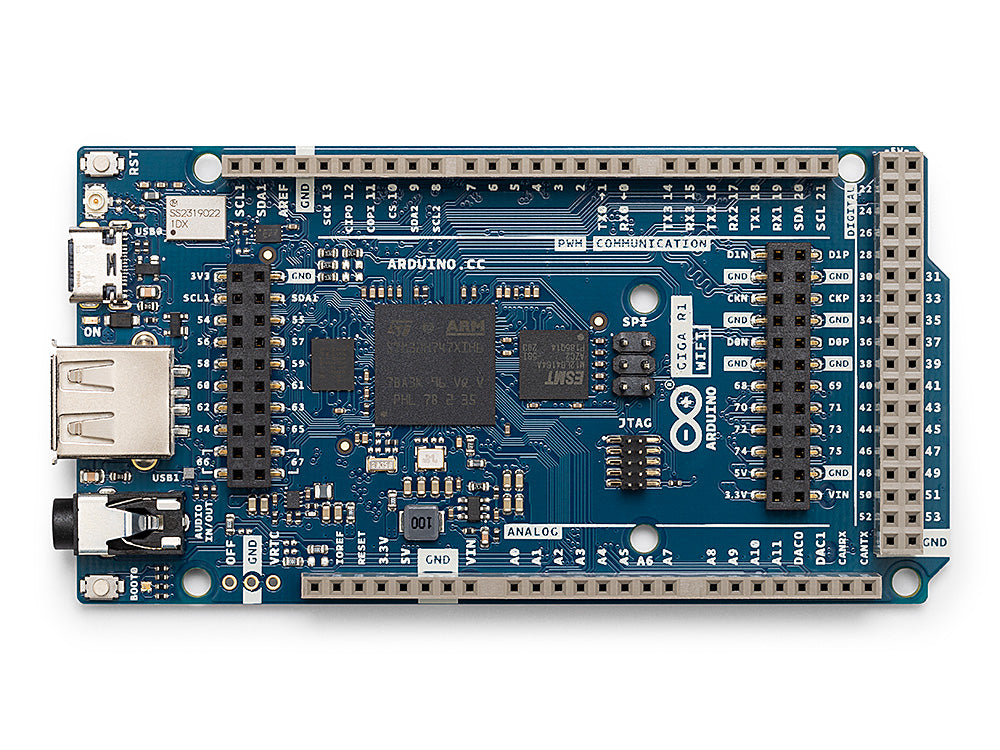
The Arduino GIGA R1 WiFi stands as the flagship high-performance microcontroller board in the Arduino lineup, announced at the end of 2023 and currently available for purchase. It is important to clarify the naming convention, as the product is sold as the GIGA R1 WiFi, while Arduino’s internal firmware cores refer to it simply as the Arduino Giga R1. As of October 2026, searches of the official store reveal no standalone non-WiFi variant, suggesting that the WiFi capability is an integral part of this specific hardware platform. The board is manufactured by Arduino, an Italian company that has been owned by Qualcomm since October 2025. Priced at €77.90, the GIGA R1 WiFi is designed for users who require significant processing power and connectivity options in a familiar form factor. It retains the legacy Mega and Due physical dimensions, allowing it to fit into existing projects, but it introduces a modern architecture that significantly outperforms its predecessors.
At the heart of the GIGA R1 WiFi is the STMicroelectronics STM32H747XI system-on-chip, a dual-core 32-bit microcontroller that defines the board's capabilities. The term SoC, or System on Chip, refers to an integrated circuit that combines all components of a computer or other electronic system into a single chip. In this case, the STM32H747XI features two distinct processor cores: an Arm Cortex-M7 running at up to 480 MHz and an Arm Cortex-M4 running at up to 240 MHz. To put this in perspective, MHz stands for megahertz, which measures the number of cycles a processor can execute per second. A frequency of 480 MHz means the Cortex-M7 core can perform 480 million cycles every second, providing substantial headroom for complex calculations. The dual-core design allows for true parallel processing, meaning the two cores can run different firmware simultaneously. For example, a user could run a real-time control loop on the Cortex-M4 while handling user interface tasks or network communication on the Cortex-M7. These cores can communicate with each other using Remote Procedure Call (RPC) mechanisms, enabling sophisticated applications that require both high-speed deterministic processing and flexible high-level logic. The chip also includes a Floating Point Unit (FPU) for efficient mathematical operations, DSP instructions for signal processing, and a Memory Protection Unit (MPU) to enhance system stability by preventing software errors from corrupting memory.
Memory resources on the GIGA R1 WiFi are substantial for a microcontroller. The board offers up to 2 MB of dual-bank flash memory for storing the program code and data, along with up to 1 MB of total on-chip RAM. RAM, or Random Access Memory, is the volatile memory used for temporary data storage while the program is running. The 1 MB of RAM is divided into specific sections: 192 KB of Tightly Coupled Memory (TCM) for low-latency access, up to 864 KB of user SRAM for general-purpose data, and 4 KB of backup SRAM that retains data even when power is removed. This amount of memory allows for the execution of complex algorithms and the handling of large datasets directly on the board without needing external memory chips for most applications.
Connectivity is a major strength of the GIGA R1 WiFi, facilitated by the Murata LBEE5KL1DX-883 module, commonly known as the 1DX. This module provides both Wi-Fi and Bluetooth Low Energy (BLE) capabilities, supported by an external antenna for improved signal range. Wi-Fi allows the board to connect to local networks and the internet, enabling IoT applications, while BLE is useful for low-power communication with mobile devices or sensors. The board does not include Ethernet or cellular connectivity, so users requiring wired network access must use external adapters. Security is also addressed with an ATECC608A secure element, a hardware chip designed to protect cryptographic keys and secure communications, which is essential for IoT devices that handle sensitive data.
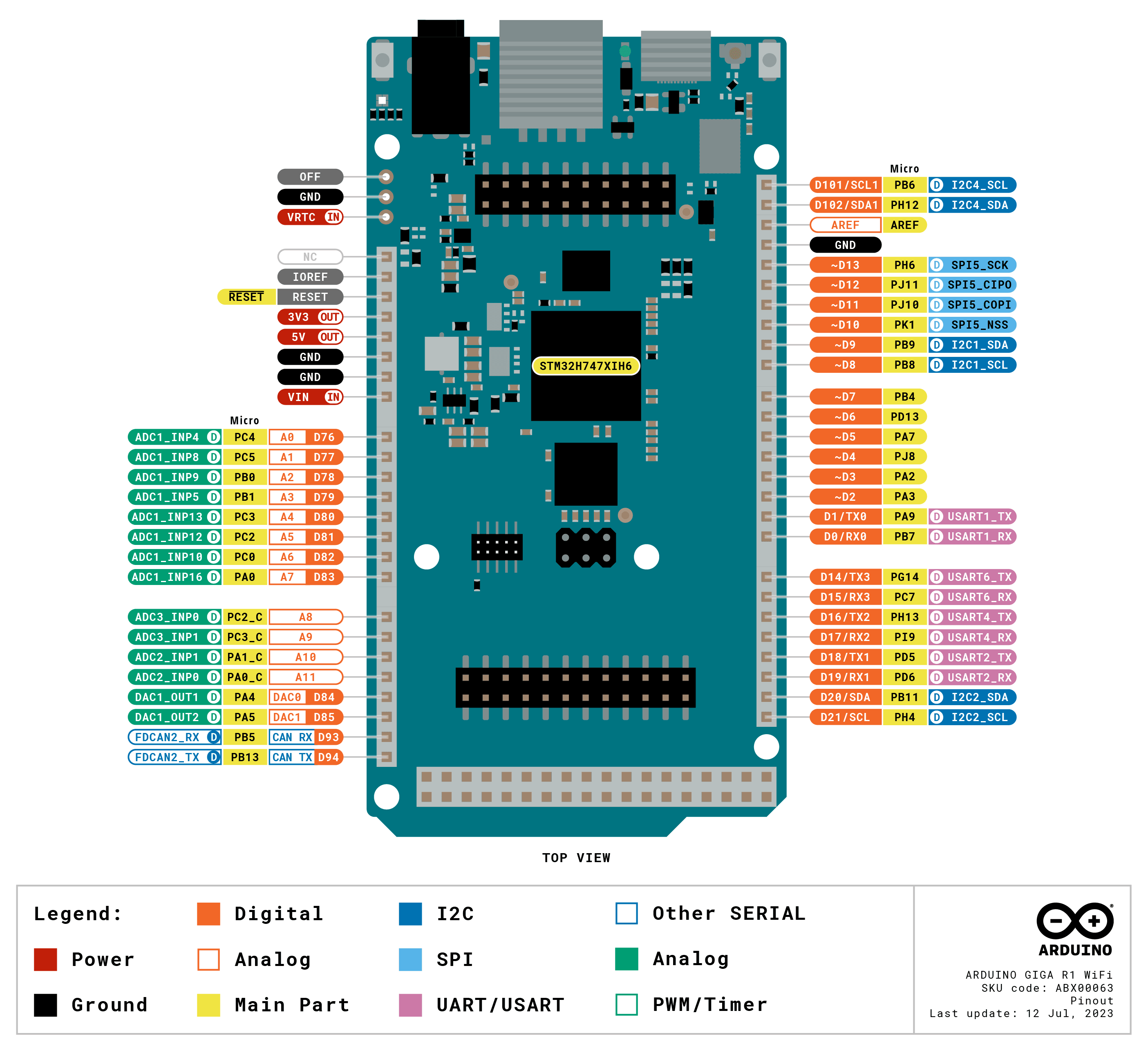
The input and output capabilities of the GIGA R1 WiFi are extensive, featuring 76 GPIO pins in total. GPIO stands for General Purpose Input/Output, which are pins that can be configured by the user to either read signals from sensors or send signals to actuators. These pins operate at 3.3 V logic levels, which is a critical detail for users migrating from older 5 V Arduino boards like the Uno or Mega. While the physical form factor matches the Mega and Due, connecting 5 V-tolerant shields or sensors directly to the GIGA R1 WiFi's GPIO pins can damage the board, as the logic levels are not compatible. The board supports multiple communication buses, including 4 UARTs for serial communication, 3 I2C buses for connecting sensors and displays, 2 SPI buses for high-speed data transfer, and 1 FDCAN bus. FDCAN is a robust communication protocol often used in industrial automation and automotive applications, highlighting the board's suitability for professional and industrial projects. Analog capabilities include 3 ADCs (Analog-to-Digital Converters) for reading analog signals and 2 DACs (Digital-to-Analog Converters) for generating analog signals. The DACs are wired to a 3.5 mm audio jack, allowing for direct audio output, which is useful for projects involving sound synthesis or playback.
Powering the GIGA R1 WiFi is flexible, accepting input via USB-C or through the VIN pin with a voltage range of 6 to 24 V. This wide voltage range makes it compatible with various power supplies, including batteries and industrial power rails. The board also features dedicated pins for VRTC, which allows for a backup battery to keep the Real-Time Clock running when main power is off, and an OFF pin for hard shutdown control. Additional dedicated connectors include a USB-A host port for connecting peripherals like keyboards or storage drives, a USB-C port for power and programming, a JTAG connector for advanced debugging, and specific connectors for the GIGA Display Shield and the HM01B0 camera module. These dedicated connectors simplify the integration of visual and vision-based projects without the need for complex wiring.
Software support for the GIGA R1 WiFi is evolving, with two primary firmware stacks available. The traditional Arduino Core based on mbed OS is the shipping core, offering a familiar environment for Arduino users. However, Arduino is transitioning to a new core based on Zephyr RTOS, which is designed to replace the mbed core in the future. Zephyr is a scalable real-time operating system that supports a wide range of hardware and offers advanced features like dynamic loading of applications. This means that on the Zephyr core, sketches are compiled as separate files and loaded onto the board dynamically, allowing for more flexible development workflows. MicroPython is also officially supported, providing a Python-based environment that is easier to learn for beginners and faster to prototype with. The dual-core nature of the board allows for mixed-language programming, where one core runs MicroPython and the other runs Arduino C++, communicating via RPC.
Despite its capabilities, users should be aware of documented issues. On the mbed core, there have been reports of TCP connection stalls where every fifth connection fails if the HTTP response body is not fully read, a bug that requires careful coding practices to avoid. There have also been issues with ADC pin mapping and crashes related to interrupt handling and global object initialization. The Zephyr core, while promising, has its own quirks, such as crashes in dynamically loaded sketches often stemming from user buffer overflows and the need to rebuild the loader if certain symbols are missing. Wi-Fi firmware can occasionally become corrupted, requiring a reflash using specific tools. Additionally, debugging field crashes can be challenging as crash diagnostics are disabled by default in some configurations. These issues are tracked on GitHub, and many have been addressed in updates, but users should stay informed about the latest core versions and known bugs.
The GIGA R1 WiFi is well-suited for a variety of projects, including HMI dashboards using the GIGA Display Shield, machine vision applications with the HM01B0 camera, and IoT devices leveraging Arduino Cloud. Its combination of high processing power, dual-core flexibility, and rich connectivity makes it a powerful tool for advanced makers and engineers. Whether you are building a smart home hub, an industrial controller, or a complex robotics platform, the GIGA R1 WiFi provides the hardware foundation needed to bring ambitious ideas to life. As with any advanced microcontroller, success depends on understanding the underlying architecture and staying current with software developments.
Pinout diagram
| Attr | Specs | verified |
|---|---|---|
soc | STMicroelectronics STM32H747XI, dual-core 32-bit (store product description, st.com product page, both fetched 2026-10-13). | ✔ |
cpu | Arm Cortex-M7 @ up to 480 MHz + Cortex-M4 @ up to 240 MHz; FPU (single/double precision on M7, IEEE-754), DSP instructions, MPU (st.com). | ✔ |
gpu | none (LCD-TFT display controller class peripheral only; the GIGA Display Shield drives a 480×800 RGB panel via the board's display connector — docs.arduino.cc/hardware/giga-r1-wifi). | ✔ |
flash | dual-bank up to 2 MB (STM32H747xI, st.com). | ? unverified |
ram | up to 1 MB total on-chip: 192 KB TCM RAM, up to 864 KB user SRAM, 4 KB backup SRAM (st.com). | ✔ |
connectivity | Murata LBEE5KL1DX-883 ("1DX") module — Wi-Fi + Bluetooth LE — plus external antenna; ATECC608A secure element (docs.arduino.cc/hardware/giga-r1-wifi, store description). No Ethernet, no cellular. | ✔ |
gpio | 76 GPIO pins total, accessible from underneath the board too; 3.3 V logic (docs hardware page, store description). - Buses: 4 UART, 3 I2C, 2 SPI, 1 FDCAN (store description). - Analog: 3 ADCs and 2 DACs on the SoC (st.com); the 3.5 mm audio jack is wired to DAC0, DAC1 and A7 (store description). - Extra pins: VRTC (RTC backup battery) and OFF (board shutdown) (store description). - Dedicated connectors: USB-C (power/programming/HID), USB-A host (mass storage, HID), 2×5 1.27 mm JTAG, 20-pin Arducam DVP camera, display connector (store description + docs). | ✔ |
power | USB-C or DC via VIN, accepted range 6–24 V (store description: "can handle a range of 6 to 24 volts"). | ? unverified |
temperature | commercial MCU range; board-level operating range not stated on fetched pages. | ? unverified |
- Manufacturer: Arduino (Italy; owned by Qualcomm since the October 2025 acquisition — en.wikipedia.org/wiki/Arduino, fetched 2026-10-13).
- Product: Arduino GIGA R1 WiFi, flagship high-performance MCU board in the legacy Mega/Due form factor (store.arduino.cc, fetched 2026-10-13).
- Year: announced end of 2023.
- Status: active — listed as available on the official store (2026-10-13).
- Price: €77.90 on store.arduino.cc (fetched 2026-10-13 via the store search API, price field).
- Order code: ABX00063 (product image asset name on the store, e.g. ABX00063_00.default.jpg).
- Variants / family: GIGA R1 WiFi (ABX00063); companion GIGA Display Shield (ASX00039, €73.20) and GIGA Display Bundle (€136.00); HM01B0 QVGA DVP camera module for GIGA (€9.00) — all prices from store search API, 2026-10-13.
+ Strengths
- True dual-core programming: M7 (480 MHz) and M4 (240 MHz) can run different firmware (e.g. Arduino + MicroPython) and talk over RPC — unique in the Arduino line (docs hardware page).
- Audio I/O on board: 3.5 mm jack on DAC0/DAC1/A7; advanced ADC/DAC usage documented for audio projects (docs hardware page).
- Camera & display connectors on board (20-pin DVP + display FFC), no shield needed for vision/HMI; official HM01B0 QVGA module and GIGA Display Shield (3.97" 480×800 capacitive touch, digital mic, 6-axis IMU) (store).
- USB host (USB-A) for sticks/keyboards + USB-C HID device role (store description).
- Hardware security: ATECC608A cryptoauthentication chip (store description).
- FDCAN bus — industrial automation use (Mega/Due form factor at 3.3 V, 6–24 V input) (store description).
- VRTC + OFF pins for battery-backed RTC and hard shutdown (store description).
- Arduino Cloud compatible (docs hardware page).
− Weaknesses
- TCP stall: every ~5th TCP connection fails (error −3005) unless the HTTP response body is fully read; 30 s hang per failure; workaround = read all bytes or slow the request interval (ArduinoCore-mbed #937, open, filed 2024-08-15).
- ADC pin-mapping bug: analogRead(A12) returned the value of A8 (ArduinoCore-mbed #758, closed).
- Crashes with attachInterrupt reported (#789, closed); OS crash when WiFiClient is a global object (#753, closed).
- Wi-Fi firmware can become unreinstallable/bricked by bad updates; restore via reflash (#650, closed); on the Zephyr core use the FlashFormat sketch (ArduinoCore-zephyr README FAQ).
- Crash diagnostics disabled: mbed_config.h ships with crash capture / error history / auto-reboot off, and printf doesn't reach USB Serial, making field crashes hard to debug (#958, closed 2024-10-11).
- LVGL/display quirks: GIGA Display going white with LVGL v9.2.2 (#1004, closed); H7 video buffer issues with LVGL (#1106, open 2026).
- Zephyr core migration quirks: crashes inside dynamically loaded sketches (llext) are often user buffer overflows; missing Zephyr symbols require rebuilding the loader; OS crashes are only collectible via a USB-UART adapter on TX0/RX0 (ArduinoCore-zephyr README FAQ).
- Gotcha: Mega/Due shields fit mechanically but the board is 3.3 V — 5 V-tolerant assumptions break (store description).
- Retour d'expérience expert expert — expert-arduino
- La GIGA R1 WiFi est une bête de course avec son dual-core STM32H747XI, mais attention aux pièges. Le passage de 5V à 3.3V logique sur les 76 GPIO a déçu certains qui voulaient du drop-in Mega, mais c'est nécessaire pour les vitesses à 480 MHz. Côté réseau, le bug TCP (issue 937) est coriace : si vo… — expert-arduino
- Merci pour le rappel sur le TCP, j'ai perdu une après-midi dessus. En fait, je confirme le souci de l'ADC. J'ai galéré avec le mapping des broches analogiques, j'ai eu des valeurs incohérentes sur A12 qui renvoyait du A8 selon les versions du core. C'est corrigé depuis ? Sinon, le double USB (C et … — maker-trois-pattes
- Pour l'ADC, le bug 758 est fermé, donc mets à jour ton core Arduino. Le vrai danger selon moi c'est le firmware Wi-Fi qui peut se bricker avec une mauvaise mise à jour (issue 650). J'ai failli perdre ma carte en tentant de flasher une beta, heureusement le reflash a marché. Sur le plan industriel, … — codeur-obscur
Community feedback and projects
- Gallery of GIGA R1 projects - share yours! forum.arduino.cc
- GIGA R1 RAM size discrepancy forum.arduino.cc
- digitalWriteFast for GIGA? forum.arduino.cc
- GIGA R1 USB Mass Storage examples : has anyone managed to run an example project ? forum.arduino.cc
Content not available yet.
- docs.arduino.cc/hardware/giga-r1-wifi
- store.arduino.cc/products/giga-r1-wifi
- content.arduino.cc/assets/Arduino-Portenta-H7_Datasheet_stm32h747xi.pdf
- content.arduino.cc/assets/Arduino-Portenta-H7_Datasheet_Murata-1dx.pdf
- Microchip summary datasheet (PDF)
- github.com/arduino/ArduinoCore-mbed
- github.com/arduino/ArduinoCore-zephyr
- boards.txt
- forum.arduino.cc
- en.wikipedia.org/wiki/Arduino
- TCP stall: every ~5th TCP connection fails (error −3005) unless the HTTP response body is fully read; 30 s hang per failure; workaround = read all bytes or slow the request interval (ArduinoCore-mbed #937, open, filed 2024-08-15).
- ADC pin-mapping bug: analogRead(A12) returned the value of A8 (ArduinoCore-mbed #758, closed).
- Crashes with attachInterrupt reported (#789, closed); OS crash when WiFiClient is a global object (#753, closed).
- Wi-Fi firmware can become unreinstallable/bricked by bad updates; restore via reflash (#650, closed); on the Zephyr core use the FlashFormat sketch (ArduinoCore-zephyr README FAQ).
- Crash diagnostics disabled: mbed_config.h ships with crash capture / error history / auto-reboot off, and printf doesn't reach USB Serial, making field crashes hard to debug (#958, closed 2024-10-11).
- LVGL/display quirks: GIGA Display going white with LVGL v9.2.2 (#1004, closed); H7 video buffer issues with LVGL (#1106, open 2026).
- Zephyr core migration quirks: crashes inside dynamically loaded sketches (llext) are often user buffer overflows; missing Zephyr symbols require rebuilding the loader; OS crashes are only collectible via a USB-UART adapter on TX0/RX0 (ArduinoCore-zephyr README FAQ).
- Gotcha: Mega/Due shields fit mechanically but the board is 3.3 V — 5 V-tolerant assumptions break (store description).
- Faire clignoter la LED de l'Arduino GIGA R1 debutant Schéma : IMG-giga-r1-d1-1-clignotement-led.svg — Vue de dessus de la carte GIGA R1 WiFi avec la LED utilisateur et le port USB-C d'alimentation mis en évidence.
- Bouton poussoir et console série sur le GIGA R1 debutant Schéma : IMG-giga-r1-d2-1-bouton-console-serie.svg — Bouton poussoir câblé entre une broche GPIO du GIGA R1 et la masse, avec le câble USB-C reliant la carte au PC pour la console série.
- Potentiomètre et sortie DAC sur la prise audio du GIGA R1 debutant Schéma : IMG-giga-r1-d3-1-potentiometre-dac-audio.svg — Potentiomètre alimenté en 3,3 V relié à l'entrée A0 du GIGA R1, et prise jack 3,5 mm de la carte reliée à un haut-parleur via la sortie DAC0.
- Piloter un micro-servo avec la PWM du GIGA R1 intermediaire Schéma : IMG-giga-r1-i1-1-pwm-servo.svg — Micro-servo alimenté par une source externe 5 V, fil de commande relié à une broche PWM du GIGA R1, masses communes entre la carte et l'alimentation.
- Connecter un capteur I2C sur le GIGA R1 intermediaire Schéma : IMG-giga-r1-i2-1-i2c-capteur.svg — Capteur d'environnement I2C externe relié aux broches SDA et SCL du GIGA R1 avec résistances de pull-up et alimentation 3,3 V.
- Publier des données en MQTT/HTTP via le Wi-Fi du GIGA R1 intermediaire Schéma : IMG-giga-r1-i3-1-mqtt-wifi.svg — Le module Wi-Fi Murata 1DX embarqué du GIGA R1 relié sans fil à un routeur, puis à un courtier MQTT et un serveur HTTP sur Internet.
- Programmer les deux cœurs M7 et M4 du GIGA R1 et les faire communiquer avance Schéma : IMG-giga-r1-a1-1-dual-core-rpc.svg — Le double cœur du STM32H747XI du GIGA R1 : Cortex-M7 à 480 MHz exécutant un programme Arduino, Cortex-M4 à 240 MHz exécutant MicroPython, reliés par un canal RPC.
- Temps réel : timers matériels et interruptions sur le GIGA R1 avance Schéma : IMG-giga-r1-a2-1-timer-interruptions.svg — Les timers matériels du STM32H747XI pilotant une sortie DAC du GIGA R1 à cadence fixe pendant que la boucle loop reste libre pour le reste du programme.
- Bootloader DFU, flash double banque et sauvegarde sur SRAM de sauvegarde avance Schéma : IMG-giga-r1-a3-1-boot-flash-basse-consommation.svg — Les modes de démarrage du GIGA R1 : application USB DFU (PID 0x0666), bootloader de récupération (PID 0x0366), flash 2 Mo double banque et SRAM de sauvegarde 4 Ko maintenue par la broche VRTC.
Code library — examples written for this board
clignotante.inoArduinobouton.inoArduinorespiration.inoArduinoanalogique.inoArduinodac-onde.inoArduinooled-i2c.inoArduinoservo.inoArduinopont-uart.inoArduinocan-boucle.inoArduinomelodie.inoArduino
Examples and repos found online
- arduino/ArduinoCore-mbed github.com
- arduino-libraries/ArduinoIoTCloud github.com
- Cycling74/rnbo.example.giga github.com