Banana Pi BPI-M2 Zero (Allwinner H2+ / H3)
⚡ The essentials in 60 seconds
- soc — Allwinner H2+ (later boards: H3) — 4× Arm Cortex-A7 (ARMv7-A, 32-bit) + Mali-400MP2 GPU @ 600 MHz, OpenGL ES 2.0 (wiki spec table). CNX's launch article says "quad core Cortex A7 @ up to 1 GHz"; Wikipedia says 1.2 GHz (H2+ nominal max).
- ram — 512 MB DDR3, shared with the GPU (wiki spec table). U-Boot drives it at DRAM_CLK=408 MHz (u-boot configs/bananapi_m2_zero_defconfig, retrieved 2026-10-13).
- cpu_core_voltage — a GPIO-switched regulator (vdd-cpux, PL1) with only two states, 1.10 V / 1.30 V (mainline DTS) — coarse DVFS, not a full PMIC.
- storage — microSD only ("TF card, Max. 64 GB", wiki). No eMMC, no SPI NOR — the wiki comparison table explicitly lists "Onboard flash: NOPE" (that is the P2 Zero's 8 GB eMMC, absent here). Cannot boot from USB storage (bret.dk: "you cannot boot from the USB SSD").
- video_out — mini-HDMI (Type-C connector per mainline DTS), 1080p@30 fps, HDCP (wiki writes "DHCP", an obvious typo for HDCP). Video engine: 1080p@60 H.264 decode, 1080p@30 H.264 encode (wiki table, bret.dk).
- camera_csi — 24-pin FPC connector marked "CSI" — parallel 8-bit DVP/CCIR656 bus, not MIPI: CSI0-D0…D7, PCLK, HSYNC, VSYNC, MCLK, I2C (PE12/PE13), Reset, PWDN; camera power enable on PD14 (CSI-PWR-EN, DTS gpio-line-names). Supports 8-bit YUV422 CMOS sensors, ~5 MP / 1080p (CNX 2017; full pin table on the wiki).
- On this board : 9 tutorials · 10 code
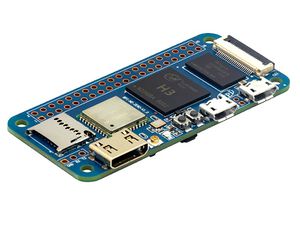
The Banana Pi BPI-M2 Zero is a compact single-board computer introduced in 2017 by Shenzhen SinoVoIP Co., Ltd. under the Banana Pi brand. Designed as a direct competitor to the Raspberry Pi Zero W, this board aims to provide a similar physical footprint and connectivity experience while offering different internal hardware characteristics. At its core, the M2 Zero utilizes the Allwinner H2+ system-on-chip, although later production runs and revisions often feature the Allwinner H3 due to the EOL status of the H2+. These chips are quad-core processors based on the ARM Cortex-A7 architecture, which means they contain four processing cores capable of handling multiple tasks simultaneously. This is a significant upgrade over the single-core processor found in the original Raspberry Pi Zero, potentially offering better performance for multitasking and heavier applications. The board is equipped with 512 MB of DDR3 RAM, which is shared between the CPU and the Mali-400MP2 graphics processing unit. It is important to note that this amount of memory is modest by modern standards, and users planning to run graphical interfaces or heavy workloads may need to configure virtual memory, known as zram, to prevent system crashes.
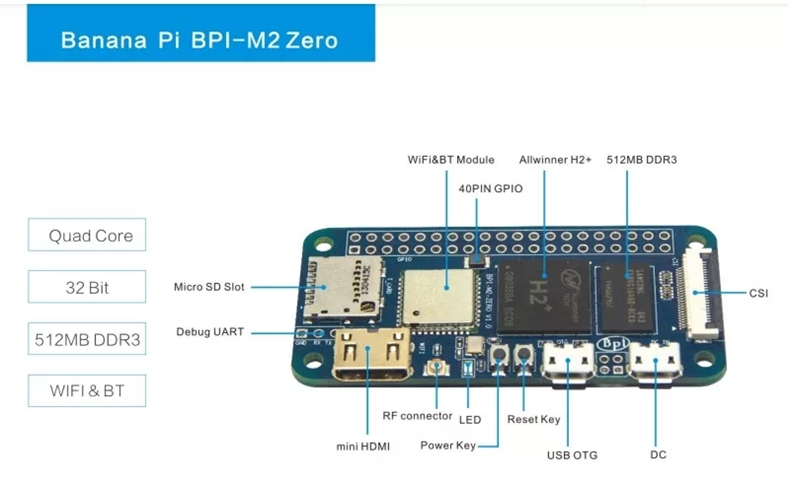
Physically, the BPI-M2 Zero measures approximately 65 by 30 millimeters, matching the dimensions of the Raspberry Pi Zero W. This compatibility extends to its expansion interface, as it features a 40-pin GPIO header that follows the Raspberry Pi pinout standard. This allows users to utilize existing cases, hats, and accessories designed for the Raspberry Pi Zero ecosystem. The General Purpose Input/Output (GPIO) pins are programmable digital pins that allow the board to interact with the outside world, such as reading switches or controlling LEDs. The board operates on 3.3-volt logic levels for these pins. For connectivity, the M2 Zero includes an on-board AP6212 Wi-Fi and Bluetooth module. However, a critical detail for users is that the board does not ship with an external antenna. The radio frequency connector is exposed next to the HDMI port, and without attaching a compatible antenna, Wi-Fi performance is severely degraded, often resulting in unstable connections and low speeds. Adding a small external antenna is highly recommended for any project requiring reliable wireless communication.
Storage on the BPI-M2 Zero is limited to a microSD card slot, with support for cards up to 64 GB. Unlike some other single-board computers, it does not have on-board eMMC flash storage or SPI NOR memory, meaning the operating system must be installed on the removable microSD card. Furthermore, the board cannot boot from USB storage devices, so the microSD card is the sole boot path. This reliance on microSD cards can be a point of concern for long-term reliability, as these cards can wear out over time with frequent write operations. For video output, the board uses a mini-HDMI port, supporting resolutions up to 1080p at 30 frames per second. The video engine supports hardware decoding of H.264 video at 1080p60 and encoding at 1080p30, making it suitable for basic media playback and streaming applications. A notable feature for its size and price point is the inclusion of a 24-pin CSI camera connector. This interface allows for the connection of a camera module, though it is important to understand that this is a parallel DVP interface, not the more modern MIPI interface found on newer Raspberry Pi models. This limits the selection of compatible camera modules to those using the DVP standard, such as certain OV5640-class sensors.
Powering the BPI-M2 Zero is handled through micro-USB ports, but users must be careful with their usage. The board features two micro-USB ports: one for power only and one for OTG data. The power port is intended for supplying 5V at 2A to the board. The OTG port allows the board to act as a USB device, which can be useful for connecting to a computer for debugging or file transfer. However, the Vbus lines of these two ports are connected together, which can lead to back-feeding power if not managed correctly. For example, powering the board via the power port while a USB host is connected to the OTG port can cause issues. Additionally, the board can be powered through the 5V pins on the GPIO header, which is useful for integration into powered bases or robotics projects. The board includes physical power and reset buttons, a feature often missing on compact boards like the Raspberry Pi Zero, providing convenient control for users.
Software support for the BPI-M2 Zero has evolved over time. Initially, the board relied on vendor-specific images running older kernels, such as Android 4.4 or Debian 9 with kernel 4.4. However, community support has grown significantly, with Armbian providing well-maintained images that support newer kernels, including versions up to 6.x. These images generally offer better performance and security updates. Mainline Linux support is also available, with device tree files included in the official Linux kernel source, allowing for broader compatibility and easier maintenance. Users can also find community guides for installing Arch Linux and other distributions. Despite this support, there are known issues, such as Bluetooth requiring manual configuration to load the necessary drivers, and potential regressions in newer kernel versions that may affect features like wired Ethernet if an external PHY is used. The board’s CPU voltage regulation is coarse, with only two states, which limits fine-grained power management and overclocking potential.
In terms of project applications, the BPI-M2 Zero is well-suited for home automation hubs, such as running openHAB, due to its small size and low power consumption. It can also be used for retro gaming, machine vision projects with compatible cameras, and general-purpose computing tasks where the quad-core processor provides an advantage over single-core alternatives. However, potential buyers should be aware of the board’s legacy status. As of late 2021, it was noted to be less relevant compared to newer options like the Raspberry Pi Zero 2 W, and its price has increased since its launch. The successor model, the BPI-M4 Zero, was introduced in 2023 with a more modern processor, suggesting that the M2 Zero is now a niche choice for those specifically seeking its particular hardware combination or existing inventory. Despite these caveats, the BPI-M2 Zero remains a functional and educational platform for understanding embedded Linux systems, GPIO programming, and the trade-offs involved in designing compact, low-cost computing devices. Its compatibility with Raspberry Pi accessories and its quad-core performance make it a viable option for specific projects where these factors are prioritized over the latest software support or connectivity features.
Pinout diagram
| Attr | Specs | verified |
|---|---|---|
soc | Allwinner H2+ (later boards: H3) — 4× Arm Cortex-A7 (ARMv7-A, 32-bit) + Mali-400MP2 GPU @ 600 MHz, OpenGL ES 2.0 (wiki spec table). CNX's launch article says "quad core Cortex A7 @ up to 1 GHz"; Wikipedia says 1.2 GHz (H2+ nominal max). | ? unverified |
ram | 512 MB DDR3, shared with the GPU (wiki spec table). U-Boot drives it at DRAM_CLK=408 MHz (u-boot configs/bananapi_m2_zero_defconfig, retrieved 2026-10-13). | ✔ |
cpu_core_voltage | a GPIO-switched regulator (vdd-cpux, PL1) with only two states, 1.10 V / 1.30 V (mainline DTS) — coarse DVFS, not a full PMIC. | ? unverified |
storage | microSD only ("TF card, Max. 64 GB", wiki). No eMMC, no SPI NOR — the wiki comparison table explicitly lists "Onboard flash: NOPE" (that is the P2 Zero's 8 GB eMMC, absent here). Cannot boot from USB storage (bret.dk: "you cannot boot from the USB SSD"). | ✔ |
video_out | mini-HDMI (Type-C connector per mainline DTS), 1080p@30 fps, HDCP (wiki writes "DHCP", an obvious typo for HDCP). Video engine: 1080p@60 H.264 decode, 1080p@30 H.264 encode (wiki table, bret.dk). | ? unverified |
camera_csi | 24-pin FPC connector marked "CSI" — parallel 8-bit DVP/CCIR656 bus, not MIPI: CSI0-D0…D7, PCLK, HSYNC, VSYNC, MCLK, I2C (PE12/PE13), Reset, PWDN; camera power enable on PD14 (CSI-PWR-EN, DTS gpio-line-names). Supports 8-bit YUV422 CMOS sensors, ~5 MP / 1080p (CNX 2017; full pin table on the wiki). | ✔ |
wifi_bluetooth | on-board AP6212 module (Ampak/AMTAK, BCM43430-class) — 802.11 b/g/n 1×1 + Bluetooth, on SDIO (brcm,bcm4329-fmac, mmc1 in DTS) with BT on UART1 (brcm,bcm43438-bt, max-speed = <1500000>, RTS/CTS on PG11–PG13, DTS). Options AP6181/AP6335 (CNX). U.FL/on-board RF connector next to the HDMI port — no antenna included (bret.dk). | ? unverified |
ethernet | none on board (wiki: "NOPE (but can extension with PIN define)"). The H2+/H3 integrated 10/100 EMAC can be brought out to an external PHY — Banana Pi published a "Zero-EPHY" PHY carrier design (schematic + PCB on the wiki, section "how to use zero 10/100 Ethernet"). | ? unverified |
usb | 1× micro-USB OTG (data; dr_mode = "otg", DTS) + 1× micro-USB power-only port. DTS comment: "The Vbus of these two connectors are connected together, so the external USB device will be powered just by the power input from the power-only USB port." One host port via ehci0/ohci0 (DTS). | ? unverified |
gpio_expansion | 40-pin header, Raspberry Pi Zero W / Pi 3 pinout-compatible (wiki: "matches that of the Raspberry Pi 3"; fits Zero W cases and hats per bret.dk). 3.3 V logic (VCC-3V3/VCC-5V pins 1/2/4/17). From the wiki pin table: I2C0 = PA11/PA12 (pins 3/5), I2C1 = PA18/PA19 (pins 27/28), SPI0 = PC0–PC3 (pins 19/21/23/24), SPI1 signals on PA13–PA16, UART2 (PA0/PA1 + CTS/RTS PA2/PA3), UART3 (PA13/PA14 + CTS/RTS PA15/PA16), PWM1 on PA6 (pin 7), SPDIF-OUT on PA17, plus two R_PIO pins PL2 (pin 32) and PL4 (pin 36). No ADC/DAC exposed (the pin table lists none; the RPi has none either). | ? unverified |
debug_console | 3-pin jumper CON3: UART0-TXD (PA4), UART0-RXD (PA5), GND, 115200 8N1 (wiki; DTS stdout-path = "serial0:115200n8"). | ? unverified |
other_i_o | Power button (PL3, KEY_POWER, wakeup — DTS) + Reset button; Power LED (PL10, bananapi-m2-zero:red:pwr, DTS) and a status LED (wiki table; | ? unverified |
power | 5 V / 2 A via the power-only micro-USB port; the wiki also documents powering via the 5 V pins of the GPIO header ("Zero power with GPIO 5V input"). No battery charger, no PoE (that is the P2 Zero). | ? unverified |
consumption_thermals | measured in the bret.dk review (stress-ng + SoC sensor), but the numeric tables did not survive text extraction. | ✔ |
mechanical | 65 × 30 mm, 15 g (wiki table; bret.dk). The Getting Started page says "60mm*30mm" (docs.banana-pi.org) — the 65 mm figure matches the Pi Zero W footprint and is repeated by the wiki product page and bret.dk. | ✔ |
- Manufacturer: Shenzhen SinoVoIP Co., Ltd. (brand: Banana Pi) (Wikipedia: Banana Pi, retrieved 2026-10-13).
- Year introduced: 2017. First retail coverage: CNX Software, "…Banana Pi M2 Zero board is a Raspberry Pi Zero W clone with a quad-core processor", 2017-10-30 (CNX Software, retrieved 2026-10-13); Armbian's board definition also records INTRODUCED="2017" (armbian/build config/boards/bananapim2zero.csc, retrieved 2026-10-13).
- Launch price: US$15 + shipping on AliExpress at launch (CNX, 2017-10-30). By late 2021 CNX noted the price had "bumped up to $23" and the board had "mostly become irrelevant" next to the Raspberry Pi Zero 2 W (CNX, 2021-11-01, retrieved 2026-10-13).
- Status: Legacy but still sold (Amazon/bpi-shop listings active in recent years, e.g. bpi-shop product page, retrieved 2026-10-13). The vendor wiki states: "As Allwinner H2+ chip is EOL, so BPI-M2 Zero will use H3 chip defaults. but image for H2+ also support H3, so all image is same" (Banana Pi wiki: Banana Pi BPI-M2 ZERO, retrieved 2026-10-13). The official successor in the same form factor is the BPI-M4 Zero (2023, Allwinner H618) (CNX, 2023-12-12, retrieved 2026-10-13).
- Variants / revisions: - H2+ boards (2017–…) — original chip; H3 boards (e.g. hardware v1.3) — same footprint, H3 instead of EOL H2+; all vendor images run on both (wiki; board revision v1.3 with H3 confirmed in bret.dk review, retrieved 2026-10-13). - WiFi module options: AP6212 (default), options AP6181 / AP6335 / "K016" (wiki hardware spec table; CNX 2017-10-30). - BPI-P2 Zero (2018) — sibling adding PoE, 8 GB eMMC and 100M LAN (CNX, 2018-08-02; wiki comparison table). - BPI-M4 Zero (2023) — modern replacement, same Zero form factor (CNX 2023-12-12).
+ Strengths
- Raspberry Pi Zero W drop-in: same 65×30 mm board outline, same 40-pin header, fits Zero W cases/hats (wiki; bret.dk) — but a quad-core Cortex-A7 vs the Zero W's single-core ARM11, roughly Zero-2-W class in UnixBench (bret.dk benchmarks).
- On-board WiFi + Bluetooth at Zero-class price (AP6212) — the stock Zero W competitor at $15 in 2017 (CNX).
- CSI camera connector (24-pin FPC, parallel 8-bit DVP, ~5 MP) — rare at this size/price; enables machine-vision builds (OpenCV tutorial: bluexmas.tistory.com, linked from wiki).
- H.264 1080p60 hardware decode / 1080p30 encode (Mali-400MP2 + cedar engine) — the Pi Zero W of the same era managed 1080p30.
- 10/100 EMAC bring-out: Banana Pi's own Zero-EPHY external-PHY design gives wired 100M Ethernet from header pins (wiki "how to use zero 10/100 Ethernet", schematic + PCB published).
- Power + Reset buttons on a Zero-sized board (wiki/bret.dk — bret.dk singles them out as "incredibly useful").
- Power over GPIO 5 V pins documented by the vendor — clean integration into powered hat/robot bases (wiki "Zero power with GPIO 5V input").
- USB OTG serial console (g_serial, ttyGS0) supported out of the box by Armbian board config — headless debugging from any PC without a UART dongle.
- Mainline Linux support: device tree in torvalds/linux since 2017 (Icenowy Zheng), mainline u-boot defconfig, Armbian CSC images on 6.x kernels.
− Weaknesses
- WiFi is nearly unusable without an external antenna. The AP6212's RF pad is broken out next to the HDMI port but no antenna ships with the board: "once I got to WiFi it leaves a little to be desired… it fell back to a default firmware/configuration with very limited performance"; without antenna: 0.68–13 Mbit swings; with a cheap antenna: ~26/34 Mbit and 20+ visible networks vs "only my phone's hotspot" (bret.dk review, retrieved 2026-10-13).
- Two micro-USB ports are not interchangeable — power trap. One is power-only, one is OTG data, and their Vbus lines are tied together (mainline DTS comment). Feeding 5 V while a USB host is plugged into the OTG port, or powering peripherals from the wrong port, back-feeds Vbus; host mode additionally needs an OTG cable. Read the DTS comment before wiring battery/USB setups.
- microSD card-detect polarity changed between hardware batches. "On the production batch of this board the card detect GPIO is high active (card inserted), although on the early samples it's low active" (mainline DTS comment) — kernels/images built for the wrong polarity see "no card inserted".
- 512 MB RAM ceiling. Heavy workloads need zram: Geekbench 5.4 multi-core only completed "to get … zram had to be enabled and bumped up to around 350MB" (bret.dk).
- No boot from USB/eMMC. microSD is the only boot path; a USB SSD helps reliability but "you cannot boot from the USB SSD" (bret.dk). (The 2023-07-06 Armbian build note "support emmc" on the wiki refers to the P2 Zero's eMMC; the M2 Zero has no eMMC chip — see forum discussion forum.banana-pi.org/t/15906, retrieved 2026-10-13.)
- Kernel/image regressions on Armbian. Community users froze at Armbian 21.08.1 / 5.10.60-sunxi because "upgrading to newer kernels broke several things including wired ethernet" (github.com/longview/BPi-M2Zero, retrieved 2026-10-13); "With the newer version of armbian it didn't work" (forum.banana-pi.org/t/16389); recent-kernel issues still reported (crimier.github.io BananaPi M2 Zero notes, "problems reported with 6.12.20 Armbian kernel that are apparently fixable").
- Vendor-mirrored Armbian images of poor quality. For the Armbian bookworm image mirrored on the wiki, forum users advise: "I recommend not using this image. Testing is indicative of being less than complete. For one, there is a malformed block device configuration" (forum.banana-pi.org/t/15906).
- Bluetooth needs manual bring-up. The BT side of the combo chip is a UART HCI (brcm,bcm43438-bt @1.5 Mbaud, DTS) that needs firmware/patch loading and hci_uart; on Armbian 6.1 kernels users report "no BT controller found … we need to manually load hci_uart module and attach it to the serial interface" (forum.armbian.com/t/55975, retrieved 2026-10-13).
- CSI is parallel DVP, not MIPI (pin table: D0–D7/PCLK/HSYNC/VSYNC on the wiki) — CNX's 2023 M4-Zero article loosely calls it "MIPI CSI"; only DVP sensors (OV5640-class) fit, and mainline sun6i-csi driver coverage for this board is incomplete.
- Chip EOL / revision confusion. H2+ is EOL and boards now ship with H3 (wiki); marketing claims (H.265, "60 mm", "DHCP") contain errors — see flags in SoC & specs.
- CPU voltage is a 2-state GPIO regulator (1.1/1.3 V) (DTS) — no fine DVFS; aggressive over-clocking beyond the vendor OPPs is not supported by the board design.
- Retour d'expérience expert expert — expert-pi-like
- Petit retour d'experience sur la BPI-M2 Zero. Le format est vraiment compact et l'empreinte Raspberry Pi est un plus pour les carrossages, mais attention aux pieges materiels. Le point le plus critique reste le WiFi AP6212 : sans antenne externe soudee, c'est inutilisable, on tombe a moins de 1 Mbi… — expert-pi-like
- Merci pour le retour. Tu confirmes que le detecteur de carte SD a pose des soucis ? J'ai vu des mentions de polarite differente selon les revisions de la carte. J'ai un vieux kernel qui ne voit pas ma carte alors que le matériel semble OK, je suspecte ce problème de GPIO haut/bas actif selon la bat… — hobbyiste-bidouille
- Effectivement, la polarite du card-detect a changé entre les premiers echantillons et la production de série. Si ton image est prevue pour l'autre polarite, il voit 'no card inserted'. Il faut vérifier les commentaires du DTS mainline. Pour le reste, n'esperes pas booter sur USB ou eMMC, le microSD… — maker-sous-linux
Community feedback and projects
- BPI-M2 Zero Review & Emulation Test Can It Replace Your Raspberry Pi Zero? forum.banana-pi.org
- A Review of the Banana Pi BPI-M2 Zero Running openHAB forum.banana-pi.org
- Configuracion y use de GPIO BPI-M2 Zero forum.banana-pi.org
- Banana Pi M2 Zero with Retro Orange Pi Playstation Tutorial and Test forum.banana-pi.org
Content not available yet.
- Official wiki page (specs, GPIO/CSI tables, image releases)
- Official docs portal
- Official docs portal
- Schematics / DXF / certifications
- Mainline Linux device tree
- Mainline U-Boot defconfig
- Armbian
- Armbian
- Vendor BSP
- Vendor BSP
- WiringPi fork for M2 Zero
- WiringPi fork for M2 Zero
- CNX Software
- CNX Software
- CNX Software
- CNX Software
- Reviews / community
- Reviews / community
- Reviews / community
- Reviews / community
- Wikipedia (family context)
- WiFi is nearly unusable without an external antenna. The AP6212's RF pad is broken out next to the HDMI port but no antenna ships with the board: "once I got to WiFi it leaves a little to be desired… it fell back to a default firmware/configuration with very limited performance"; without antenna: 0.68–13 Mbit swings; with a cheap antenna: ~26/34 Mbit and 20+ visible networks vs "only my phone's hotspot" (bret.dk review, retrieved 2026-10-13).
- Two micro-USB ports are not interchangeable — power trap. One is power-only, one is OTG data, and their Vbus lines are tied together (mainline DTS comment). Feeding 5 V while a USB host is plugged into the OTG port, or powering peripherals from the wrong port, back-feeds Vbus; host mode additionally needs an OTG cable. Read the DTS comment before wiring battery/USB setups.
- microSD card-detect polarity changed between hardware batches. "On the production batch of this board the card detect GPIO is high active (card inserted), although on the early samples it's low active" (mainline DTS comment) — kernels/images built for the wrong polarity see "no card inserted".
- 512 MB RAM ceiling. Heavy workloads need zram: Geekbench 5.4 multi-core only completed "to get … zram had to be enabled and bumped up to around 350MB" (bret.dk).
- No boot from USB/eMMC. microSD is the only boot path; a USB SSD helps reliability but "you cannot boot from the USB SSD" (bret.dk). (The 2023-07-06 Armbian build note "support emmc" on the wiki refers to the P2 Zero's eMMC; the M2 Zero has no eMMC chip — see forum discussion forum.banana-pi.org/t/15906, retrieved 2026-10-13.)
- Kernel/image regressions on Armbian. Community users froze at Armbian 21.08.1 / 5.10.60-sunxi because "upgrading to newer kernels broke several things including wired ethernet" (github.com/longview/BPi-M2Zero, retrieved 2026-10-13); "With the newer version of armbian it didn't work" (forum.banana-pi.org/t/16389); recent-kernel issues still reported (crimier.github.io BananaPi M2 Zero notes, "problems reported with 6.12.20 Armbian kernel that are apparently fixable").
- Vendor-mirrored Armbian images of poor quality. For the Armbian bookworm image mirrored on the wiki, forum users advise: "I recommend not using this image. Testing is indicative of being less than complete. For one, there is a malformed block device configuration" (forum.banana-pi.org/t/15906).
- Bluetooth needs manual bring-up. The BT side of the combo chip is a UART HCI (brcm,bcm43438-bt @1.5 Mbaud, DTS) that needs firmware/patch loading and hci_uart; on Armbian 6.1 kernels users report "no BT controller found … we need to manually load hci_uart module and attach it to the serial interface" (forum.armbian.com/t/55975, retrieved 2026-10-13).
- CSI is parallel DVP, not MIPI (pin table: D0–D7/PCLK/HSYNC/VSYNC on the wiki) — CNX's 2023 M4-Zero article loosely calls it "MIPI CSI"; only DVP sensors (OV5640-class) fit, and mainline sun6i-csi driver coverage for this board is incomplete.
- Chip EOL / revision confusion. H2+ is EOL and boards now ship with H3 (wiki); marketing claims (H.265, "60 mm", "DHCP") contain errors — see flags in SoC & specs.
- CPU voltage is a 2-state GPIO regulator (1.1/1.3 V) (DTS) — no fine DVFS; aggressive over-clocking beyond the vendor OPPs is not supported by the board design.
- Flasher Armbian et premier boot du BPI-M2 Zero debutant Schéma : IMG-bananapi-m2-zero-debutant-1-flasher-armbian-m2-zero.svg — BPI-M2 Zero (65 × 30 mm) vue de dessus avec les deux ports micro-USB annotés « OTG (données) » et « Power only », microSD insérée au dos, et le pont CON3 (UART0 TXD/RXD/GND) surligné près du connecteur 40 broches.
- LED et bouton avec libgpiod sur le port 40 broches debutant Schéma : IMG-bananapi-m2-zero-debutant-2-clignoter-gpiod-m2-zero.svg — connecteur 40 broches du BPI-M2 Zero (brochage compatible Pi Zero W) : LED + résistance 330 Ω entre la broche 7 (PA6) et la masse, bouton entre la broche 32 (PL2) et GND (broche 6).
- Wi-Fi AP6212 : le piège de l'antenne U.FL non fournie debutant Schéma : IMG-bananapi-m2-zero-debutant-3-wifi-ap6212-antenne-m2-zero.svg — BPI-M2 Zero avec gros plan sur le connecteur RF U.FL situé à côté du mini-HDMI, petite antenne vissée, et terminal affichant nmtui connecté à un réseau 2,4 GHz.
- Console série sur USB-OTG : dépanner sans réseau ni câble UART intermediaire Schéma : IMG-bananapi-m2-zero-intermediaire-1-console-serie-otg-ttygs0.svg — BPI-M2 Zero reliée par un câble USB à un ordinateur portable via son port OTG ; sur l'écran du PC, un terminal picocom ouvert sur /dev/ttyACM0 ; la puce du gadget CDC-ACM est surlignée sur la carte.
- Activer le bus SPI0 et piloter un petit écran TFT intermediaire Schéma : IMG-bananapi-m2-zero-intermediaire-2-spi0-ecran-tft-m2-zero.svg — écran TFT 2,4 pouces (contrôleur ILI9341) câblé sur les broches SPI0 du BPI-M2 Zero : broches 19/21/23/24 (PC0 à PC3) plus 3V3 et GND, avec les étiquettes MOSI/MISO/CLK/CS.
- Survivre avec 512 Mo : zram, swap compressé et services légers intermediaire Schéma : IMG-bananapi-m2-zero-intermediaire-3-zram-memoire-512mo-m2-zero.svg — BPI-M2 Zero avec jauge de RAM à moitié pleine ; diagramme en médaillon : la RAM se scinde en applications + bloc zram compressé utilisé comme swap, la microSD reste à l'écart du swap.
- Câbler l'Ethernet 10/100 EMAC avec le carrier Zero-EPHY avance Schéma : IMG-bananapi-m2-zero-avance-1-emac-100mbps-zero-ephy.svg — BPI-M2 Zero montée sur le carrier Zero-EPHY : lignes RMII issues du connecteur 40 broches vers une PHY Ethernet externe, jack RJ45 avec transformateur, et le câble réseau qui sort du montage.
- Caméra DVP 8 bits sur le connecteur CSI et vision OpenCV avance Schéma : IMG-bananapi-m2-zero-avance-2-camera-dvp-csi-opencv-m2-zero.svg — nappe FPC 24 broches reliant un module caméra OV5640 (capteur DVP parallèle) au connecteur CSI du BPI-M2 Zero ; tableau des signaux D0-D7, PCLK, HSYNC, VSYNC, MCLK, I2C PE12/PE13, CSI-PWR-EN (PD14) ; écran affichant une détection de visage OpenCV.
- Réveiller le Bluetooth de l'AP6212 : hci_uart et firmware BCM avance Schéma : IMG-bananapi-m2-zero-avance-3-bluetooth-ap6212-m2-zero.svg — BPI-M2 Zero avec la puce AP6212 surlignée, lignes UART1 (PG11-PG13, RTS/CTS) reliant le SoC au section Bluetooth ; terminal bluetoothctl affichant un scan d'appareils BLE.
Code library — examples written for this board
clignotante.pyPythonbouton-gpio.pyPythoncapteur-i2c.shBashsurveillance-temperature.shBashcapteur-dht11.pyPythonservo-pwm-sysfs.shBashserveur-web-capteur.pyPythonreseau-ethernet.shBashjournal-cron.shBashveilleur-systemd.pyPython
Examples and repos found online
- avafinger/bananapi-zero-ubuntu-base-minimal github.com
- TuryRx/Banana-pi-m2-zero-GPIO github.com
- Qengineering/BananaPi-M2-Zero-OV5640 github.com
- shivammaggu/bananapi-m2-zero-print-server github.com